Workflow
Shopify AI Customer Support Agent
What it connects
- Shopify
- ChatInput
- AI Agent
- Get Products
- Get Order Status
- Document Retriever
- Chat Output
Build it
- 1
Receive User Query
Collects customer questions or inquiries via chat input.
- 2
Retrieve Product and Order Data
Fetches Shopify product details and order statuses as needed to answer customer questions.
- 3
Search Internal Documentation
Looks up information from internal knowledge sources to provide comprehensive responses.
- 4
AI Agent Composes Response
An AI agent analyzes the user's request, pulls together product, order, and documentation data, and generates a helpful answer.
- 5
Deliver Response to User
Shows the AI-generated response back to the customer in the chat interface.
What it costs to run
- Running cost
- Not supplied
Where it breaks
Not supplied — and this section is required.
A workflow for an AI-powered customer service agent that can answer queries about Shopify products, retrieve order status, and access information from internal documentation to assist users in real time.
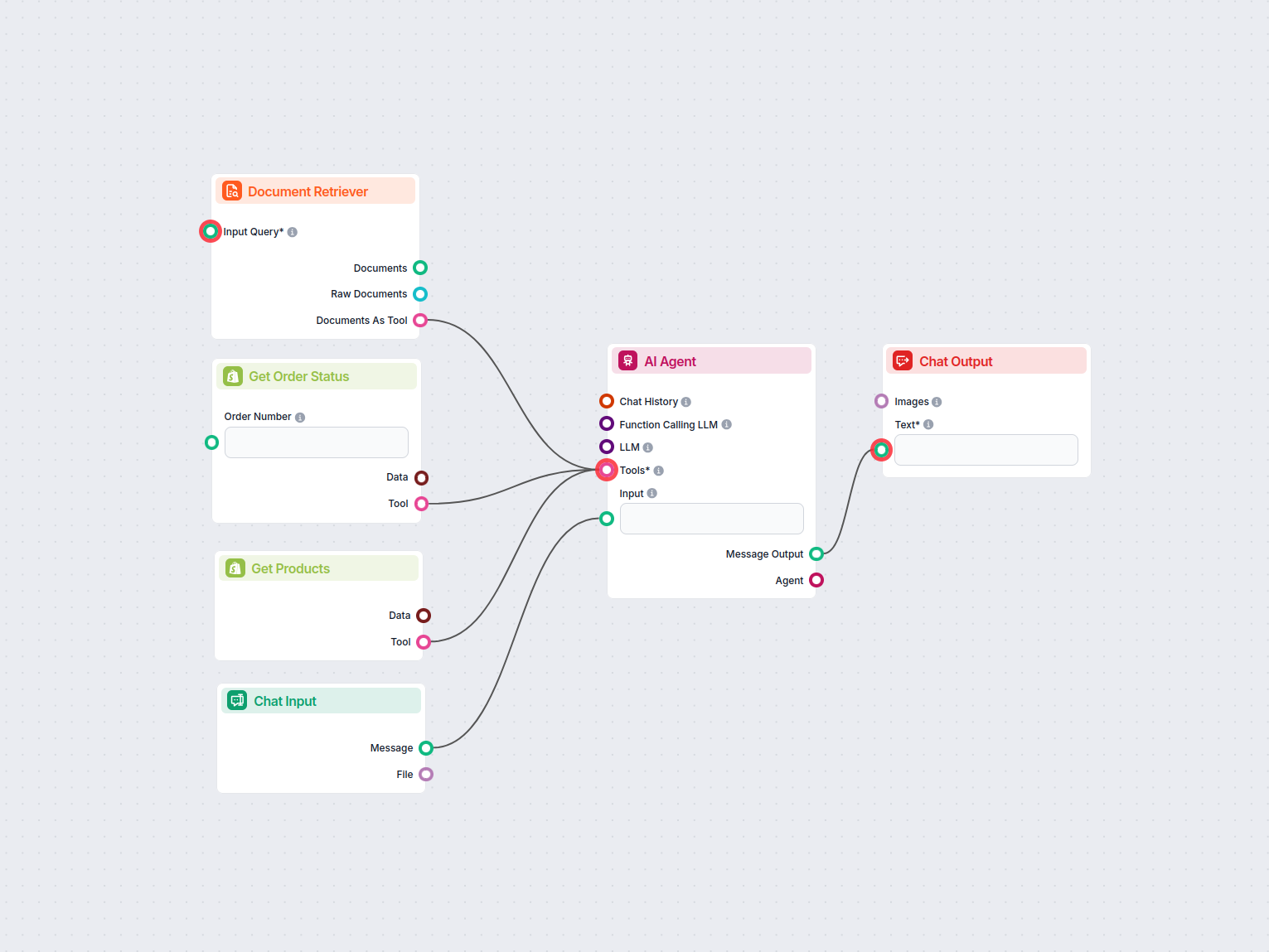
How the AI Flow works
Receive User Query.
Collects customer questions or inquiries via chat input .
Retrieve Product and Order Data.
Fetches Shopify product details and order statuses as needed to answer customer questions.
Search Internal Documentation.
Looks up information from internal knowledge sources to provide comprehensive responses.
AI Agent Composes Response.
An AI agent analyzes the user’s request, pulls together product, order, and documentation data, and generates a helpful answer.
Deliver Response to User.
Shows the AI-generated response back to the customer in the chat interface.
Prompts used in this flow
AI Agent
An AI agent that connects to tools and generates responses according to a goal, backstory, and optionally a role.
Backstory:
sales woman with 20 years of experience

Goal:
you are a shop clerk with information about all the products in the online shop.

you are also able to read order status and give the user notification on their order.

you will also answer any queries that are related to the store and is present in the document retriever as data.
Components used in this flow
Below is a complete list of all components used in this flow to achieve its functionality. Components are the building blocks of every AI Flow. They allow you to create complex interactions and automate tasks by connecting various functionalities. Each component serves a specific purpose, such as handling user input, processing data, or integrating with external services.
ChatInput
The Chat Input component in FlowHunt initiates user interactions by capturing messages from the Playground. It serves as the starting point for flows, enabling the workflow to process both text and file-based inputs.
AI Agent
The AI Agent component in FlowHunt empowers your workflows with autonomous decision-making and tool-using capabilities. It leverages large language models and connects to various tools to solve tasks, follow goals, and provide intelligent responses. Ideal for building advanced automations and interactive AI solutions.
Get Products
The Get Products component connects your FlowHunt workflow to a Shopify store, allowing you to fetch and sort product listings directly from your integrated shop. Easily pull product data by criteria like best-selling, price, or relevance to streamline e-commerce automations and chatbot responses.
Get Order Status
The Get Order Status component connects your FlowHunt workflow to Shopify, allowing you to fetch real-time order status information by providing an order number. Essential for automating order tracking, customer support , or e-commerce flows, it seamlessly integrates Shopify data into your AI workflows.
Document Retriever
FlowHunt’s Document Retriever enhances AI accuracy by connecting generative models to your own up-to-date documents and URLs, ensuring reliable and relevant answers using Retrieval-Augmented Generation (RAG).
Chat Output
Discover the Chat Output component in FlowHunt—finalize chatbot responses with flexible, multi-part outputs. Essential for seamless flow completion and creating advanced, interactive AI chatbots.
Purpose and benefits
Overview
This workflow sets up an AI-powered virtual shop assistant for an online store, integrating product information, order status checking, and knowledge base search. The workflow automates user interactions by combining a conversational AI agent with tools for retrieving document knowledge, checking Shopify order statuses, and fetching product information. All communication is managed via chat input and output nodes, allowing for seamless, scalable, and automated customer support.
Workflow Structure
The workflow consists of the following main components (nodes):
| Node Name | Role / Functionality |
|---|---|
| Chat Input | Receives user messages as input. |
| Document Retriever | Searches and retrieves relevant documents from a knowledge base. |
| Get Order Status | Fetches order status information from Shopify given an order number. |
| Get Products | Retrieves product information from Shopify, sorted by relevance or other criteria. |
| AI Agent | Orchestrates tools, interprets user queries, and generates intelligent responses. |
| Chat Output | Displays the AI agent’s message as the chat response to the user. |
Detailed Flow Description
User Message Intake The process starts with a Chat Input node, where users can type their queries. This could include questions about products , order statuses, or general inquiries about the store.
AI Agent as Virtual Shop Clerk The input message is routed to an AI Agent node. This agent is designed as a seasoned saleswoman (with a backstory of 20 years of experience), acting as a knowledgeable shop clerk. Its goals are:The agent is configured to use multiple tools to achieve these goals.
To provide information about products.
To read and relay order status updates.
To answer any store-related queries using the knowledge base.
- Integrated Tools (for the Agent):
Document Retriever Tool: Searches the store’s knowledge base for documents relevant to the user’s query. It is highly configurable, supporting features such as:Filtering by categories, schedules, or URL patterns.Limiting the number of documents and output tokens.Including specific content types (headings, paragraphs) and metadata (e.g., Product).Strategies to balance document inclusion. This tool enables the agent to answer not only factual questions but also provide nuanced information from policies, FAQs, guides, etc.
Get Order Status Tool: Connects to Shopify to fetch the status of a user’s order based on the provided order number. This supports real-time, automated order tracking for customers.
Get Products Tool: Allows the agent to fetch product details from Shopify , sorted by criteria such as best-selling, price, or relevance. This supports product recommendation and catalog browsing use cases.
- Response Generation and Output The AI agent processes the user’s message, determines which tools are needed, invokes them as required, and composes a response. The generated response is sent to the Chat Output node, which presents the answer back to the user in the chat interface.
Example Workflow Scenario
Product Inquiry: The user asks, “What are your best-selling headphones?”
The agent uses the Get Products tool (sorting by best_selling) and responds with relevant product information.
Order Status Inquiry: The user asks, “Where is my order #1234?”
The agent invokes the Get Order Status tool, retrieves the information, and reports back to the user.
Policy/Information Query: The user asks, “What is your return policy?”
The agent utilizes the Document Retriever tool to find and present the relevant policy from the knowledge base.
Automation and Scalability Benefits
Unified Support: The workflow integrates multiple sources (Shopify, custom knowledge base) into a single conversational interface, providing comprehensive support.
Automation: By automating responses to common queries, order tracking, and product recommendations, the workflow reduces manual workload and response times.
Scalability: The modular design allows for easy extension (e.g., adding new tools or knowledge sources) and supports handling many simultaneous user conversations.
Consistency: The AI agent ensures that customers receive consistent, accurate, and up-to-date information, improving customer satisfaction.
Summary Table: Workflow Steps
| Step | Action |
|---|---|
| 1. User Input | User sends a message via chat input. |
| 2. AI Agent | Receives the message, interprets intent, and selects tool(s) to answer the query. |
| 3. Tool Invocation | Agent uses Product, Order, or Document Retriever tools as needed. |
| 4. Response | Agent composes a response and sends it to the chat output for the user to read. |
Conclusion
This workflow enables a powerful, automated virtual shop assistant, leveraging AI and integrations with Shopify and internal knowledge bases. It is ideal for scaling customer support and sales operations in an online retail environment, ensuring fast, accurate, and context-aware responses to a wide array of customer queries.