Is it Safe to connect ChatGPT to Gmail, Google Drive or SharePoint?
Is it safe to connect ChatGPT to Gmail, Google Drive or SharePoint? What it can read, whether it trains on it, who should switch it on, and a safe set-up.
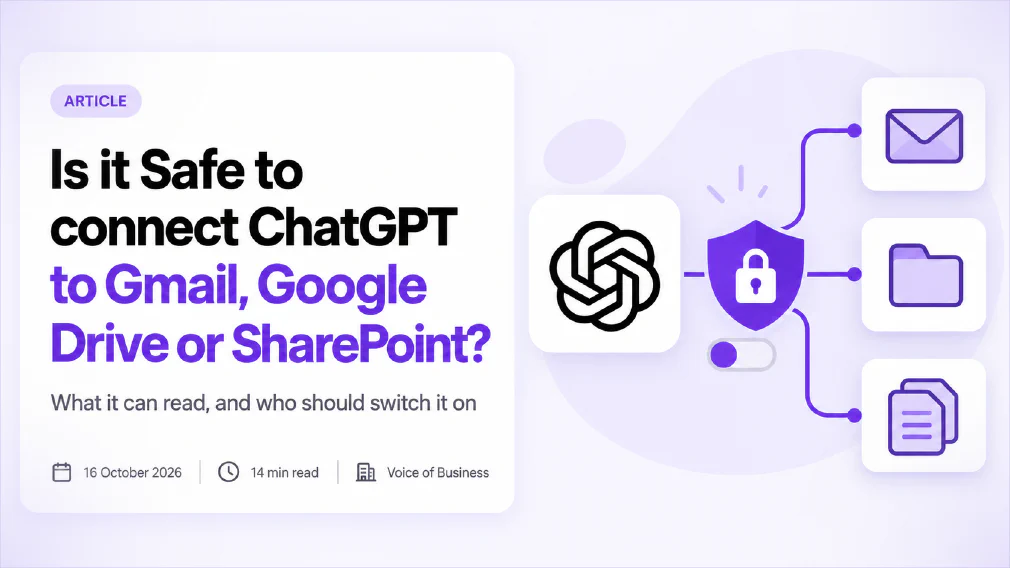
Connecting ChatGPT to Gmail, Google Drive or SharePoint is safe enough when a business has chosen to do it, decided what may be connected, and kept the permissions narrow. It is not safe when a member of staff clicks “Connect” on a personal account at 4pm because the task was urgent. The tool is the same in both cases. The difference is who decided.
This article explains what a connector actually does, what it can see, what the providers say about training, where the real risks sit, and how to set it up so the answer to “is it safe?” is yes. It is written for owners and managers who have to decide, not for the person who will click the button.
Key takeaways
- A connector gives ChatGPT a sign-in to your email or files, so it can search and read them whenever you ask a question.
- It works with the signed-in person’s own permissions. That limits what it can see, but it also means every badly shared file is suddenly easy to find.
- Business and enterprise plans say your workspace data is not used for training by default. Personal accounts depend on a setting you choose yourself.
- The biggest risks are over-shared files, mail from outsiders, and staff connecting personal accounts. Hacking the connector is far down the list.
- Both main platforms let an administrator control which outside apps can reach company data. Few small businesses have looked at that setting.
- Decide first, connect second: name the mailboxes and drives, use a work account, pick the narrowest permission, and write down who approved it.
What does connecting ChatGPT to Gmail, Google Drive or SharePoint actually do?
Normally, ChatGPT knows only what you type or upload. A connector changes that. You sign in to your email or file storage through the usual consent screen, and ChatGPT receives a token that lets it search and read that account on your behalf. From then on, a question like “what did the supplier say about delivery dates last month?” is answered from your real mail, not from guesswork.
Three things are worth knowing about the mechanics.
It reads on demand. The connector is not a copy of your inbox sitting in a chatbot. It looks things up when you ask. The exception is file sync: one security review published in February 2026 noted that full indexing, where ChatGPT keeps a searchable copy of your files, was available for Google Drive only at that time. If sync is on, ask where that copy lives and whether it is deleted when you disconnect.
Some connections can act, not just read. Reading mail and searching files is the common case. Some connections can also create, change or share files, and the permission screen tells you which. Sources describing the Drive connection disagree on whether it is read-only, which is a good reason to read the screen yourself instead of trusting a summary, including this one.
The names keep moving. The provider has renamed connectors to apps, and later moved its directory to a plugin directory, so the menu you see may not match the article you read last quarter. The principle stays the same: you are granting a tool standing access to an account.
The plans differ too. SharePoint was offered at launch on the business, enterprise and education plans, not on personal ones. Gmail and Google Drive are available more widely. So the answer to “can I connect it?” depends on the plan you pay for, and the answer to “should I?” depends on the rest of this article.
Can ChatGPT see more than you can?
No. In the normal set-up it uses your sign-in, so it can reach what you can reach and nothing beyond it. The provider’s own admin documentation says its workspace connectors respect each user’s existing permissions. A person who cannot open the finance folder cannot ask ChatGPT to summarise it.
That sounds reassuring, and it is, up to a point. The catch is in what you can reach. One security review of these connectors makes the point bluntly: if a connector is enabled, the tool will find whatever the user’s permissions allow, whether or not anyone intended the user to have it. Its example is customer data a person was never meant to see in one system but which sits in a SharePoint site or an old email thread they can open.
Picture a 40-person company. Over six years, people have shared folders with “anyone in the company” because it was quicker than choosing names. HR once exported a spreadsheet into a team site. A director’s old mailbox rules forward copies to a shared inbox. None of this was a problem when finding those files meant knowing where to look. With a connector, a new starter can type “show me salary bands” and get an answer in seconds.
So the connector does not create the exposure. It removes the friction that was quietly protecting it. If you are going to connect anything, tidy the sharing first, starting with the folders and mailboxes that matter most. This is where a structured look at your tools, an AI audit, tends to find the real issues, because it is the permissions that need fixing and not the AI.
Is your Data used to train the Model?
It depends on the plan, and you should check, not assume.
For business, enterprise and education plans, the provider states that it does not train its models on your workspace data by default. That is the headline commitment, and it is the reason most companies are comfortable with a paid workspace. Personal accounts are different. What happens to your conversations there depends on the “Improve the model” setting, which our short answer on stopping ChatGPT from using your data for training explains how to switch off.
Three cautions apply before you treat that as settled.
Connected data is a separate question. The provider’s wording about data from connected Google services sits on its own page, and I could not confirm it from the pages that were readable when this was written. Read it directly on the day you decide, and keep a copy of what it said.
Training is not the only worry. Even when nothing is used to train a model, your mail and files are still being processed by another organisation, stored for some period, and in some cases viewed by its staff under defined conditions. For personal data, that makes the provider a processor under the GDPR, which requires a written agreement. A personal sign-up has none. The ICO is clear that buying in an AI system does not remove your own responsibility, so the business still answers for what happens to its customers’ data.
Memory is its own switch. Features that remember details between chats can retain things learned from a connected inbox. Whether a detail trains a model and whether it appears again next week are separate questions, and both deserve a setting you have looked at.
What are the Real Risks of connecting company Email and Documents?
Ranked by how often they cause harm in small and mid-sized businesses, not by how dramatic they sound:
- Staff connect personal accounts. This is the most common route. Someone links a personal ChatGPT login to the work mailbox, because it is quicker than asking. The business has no agreement, no admin control and no record. It is shadow AI in its purest form, and banning AI tools makes it more likely, not less.
- Over-shared files become easy to find. Covered above. The risk is a permissions problem that the connector exposes.
- Outsiders can write to your assistant. This one is new. An email from a stranger, or a document from a supplier, can contain text that tells the AI to behave differently, for example to ignore your question and include sensitive details in its answer. This is called prompt injection. On 8 December 2025 the UK National Cyber Security Centre published a warning that current language models do not enforce a boundary between instructions and data, and that this may never be fully fixed in the way older injection attacks were. Its advice is to reduce the impact of an attack, not to count on blocking it.
- A connection that can act can act wrongly. If the permission allows sending, sharing or deleting, a bad instruction has consequences beyond a wrong answer.
- Tokens outlive the moment. A granted connection stays valid until someone revokes it. When a person leaves, their personal account and its tokens do not leave with them.
- Compliance gaps. If personal data in those mailboxes goes to a tool without a contract, a lawful transfer route or a record in your documents, the business has a data protection problem even if nothing ever goes wrong. If it does go wrong, the GDPR expects the supervisory authority to be told within 72 hours of the business becoming aware of a personal data breach.
Notice what is missing from the list: someone breaking into the connector itself. That is possible, but it is much less likely than a tidy folder structure that nobody ever checked.
Who decides whether a Connector is switched on?
Both big platforms let an administrator decide, and in most small businesses nobody has.
In ChatGPT. The provider’s admin documentation says that on enterprise and education workspaces, apps are off until a workspace owner turns them on, and that admins can limit apps to certain roles. On business plans, it says apps are on by default, and admins can still choose which ones are enabled. Because that default differs by plan and has been described differently in different places, open the admin console and look. Do not rely on a summary, including this one.
In the Gmail and Drive admin console. Under Security, Access and data control, API controls, an administrator can set each outside app to Trusted, Limited, Specific data only, or Blocked. For Gmail and Drive, the console can also restrict the high-risk permissions, such as sending mail or full access to files. When a service is switched to Restricted, apps that have not been trusted stop working and their tokens are revoked. The list of apps with access updates 48 hours after a token is granted or removed, so do not expect an instant picture.
In the Entra admin centre for SharePoint. By default, users may consent to apps for permissions that do not need an administrator. The documentation’s example is that a user can allow an app into their mailbox but cannot allow unrestricted read and write access to every file in the organisation. The documentation recommends allowing user consent only for apps from verified publishers, and an admin consent workflow lets staff request approval for the rest. Changes affect future consent only. Existing grants stay in place until someone reviews and removes them.
Two points follow. First, if you do not set these controls, the default is that a motivated member of staff can grant access without anyone noticing. Second, tightening them is a ten-minute job for whoever administers your accounts, and it moves the decision from the person clicking to the business. Compare the cost of that conversation with the cost of finding out later which personal accounts have been connected for months. This is what AI governance means in practice: a named person has decided what is allowed.
How do you set up a Safe connection?
If you have decided to go ahead, use this order. It takes an afternoon, not a project.
- Start with the tool inventory. List every AI tool already in use, including the ones nobody approved, and note which are already connected to work accounts. An AI tool inventory shows you what you are starting from.
- Fix the sharing first. For the mailboxes and folders you plan to connect, check who can open them. Remove “anyone in the company” links from sensitive folders. This is the most valuable step and the most boring one.
- Use a work account the business controls. Never connect through a personal login. The business needs the agreement, the admin console and the ability to switch it off.
- Choose the narrowest permission. Where there is a read-only option, take it. Add write access only for a task that needs it, and only after a trial.
- Connect one mailbox or drive, not everything. A single team’s shared folder is a better pilot than the entire company drive. Keep shared inboxes, legal and HR folders out at the start.
- Set the admin controls. Restrict who can consent to apps, in your email and file platform and in ChatGPT’s workspace settings. Block what you have not approved.
- Write a one-page rule. Say which connections are allowed, who approved them and who to ask. Use the tiers from our guide on what is safe to paste into an AI tool, because a connector pulls in the same customer data, only faster.
- Check what comes back. An answer built from your mail is still an answer from a model, and it can be wrong. Staff should open the source email or file before acting on a figure or a date.
- Put a review date in the diary. Plans, defaults and terms change. Three months is a sensible first check.
For most small businesses, a good first connection is read-only access to a single shared documents folder. It delivers most of the benefit, such as finding the latest version of a policy or summarising a long contract folder, with a small fraction of the exposure that comes from connecting the whole mailbox.
How do you disconnect ChatGPT and revoke its access?
Do this when someone leaves, when a pilot ends, or when you find a connection nobody approved.
First, disconnect the app inside ChatGPT, in the settings for apps or connectors. The provider says this can be done at any time and that, for Gmail, it stops the related monitoring of the mailbox.
Second, remove it from the other side. In a Google account, open the list of third-party connections and remove ChatGPT, which revokes the token. In the Entra admin centre, review the permissions granted to enterprise applications and remove the grant. This second step matters because disconnecting in one place does not prove the token has gone in the other.
Third, ask about copies. If file sync was on, ask the provider whether the indexed copy is deleted, and how long that takes. Keep the answer with your records.
Finally, add the check to your leaving process. The person’s personal accounts are outside your reach, so the working rule is that company data should never have been reachable from them in the first place.
What should you do this week?
On Monday, ask your IT contact or whoever runs your accounts one question: can any member of staff connect an outside app to company mail and files today? If the answer is “I think so”, you have found your first job.
By Wednesday, open the admin settings described above and decide whether user consent should be allowed, limited or blocked. By Friday, pick one team and one shared folder for a read-only trial, fix the sharing on that folder, and write the one-page rule.
If you would like a second pair of eyes on which tools are connected to what, an AI audit maps it in a structured way and returns the inventory, the permissions to fix and the rule your team can follow. The aim is simple: you decide what ChatGPT can see, and nobody finds out by accident.
Sources
- Provider documentation: admin controls, security and compliance for apps and connectors on business, enterprise and education plans: apps are off by default on enterprise and education workspaces, on by default on business plans, and can be limited to roles.
- Admin documentation: control which outside apps can reach Gmail and Drive data: the Trusted, Limited, Specific data and Blocked settings, restricting high-risk Gmail and Drive scopes, token revocation on restriction, and a 48-hour delay on the accessed-apps list.
- Identity documentation: configure how users consent to applications: users can consent by default to permissions that do not need an administrator, verified-publisher consent is recommended, and changes affect future consent only. Page updated 4 August 2026.
- NCSC, Prompt injection is not SQL injection (it may be worse): published 8 December 2025; current language models do not enforce a boundary between instructions and data, so the focus is on reducing the impact of an attack.
- Security review of ChatGPT enterprise connectors: last updated 6 February 2026; connectors respect user permissions, over-shared files widen the exposure, and sync was available for one file service only. A vendor view, not a regulator’s.
- ICO, How do we ensure lawfulness in AI?: a lawful basis is needed whenever personal data is processed, and buying in an AI system does not remove your own responsibility.
- Regulation (EU) 2016/679 (GDPR): processors act under a written contract (Article 28), and a personal data breach is notified to the supervisory authority within 72 hours of becoming aware of it (Article 33).
FAQ
Questions we get asked
Is it Safe to connect ChatGPT to Gmail?
It is as safe as the controls around it. The sign-in itself uses your normal account security, but once connected, ChatGPT can search and read your mail whenever you ask it a question. That is fine for a personal inbox you are happy to expose and risky for a shared or customer-facing one. For business mail, connect only through a work account where an administrator has chosen to allow it, and keep the permission to the narrowest setting on offer.
Can ChatGPT read all of my Email?
Once a mailbox is connected, it can search across the mail your account can see, not only the messages you point it at. It reads what is relevant to your question at the time you ask, and it does not forward your inbox anywhere on its own. The practical point is that the connection has no sense of which messages are private to you, so treat anything in that mailbox as reachable by the tool.
Does ChatGPT train on my Google Drive Documents?
On workspace plans for businesses, the provider states that it does not train on your workspace data by default. On a personal account, what happens to your conversations depends on the Improve the model setting, so check it before you connect anything. The provider's published wording specifically about connected Google data is worth reading in full on the day you decide, because plans and terms change.
Can ChatGPT access SharePoint files I cannot open?
No, in the normal set-up. The connector works with your own sign-in, so it sees what you can see. The trouble is that many SharePoint sites are shared far more widely than anyone intended, so what you can open may already be too much. Connecting ChatGPT does not create that exposure, but it makes it effortless to find.
How do I disconnect ChatGPT from my Google account?
Do it in two places. Disconnect the app in ChatGPT's settings, then open your Google account's list of third-party connections and remove ChatGPT there too, which revokes the access token itself. Disconnecting in one place does not prove the other has happened, so check both, and ask whether any indexed copy of your files is deleted when you disconnect.
Should a Small Business allow staff to connect ChatGPT to company Email?
Only on purpose. Decide which mailboxes and drives may be connected, do it from an account the business controls, and keep shared and customer-facing mailboxes out until you have tested the set-up. If you do nothing, some staff will connect personal accounts anyway, and you will not see it.
What is Prompt injection and why does it matter for Connectors?
Prompt injection is when text inside an email or document tells the AI to do something its user never asked for. Connectors make this possible because the tool reads content written by other people. The UK National Cyber Security Centre warned in December 2025 that current models do not separate instructions from data, so the aim is to limit what a successful attack could do, not to assume it can be filtered out.
Ready to Put This to Work?
Tell us where your team is with AI and we will tell you honestly what would make the biggest difference.