Cloud AI vs On-Premise AI: Which fits your Business?
Cloud AI and on-premise AI put data, cost and control in different places. What each deployment model requires, and how to tell which one a workload needs.
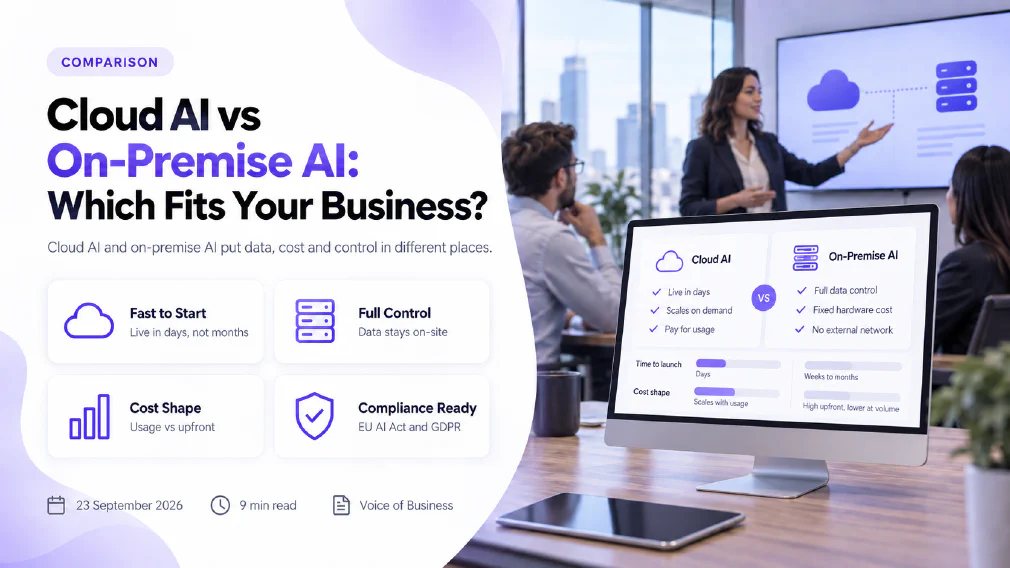
Cloud AI and on-premise AI answer the same question with different trade-offs attached: where the data sits, who maintains the infrastructure underneath the model, and how the cost shows up on a balance sheet. Choosing between them by which one sounds more secure, or which one is cheaper on paper, usually misses the workload-specific detail that actually decides it.
This review sets out what each deployment model actually requires, where data control and compliance obligations really sit, what each one costs beyond the number on the invoice or the hardware order, and a way of deciding which fits a given workload rather than a business in the abstract.
Key takeaways
- Cloud AI runs on infrastructure a provider owns and maintains; on-premise AI runs on infrastructure the organisation itself owns and maintains. Neither location is automatically the more compliant or the more secure one.
- Cloud AI’s cost scales with usage and starts small. On-premise AI’s cost is front-loaded into hardware, licensing and the staff needed to run it, then falls per unit of use once volume is high and steady.
- EU AI Act and GDPR obligations attach to what a system does with data, not to where that data is physically hosted, so relocating a workload does not by itself discharge a compliance requirement.
- A hybrid deployment, splitting workloads between an organisation’s own infrastructure and a cloud platform by sensitivity or latency need, is a standing third option rather than a fallback for an undecided team.
- Scalability behaves differently in each direction: cloud AI adds capacity on demand, on-premise AI adds capacity by ordering and installing more of it.
- The right deployment model is decided workload by workload, against documented requirements for data residency, latency and volume, not chosen once for the whole organisation.
What Cloud AI actually requires
Cloud AI means running models and the infrastructure behind them on a provider’s own servers, reached over a network connection rather than housed on site. Nothing has to be bought, installed or racked before a team can start using it, which is the source of its main advantage: a pilot can be running the same week it is proposed. Capacity is added by changing a configuration rather than ordering hardware, so a workload that grows unpredictably is rarely the reason a cloud deployment runs out of headroom. The trade-off sits on the other side of that convenience: data leaves the organisation’s own network to be processed, which is exactly the point a discovery call needs to settle before any regulated or commercially sensitive workload goes anywhere near it.
What On-Premise AI actually requires
On-premise AI means the servers, storage and networking behind the model sit inside infrastructure the organisation itself owns, typically in its own data centre or a facility it directly contracts. Nothing about it is quick: the hardware has to be specified, bought and installed, and it needs staff with the skills to keep it running, patched and monitored, which is an ongoing cost that does not appear once and stop. What it buys in exchange is direct, demonstrable control over where data physically sits and who can reach it, which matters most to a workload where data residency, a specific contractual restriction, or an internal security policy rules out sending information outside the organisation’s own network at all.
Cloud AI
Runs on infrastructure a provider owns and maintains
Live in days, capacity added on demand
Data leaves the organisation's own network to be processed
On-premise AI
Runs on infrastructure the organisation owns and maintains
Weeks to months to specify, buy and install
Data stays inside infrastructure the organisation directly controls
What each actually costs beyond the headline number
A cloud AI subscription or usage bill is the easier number to point at, and it is not the complete cost. It scales with how much the workload is actually used, which suits a workload of uncertain or seasonal volume, but a workload that runs constantly at high volume can, over time, cost more this way than the same capacity bought outright would have.
On-premise AI inverts that shape. The hardware, the licensing and the initial setup are paid before the system processes a single real request, and the staff time to run, secure and patch it continues for as long as the system exists, whether it is heavily used that month or barely touched. Once volume is high and steady, that fixed cost is spread across more use and the per-unit cost tends to fall below a comparable cloud subscription. Set against the wrong workload, either shape wastes money: cloud capacity billed every month against a workload that barely runs, or on-premise hardware bought for volume that never actually arrives.
Where Data Control and Compliance obligations actually sit
Neither deployment model is a compliance shortcut on its own. The EU AI Act’s obligations scale with the risk classification of the system, and GDPR’s obligations attach to how personal data is processed, in both cases regardless of whether the infrastructure sits in a provider’s data centre or the organisation’s own building. What changes between the two is how directly the organisation can demonstrate its own answer: on-premise makes it more straightforward to show exactly what happens to data at each processing step, because every layer of the system was chosen by the organisation itself, while a cloud deployment’s compliance position depends on the provider’s own documented data processing terms being read, checked and kept on file, not assumed. A high-risk AI system carries the same documentation and human oversight requirements under either deployment model; moving it to on-premise infrastructure does not remove that requirement, it only changes who is directly answerable for the evidence.
When Cloud AI is the better Investment
Cloud AI suits a workload of uncertain or variable volume, where paying for unused on-premise capacity would be the more expensive mistake. It suits a team testing whether a use case for generative AI is worth pursuing at all, before committing capital to infrastructure for it. It suits an organisation without existing IT staff able to run specialised hardware, since the operational burden sits with the provider rather than an internal team. A short pilot on real work, rather than a demonstration dataset, is usually enough to show whether a cloud platform’s data handling terms are actually acceptable for the workload in question.
When On-Premise AI is the better Investment
On-premise AI suits a workload with a genuine data residency requirement, a contractual restriction, or an internal policy that rules out data leaving the organisation’s network. It suits volume high and steady enough that the fixed cost of owning infrastructure is spread across enough use to fall below an ongoing subscription. It suits an organisation that already employs, or is prepared to employ, the staff needed to keep specialised infrastructure secure and current, since that ongoing operational load does not disappear once the hardware is installed. It also suits a workload where latency has to be near-instant and predictable, since nothing sits between the model and the data it works from.
Comparison at a glance
| Aspect | Cloud AI | On-premise AI |
|---|---|---|
| Infrastructure owned by | The provider | The organisation |
| Time to first use | Days | Weeks to months |
| Cost shape | Scales with usage, low upfront cost | High upfront cost, lower cost per unit at volume |
| Data location | Leaves the organisation’s own network | Stays inside infrastructure the organisation controls |
| Scaling capacity | On demand, by configuration | By ordering and installing more hardware |
| Compliance evidence | Depends on the provider’s documented terms | Directly demonstrable, built by the organisation itself |
| Best fit | Uncertain or variable volume, fast start needed | Strict data residency, high steady volume, in-house IT capability |
Hybrid: the third option, not a compromise
A hybrid deployment runs the workloads that carry a genuine data residency requirement or a hard latency need on the organisation’s own infrastructure, and routes everything else to a cloud platform. It is a common landing point for an organisation whose workloads genuinely vary in sensitivity, rather than a hedge chosen because a straight cloud-or-on-premise decision felt too hard. The cost of running it is that two environments now need maintaining instead of one, and that split has to be documented clearly enough that nobody is left guessing which workload belongs where. Where that split actually sits is a question the workload’s own requirements answer, not a default position picked in advance of mapping them.
A Decision Framework, not a location preference
Neither cloud nor on-premise is safe to choose from a general instinct about which one sounds more secure. The workload comes first: what data it touches, whether that data carries a residency or contractual restriction, how much volume it actually runs at, and how sensitive it is to latency. Only once those are documented does it make sense to weigh a provider’s infrastructure against the organisation’s own. That mapping step is the first of the five steps in how we audit, and it produces the same output whichever direction the answer points: a documented workload, a deployment recommendation attached to a reason, and the compliance obligations that workload carries checked at the same time rather than afterwards.
Which fits your organisation
Cloud AI and on-premise AI are not a ranking with one option ahead of the other by default. They are two different places to put the same responsibility, and the workload being deployed decides which placement actually fits. A team choosing between them with no workload mapping done yet is choosing between two guesses; a team that has documented what the workload actually needs is choosing between two answers to the same, now-specific question. Request a discovery call if that mapping has not happened yet, and the choice between cloud and on-premise stops being a guess about which one sounds safer.
FAQ
Questions we get asked
Is On-Premise AI always more Secure than Cloud AI?
Not automatically. On-premise keeps data inside infrastructure the organisation itself controls, which removes one layer of trust in a third party, but the security of that data then depends entirely on how well the organisation runs its own systems. A cloud AI platform run by a provider with dedicated security staff can outperform an on-premise setup that nobody is actively maintaining.
Does On-Premise AI make EU AI Act or GDPR Compliance easier?
It changes where evidence has to be produced, not whether the obligation exists. Both frameworks attach to what a system does and what data it processes, not to where the hardware sits. On-premise can make it simpler to document exactly what happens to data at each step, but a cloud deployment with a properly reviewed data processing agreement can meet the same obligations.
Is a hybrid approach just a compromise, or a Real third option?
It is a genuine option in its own right, not a hedge against choosing wrong. A hybrid setup runs sensitive or latency-sensitive workloads on infrastructure the organisation controls and routes everything else to a cloud platform, which is often the closest match to how a business's own workloads actually vary, rather than an either-or split.
What is the biggest mistake Businesses make when comparing Cloud and On-Premise AI?
Comparing the sticker price of a cloud subscription against the sticker price of on-premise hardware. Cloud pricing scales with usage, and on-premise cost is front-loaded into hardware and the staff time to run it. The two are shaped so differently that comparing them on a single number almost always understates one side.
How long does it typically take to move from Cloud AI to On-Premise, or the other way round?
There is no fixed figure worth quoting, because it depends on the volume of data being moved, the systems it has to integrate with, and how much of the process was already documented before the move started. A workload mapped in advance moves faster than one where the move itself is the first time anybody wrote down what the workload actually does.
Ready to Put This to Work?
Tell us where your team is with AI and we will tell you honestly what would make the biggest difference.