Copilot Chat vs Microsoft 365 Copilot: Which does your Business need?
Copilot Chat comes with eligible Microsoft 365 licences. Microsoft 365 Copilot is the add-on. What separates them, and how to tell which one a team needs.
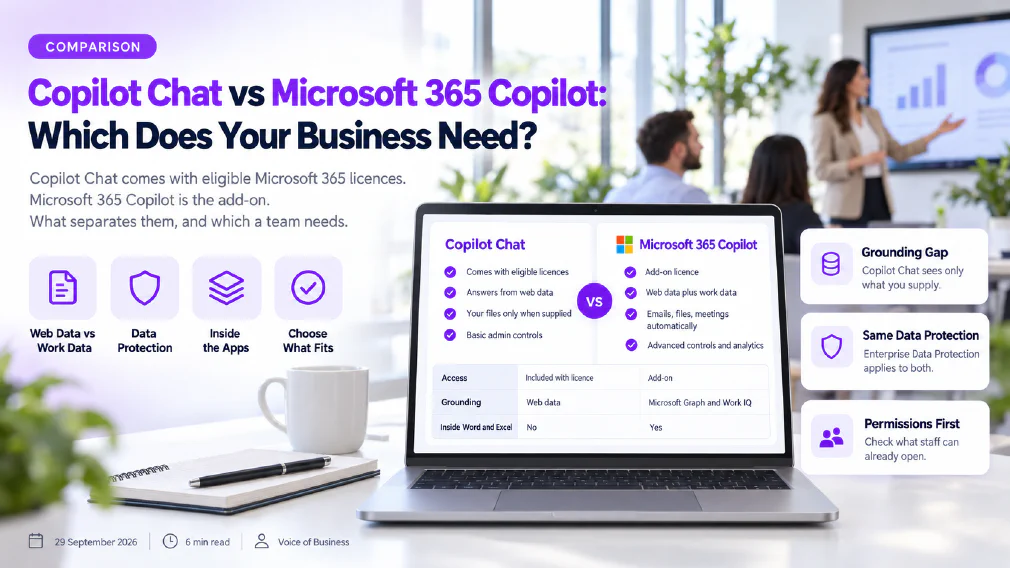
Copilot Chat and Microsoft 365 Copilot sound like one product with two names, and Microsoft has renamed both more than once. They are not the same thing. Copilot Chat is the baseline chat experience that comes with eligible Microsoft 365 licences. Microsoft 365 Copilot is the add-on that reaches into a business’s own emails, files and meetings. Which one a team needs depends on whether its work starts from the web and a few supplied documents, or from everything already stored in Microsoft 365.
This review sets out, from Microsoft’s own documentation, what each one covers, what each can and cannot read, how data protection applies to both, what an administrator controls, and how to decide without buying the larger one by default.
Key takeaways
- Microsoft describes three licence positions, not two, and only the Premium one needs the add-on.
- Copilot Chat works from the web plus whatever a user supplies. The add-on reads work data automatically through Microsoft Graph.
- Data protection and EU Data Boundary coverage are stated to be the same on all three positions, provided staff sign in with a work account.
- The add-on brings priority access, work-data agents and advanced administrator controls.
- Because Copilot surfaces what users can already open, permissions need reviewing before the add-on is switched on.
Three Licence positions, not two
The search is usually “Copilot Chat versus Copilot”, which assumes two products. Microsoft’s overview page draws three columns, and the middle one is where most of the confusion sits. Microsoft also notes that Microsoft 365 Copilot is now named Microsoft Copilot and Copilot Chat is now Microsoft Copilot Chat, while licences and admin screens may keep the older names during the transition. This review uses Microsoft 365 Copilot for the add-on, as the licence documentation still does.
Copilot Chat
Comes with eligible Microsoft 365 licences
Answers from web data
Uses your files only when you supply them
Basic usage controls and reporting for admins
Microsoft 365 Copilot (Premium)
Add-on licence on top of Microsoft 365
Answers from web data and work data together
Reaches emails, files, meetings and calendars automatically
Advanced controls, analytics and priority access
Copilot Chat (Basic) is the standalone chat. Users reach it through a browser page, through Copilot Chat in Edge, and through chat inside Outlook and Teams. Microsoft 365 Copilot (Basic) is the label for users who do not hold the add-on but still have standard access to Copilot inside Word, Excel, PowerPoint and OneNote. Standard access is, in Microsoft’s words, subject to service capacity and can vary through the day. Microsoft 365 Copilot (Premium) is the full add-on, with priority access to those same apps and the deeper features described below. In-product labels in the apps tell users which of the three they are actually using.
What each one can read, and what it is built into
The practical gap is grounding. A response can be grounded in the public web, in a business’s own data, or in both, and the answer to “what does it know about our work?” changes with the licence.
Copilot Chat cannot use organisational data through Microsoft Graph. Microsoft is explicit that a user has to bring the content: paste it, upload a file, use Copilot Chat inside Outlook or Teams with content already open, or use an agent that has been given access to organisational content. The user decides, prompt by prompt, what the assistant sees.
Microsoft 365 Copilot (Premium) pulls that context in without being asked. Microsoft describes grounding in emails, files, meetings, calendars, teams and organisational relationships through Microsoft Graph, with Work IQ as the intelligence layer over them. A user can point it at particular files but does not have to upload them. An administrator can switch Work IQ on or off; with it off, Microsoft says responses are no longer enriched with that work context, though users still receive answers.
| Task | Copilot Chat | Microsoft 365 Copilot (Basic) | Microsoft 365 Copilot (Premium) |
|---|---|---|---|
| Chat on web data | Yes | Yes | Yes |
| Work from a pasted or uploaded file | Yes | Yes | Yes |
| Answer from emails, files and meetings without uploading | No | No | Yes, through Microsoft Graph |
| Draft and edit inside Word, Excel, PowerPoint, OneNote | No | Standard access | Priority access |
| Summarise meetings and threads in Teams and Outlook | On open content | Yes | Yes |
| Agents using web data | Included | Included | Included |
| Agents using work data | Usage-based | Usage-based | Included |
| Administrator controls and reporting | Basic | Basic | Advanced, with analytics |
In the apps, Microsoft describes the same core tasks across the paid positions: drafting, rewriting and summarising in Word, analysing data and building formulas and visuals in Excel, generating presentations in PowerPoint, drafting emails and summarising threads in Outlook, and summarising and transcribing meetings with action items in Teams. What the add-on changes is not the list of tasks. It is the amount of the business the assistant can draw on while doing them, and how reliably it is available at busy times.
Agents are where the boundary is easiest to miss. Microsoft states that declarative agents built on instructions and public websites are included with Copilot Chat, while agents that use work data are usage-based unless the add-on is held. A business can therefore build useful AI agents on the baseline licence, provided what they read is public or supplied, and can add work-data agents on a metered basis without buying the add-on for every seat.
One caution applies to every position. Microsoft’s own documentation says the content generative AI produces is not guaranteed to be factual and that users should use their judgement before sending it on. The larger licence changes what the assistant can see. It does not change the need to read what it wrote.
What Data Protection covers on all of them
Microsoft states that all three positions are covered by Enterprise Data Protection when users sign in with a Microsoft Entra work account, so prompts and responses fall under the same contractual terms that govern email in Exchange and files in SharePoint. Its privacy documentation adds that prompts, responses and data accessed through Microsoft Graph are not used to train the foundation models behind Copilot, and that Copilot is compliant with Microsoft’s existing commitments to commercial customers, including the GDPR. Microsoft also says it is committed to complying with the laws that apply to it, including the EU AI Act, and lists certifications such as ISO 42001 for AI management systems.
For EU users, Microsoft states that traffic stays within the EU Data Boundary, while worldwide traffic can be processed in the EU and other regions. That statement is listed for Copilot Chat and both Microsoft 365 Copilot positions alike.
Three qualifications are worth reading rather than assuming. First, the protection depends on the sign-in. Microsoft lists several Copilot entry points that also accept a personal account, so a business relying on Enterprise Data Protection needs staff to use work accounts, and can restrict personal ones through tenant settings. Second, Microsoft notes that models from one third-party subprocessor are currently excluded from the EU Data Boundary and are not available to every user by default. For an organisation with residency requirements, that is a setting to confirm with the administrator before rollout. Third, Copilot does keep a record: prompts and responses are stored as the user’s activity history, under the same commitments as other Microsoft 365 content. Administrators can set retention through Microsoft Purview, and users can delete their own history.
Web search is a separate control. When Copilot decides a web lookup would improve an answer, it generates a search query for a web search service, and Microsoft gives administrators a policy that switches web grounding off across every licence position.
Rollout: what administrators Control, and the catch with the larger Licence
Microsoft’s Copilot controls sit in one admin area and cover all three positions. An administrator can decide whether Copilot Chat is pinned in the Microsoft 365 app, whether users can generate images, how agents are created and used, and whether web search is allowed. Access can be removed entirely, including for Copilot Chat users, and a dedicated AI Administrator role manages the settings without full Global Administrator rights. The add-on adds advanced management controls and analytics on top of this baseline.
Usage reporting is split in two, which is easy to overlook when judging adoption. The Copilot Chat usage report covers chat activity across all licences: active users, prompts submitted and prompts per user. A second report covers use of Copilot inside the apps and requires the Basic or Premium licence. Read together, they show whether staff are using a chat window, or the assistant embedded in their work, which is precisely the evidence needed to decide who should hold the add-on.
The catch with the larger licence is permissions. Microsoft 365 Copilot only surfaces organisational data that the individual user already has at least view permission to open. That is the right design, and it has a consequence: any file shared more widely than it should be, in a SharePoint site nobody reviewed, becomes retrievable by a plain question. Microsoft’s overview points administrators to SharePoint Advanced Management, including restricted content discovery, and to Microsoft Purview for classifying and labelling sensitive content. None of that is new work, but the add-on turns it from a tidy-up into a precondition. It is also an AI governance question rather than only a licensing one, because someone has to own what the assistant is allowed to reach.
Copilot Chat carries less of this exposure, because it cannot reach anything the user does not supply. That is a genuine argument for starting there. The matching risk runs the other way: with the baseline licence, the quality of the result depends on what each person chooses to paste, so staff need the habits of good prompt engineering more than any setting an administrator can turn on.
Which one a Business needs
The honest starting question is not “which is better” but “where does the work actually start?” A team that researches, drafts, summarises and reformats material it already has in hand gets most of the value from Copilot Chat, with the added benefit that it can only see what the person chooses to give it. A team whose day depends on finding what was said in a thread three weeks ago, across meetings, mailboxes and libraries, is asking for what the add-on provides.
Four questions settle most cases:
- Does the work depend on content that sits across email, files and meetings, or on material people already hold?
- Do staff need the assistant inside Word, Excel and PowerPoint at busy times, where priority access matters?
- Are the sharing permissions in SharePoint reviewed, and does anyone own them?
- Do the agents the business wants need work data, or would public and supplied sources do?
Between the two options sits a common mistake: buying the add-on for everyone because it is the one with the name, then finding that most seats use it as a chat window. A phased rollout, with Copilot Chat for the whole organisation and the add-on for roles that demonstrably need Graph-wide context, is a position Microsoft’s own licence structure supports. The same reasoning applies when the alternative on the table is another vendor’s assistant, as in the comparisons of Copilot vs Google Workspace AI and ChatGPT vs Copilot.
| Aspect | Copilot Chat | Microsoft 365 Copilot (Premium) |
|---|---|---|
| How it is obtained | Comes with eligible Microsoft 365 licences | Add-on licence on top of a Microsoft 365 plan |
| Grounding | Web data; your content only when supplied | Web data plus Microsoft Graph and Work IQ |
| Inside Word, Excel, PowerPoint, OneNote | No | Yes, with priority access |
| Work-data agents | Usage-based | Included |
| Enterprise Data Protection | Yes, with a work account | Yes, with a work account |
| EU Data Boundary | Yes, for EU users | Yes, for EU users |
| Administrator controls | Basic controls and reporting | Advanced controls and analytics |
| Main rollout task | Teach staff what to supply, and what not to | Review permissions before switching it on |
| Best fit | Work that starts from the web and a few documents | Work that lives across Microsoft 365 |
This is exactly the question an audit’s Identify step is built to answer: which processes depend on organisational data, what the current licence already covers, and where the add-on would genuinely change the work. Once that is settled, a course built on Copilot Chat turns the baseline licence into something staff use well rather than something they open once.
FAQ
Questions we get asked
What is the difference between Copilot Chat and Microsoft 365 Copilot?
Copilot Chat is the baseline chat experience that comes with eligible Microsoft 365 licences. It answers from web data and works with your own files only when you supply them. Microsoft 365 Copilot is the paid add-on that also reaches your emails, files, meetings and calendars automatically through Microsoft Graph, and works inside Word, Excel, PowerPoint and OneNote with priority access. Microsoft also names a middle position with standard, capacity-dependent access to those apps.
Is Copilot Chat Safe to use with Business Data?
Microsoft states that Copilot Chat is covered by Enterprise Data Protection when staff sign in with a work (Microsoft Entra) account, the same protection that applies to the paid add-on. The condition matters: Microsoft lists several entry points that also accept a personal account, and a personal sign-in is outside that protection. A business relying on it should confirm that staff use work accounts and decide whether personal sign-in is blocked.
Does Copilot Chat see my company's Emails and Documents?
Not automatically. Microsoft's documentation says Copilot Chat cannot use organisational data through Microsoft Graph. It can work with content you paste, upload or have open in Outlook and Teams, or with an agent that has been given access to it. Automatic access across emails, files, meetings and calendars is what the Microsoft 365 Copilot add-on provides, and only for content each user already has permission to open.
Do our Prompts train Microsoft's Models?
Microsoft states that prompts, responses and data accessed through Microsoft Graph are not used to train the foundation models behind Copilot. That statement is made for Copilot as a whole, and Microsoft lists Enterprise Data Protection and the EU Data Boundary as applying to Copilot Chat and both Microsoft 365 Copilot experiences alike. Microsoft does store prompts and responses as activity history under its Microsoft 365 commitments, which administrators can govern with retention policies.
Can we start with Copilot Chat and add Microsoft 365 Copilot later?
Yes, and Microsoft's licence structure is built around that path. Copilot Chat is the baseline for eligible Microsoft 365 users, while the add-on is a licence held by an individual user, so it can be given first to the roles that need Graph-wide context. Starting on the baseline also gives an administrator usage data to judge where the add-on would change the work, before any wider purchase is made.
What can an administrator Control in Copilot Chat?
Microsoft's Copilot controls let an administrator decide whether Copilot Chat is pinned across the Microsoft 365 app, whether users can generate images, how agents are created and used, and whether web search grounding is allowed. Access to Copilot Chat can be removed entirely, and a dedicated AI Administrator role manages these settings without full Global Administrator rights. The add-on adds advanced controls and analytics on top of this baseline.
Ready to Put This to Work?
Tell us where your team is with AI and we will tell you honestly what would make the biggest difference.