Zapier vs Make vs N8N
Zapier, Make and N8N all automate the same jobs but bill in three different units. Prices, free plans, EU data and which one suits a small business.
Zapier, Make and N8N all do the same basic job: they connect the tools a business already uses and run a task when something happens, with no code required for most workflows. What separates them is not the headline feature list. It is how each one counts what you use, and that decides what you pay once a workflow runs a few thousand times a month.
This comparison sets out what each one is, how their pricing units differ, what the free options really give you, where each keeps your data, and which one fits which kind of small business. Prices and limits are those published on each company’s own pages on 19 October 2026 and change often, so check the current page before you commit.
Key takeaways
- All three are automation tools that connect business apps. The real difference is the unit each one bills in.
- Zapier bills per task, Make bills per credit, and N8N bills per execution. A workflow with many steps costs the most on Zapier and the least on N8N.
- Zapier is the easiest to start with and has the biggest app library. It is also the most expensive as volume grows.
- Make sits in the middle: a visual canvas that handles branching and lists well, at a lower price than Zapier for the same work.
- N8N is the cheapest and most flexible, and the only one you can self-host, but it asks the most of whoever builds in it.
- Where the data runs matters for GDPR. Zapier hosts in the United States only, Make offers EU zones with exceptions, and N8N hosts in Frankfurt or on your own server.
What is the difference between Zapier, Make and N8N?
Zapier is the simplest of the three. A workflow, called a Zap, is a trigger followed by actions in a list, and the app library is the largest of the three. It is built so that someone with no technical background can get a working automation live in an afternoon.
Make gives you a visual canvas instead of a list. You see the workflow as connected modules, with routers that split it into branches and iterators that loop over a list of records. That layout makes complex logic easier to follow than a long list of steps, at the cost of a steeper first week.
N8N is the most technical. It is also built on a canvas, but it is open source, it can be self-hosted, and it lets you drop into code or build AI agents when a pre-built step is not enough. Of the three, it is the one that rewards a team with some technical confidence.
What is a task, a credit and an execution?
This is the part that decides your bill, and it is the part most comparisons skip.
| Zapier | Make | N8N | |
|---|---|---|---|
| Billing unit | Task | Credit | Execution |
| What counts | Each action step that completes successfully | Most actions: reading, searching, creating, updating and transforming data | One run of the whole workflow |
| What does not count | Triggers, filters, paths, the Formatter tool and failed actions | Routers and error handler modules | Nothing inside the run, however many steps it has |
| Does a longer workflow cost more? | Yes, every extra action adds tasks | Yes, every extra module adds credits | No, one run is one execution |
Take a workflow that fires 1,000 times a month and has five steps, one trigger and four actions. On Zapier that is about 4,000 tasks. On Make it is up to about 5,000 credits. On N8N it is 1,000 executions. That is illustrative arithmetic from each vendor’s own definitions, not a quote, but it shows why the same workflow can cost very different amounts on the three platforms.
The three units are not the same size, so the bars show what each tool counts for the same workflow, not what each one charges.
How much do Zapier, Make and N8N cost?
| Plan level | Zapier | Make | N8N |
|---|---|---|---|
| Free | 100 tasks a month, one user, two-step Zaps | 1,000 credits a month | Community Edition, self-hosted, no execution limit |
| Entry paid plan | Professional from $19.99 a month billed annually ($29.99 monthly), 750 tasks | Core, 10,000 credits, about $9 a month billed annually | Starter, €20 a month billed annually, 2,500 executions |
| Mid plan | Team from $69 a month billed annually, 2,000 tasks, 25 users | Pro, 10,000 credits, about $16 a month billed annually | Pro, €50 a month billed annually, 10,000 executions |
| Larger plan | Custom, or higher task tiers (Professional is $89 a month at 5,000 tasks) | Teams, about $29 a month billed annually | Business, €667 a month billed annually, 40,000 executions, self-hosted |
| Billing unit | Task | Credit | Execution |
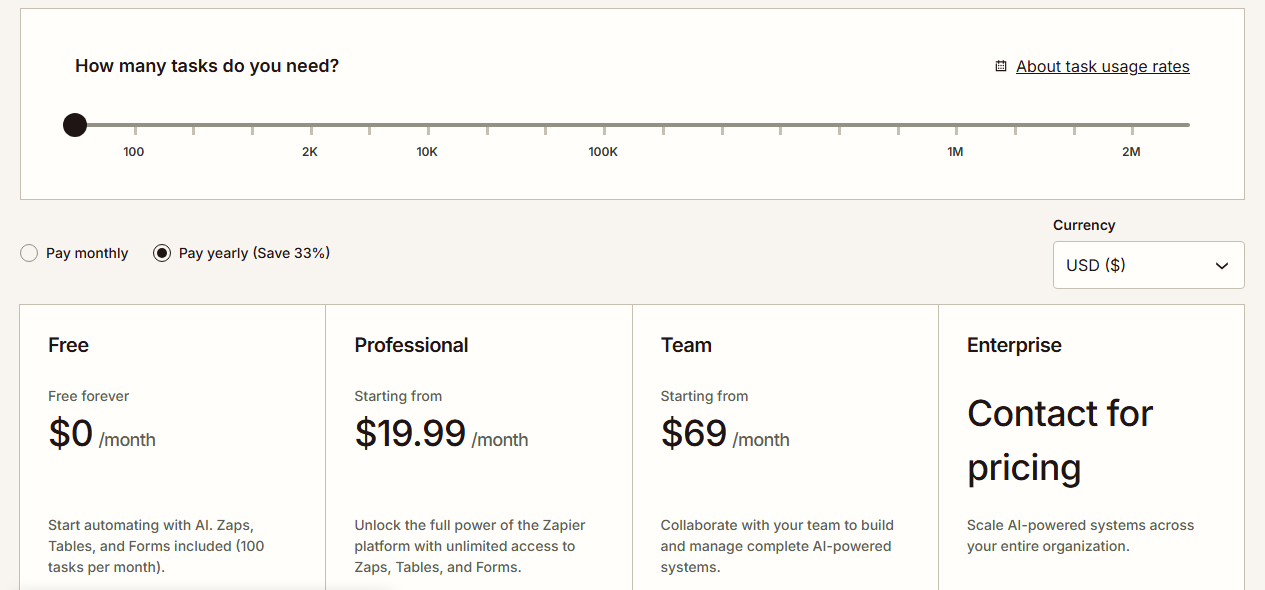
Two cautions. Zapier’s price rises with the task tier you pick, so the entry figure is a starting point and the bill grows quickly. Make’s own pricing page did not show plan prices when we read it, so the Make figures come from a third-party summary of its plans and should be confirmed on Make’s site before you budget. Annual billing is cheaper than monthly on all three.
Is N8N really Free?
The software is free. The Community Edition is open source and you can host it yourself with no limit on executions, which is why N8N tops “cheapest automation tool” lists. What is not free is everything around it: a server, backups, security updates and someone who owns all of that.
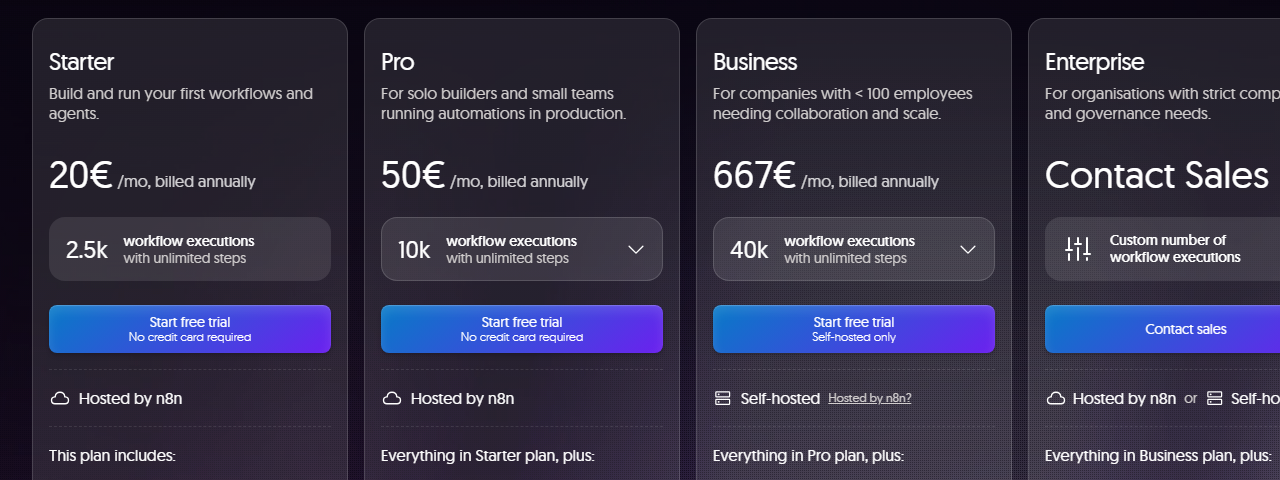
The Community Edition also leaves out features that the paid plans include, among them SSO, Git version control, shared projects and environments. Its licence lets you use it for your own internal business operations. It does not let you sell access to it or charge others for using it.
If you want N8N without the server, its Starter and Pro plans are hosted by N8N. For a team with nobody to run a server, that hosted route is the realistic one, and it still costs less than Zapier does at the same volume.
Is Zapier worth it?
For a lot of small businesses, yes. Zapier is worth it when your workflows are simple, they run a few hundred times a month, and the people building them are not technical. The time it saves on set-up is real, and at low volume the bill is small enough not to matter.
It stops being good value when workflows have many steps or run frequently, because every action is a task and the task tiers climb steeply. A business paying for the 100,000-task tier is paying a figure that makes Make or N8N worth the migration effort. That is the point where people start searching for Zapier alternatives.
Which Automation Tool is easiest to learn?
Zapier, by a clear margin. The list layout, the plain-language steps and the guided set-up mean most people produce a working Zap on their first attempt.
Make comes second. The canvas is intuitive once you have seen it, but routers, iterators and the way data passes between modules take time to understand. Plan for a week of getting used to it rather than an hour.
N8N is third for non-technical users. It rewards people who are comfortable reading data structures and writing small expressions, and it frustrates people who are not. A team with one technically minded person can do well on it. A team without one usually should not start there.
Are Zapier, Make and N8N GDPR Compliant?
None of them is compliant or non-compliant by itself. What matters is where your data is processed and what agreements are in place, because under GDPR you remain responsible for personal data that flows through a workflow.
| Zapier | Make | N8N | |
|---|---|---|---|
| Where data is hosted | United States, no EU-only option | Your choice of EU1, EU2, US1 or US2 data zone | Frankfurt, Germany on hosted plans, or your own server |
| Transfer basis | EU-US Data Privacy Framework, standard contractual clauses as fallback | EU zone keeps most processing in the EU | Not needed if data stays in Frankfurt or on your server |
| The catch | Cannot keep personal data inside the EU | Some AI features run in the US or UK, and your own AI connections can leave the EU | Self-hosting makes you responsible for security and updates |
Make’s own help page is the clearest warning of the three. An EU zone does not guarantee every request stays in the EU, because some built-in AI features and models are processed in the US or the UK, and connecting your own AI provider can remove the guarantee entirely.
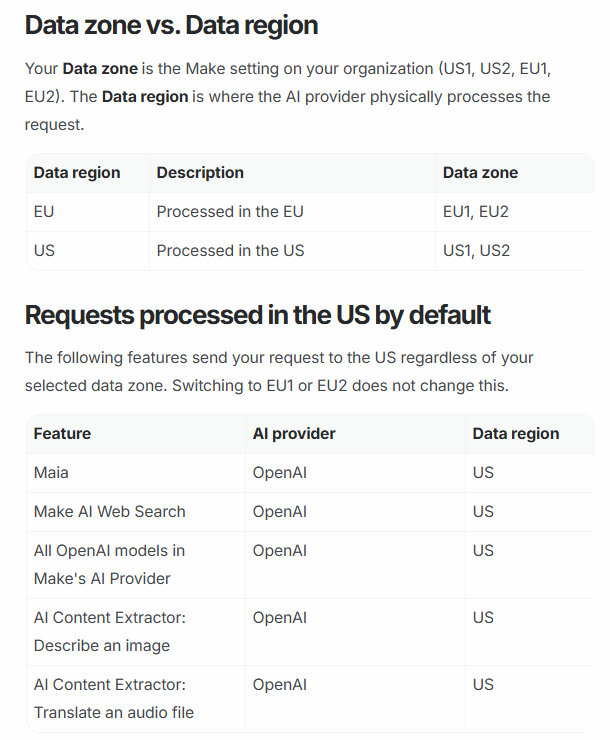
The same applies to any AI step you add. A workflow that sends customer data to an AI model has its own transfer question, separate from the automation tool. Mapping that before you build is cheaper than fixing it afterwards, and it is exactly what a workflow design pass is for.
Comparison at a glance
| Aspect | Zapier | Make | N8N |
|---|---|---|---|
| Best for | Simple automations, non-technical teams | Branching logic and lists of records | High volume, technical teams, self-hosting |
| Ease of learning | Easiest | Moderate | Hardest |
| Cost as volume grows | Highest | Middle | Lowest |
| Free option | 100 tasks a month | 1,000 credits a month | Self-hosted Community Edition |
| Self-hosting | No | No | Yes |
| Where data is hosted | United States | EU1 or EU2 zones, with AI exceptions | Frankfurt, or wherever you self-host |
| Built-in AI | AI by Zapier steps | AI modules | AI nodes and agents |
Which one should a Small Business choose?
Simple steps, low volume
Zapier
Branches, loops and lists
Make
High volume, one technical person
N8N hosted
Strict data control
N8N self-hosted
Choose Zapier if the workflows are simple, the volume is low, nobody on the team is technical, and speed to a working automation matters more than the bill.
Choose Make if workflows have branches, loops or lists of records, you want a visual map of what is happening, and you want to pay less than Zapier charges for the same work.
Choose N8N if volume is high, someone on the team is technical, you need control over where data runs, or you want to build AI agents into the workflow. Start on a hosted plan unless you already have someone to run a server.
If you are unsure, the cheaper test is to build the same single workflow on two of them and compare the effort and the cost for a month. For the bigger question of when none of these is the right answer and a custom build is, see the comparison of no-code automation and a custom API build.
Verdict
Zapier is the easiest to start with and the most expensive to keep. Make is the best balance for most small businesses with workflows that are more than a straight line. N8N is the cheapest and most flexible and the one that most needs a technical owner. The unit each one bills in, not the feature list, is what decides which is cheapest for your workflow, so count your steps and your monthly runs before you pick. Request a scoping conversation if you want the workflows mapped and costed before you commit to a platform.
Sources
- Zapier pricing (Zapier): plan table, task tiers, the definition of a task and which steps do not count.
- Data privacy overview (Zapier): where data is hosted, the transfer mechanism and the absence of EU-only storage.
- Make pricing (Make): the credit as billing unit, which modules cost credits, the free allowance and extra credit rules.
- AI providers and data zones in Make (Make): what the EU1 and EU2 zones cover and which AI features still route outside the EU.
- Make pricing in 2026 (Jetadmin): a third-party summary of Core, Pro and Teams prices at 10,000 credits, used because the vendor page did not list them.
- n8n pricing (n8n): plan prices, execution allowances, the definition of an execution and EU hosting.
- Community Edition features (n8n docs): what the free self-hosted edition includes and leaves out.
- n8n licence (n8n on GitHub): the internal business use limit in the Sustainable Use Licence.
FAQ
Questions we get asked
Which is cheaper, Zapier, Make or N8N?
N8N is usually cheapest once a workflow has more than a few steps, because it bills one execution per run however many steps the run contains. Make is next, at one credit for most actions. Zapier is the most expensive at volume, because every successful action counts as a task. At very low volume all three have a free or near-free entry point, so the gap only opens as the workflows grow.
Is Make better than Zapier?
Make is better when a workflow branches, loops or handles lists of records, and it costs less for the same amount of work. Zapier is better when you want the largest app library and the quickest route from an idea to a working automation. Neither is better overall. It depends on how complex the workflow is and how often it runs.
Is N8N harder to use than Zapier?
Yes, for most non-technical teams. N8N gives you more control and a lower bill, and in exchange it expects you to be comfortable with data structures, expressions and sometimes a little code. Its hosted plans remove the server work, but the builder itself still asks more of you than Zapier does.
Can I use N8N for my Business for Free?
You can self-host the Community Edition for free for your own internal business purposes, which covers automating your own company's work. Its licence does not allow you to sell access to it or charge others to use it. You also pay for the server and its upkeep, and the free edition leaves out features such as SSO, Git version control and shared projects.
Does Zapier store my Data in the EU?
No. Zapier says it hosts data on servers in the United States and does not offer EU-only storage. It relies on the EU-US Data Privacy Framework for transfers, with standard contractual clauses as the fallback. For a business that must keep personal data inside the EU, that makes Make's EU zones or N8N's Frankfurt hosting or self-hosting the easier route.
Can Zapier, Make and N8N run AI Agents?
All three can call AI models inside a workflow. Zapier has AI by Zapier steps, Make has built-in AI modules, and N8N lists agents and AI nodes on every cloud plan. The question to ask is where the model runs, since a workflow that sends customer data to an AI model has its own GDPR question on top of the automation tool's.
Should I switch from Zapier to Make or N8N?
Switch when the Zapier bill has become a real line in your budget, or when workflows have outgrown simple step-by-step Zaps. Rebuild one workflow first and compare the cost and the effort before moving the rest. If your Zaps are simple and the bill is small, switching costs more in time than it saves in money.
Ready to Put This to Work?
Tell us where your team is with AI and we will tell you honestly what would make the biggest difference.