HubSpot AI vs Salesforce Einstein vs Pipedrive
HubSpot AI, Salesforce Einstein and Pipedrive AI compared for a small business: what each does, what it costs, how credits work, EU data handling, and which fits.
For most small businesses, HubSpot or Pipedrive is the safer CRM to start with, and Salesforce is the choice when you already have an administrator and processes complicated enough to need it. HubSpot gives you the widest set of AI agents but bills them in credits. Pipedrive gives you the lightest AI at the lowest seat price. Salesforce gives you the most control at the highest price.
This review is based on each vendor’s own public pages as we read them on 9 November 2026. Prices change, differ by billing period and region, and exclude tax, so confirm them on the live pages before you buy.
Key takeaways
- All three CRMs now sell AI as a layer on top of the contact and deal records. The difference is how much the AI does on its own and how it is billed.
- HubSpot lists named agents for prospecting, customer service and data questions, and runs many of them on credits. Paid Sales Hub plans include 500, 3,000 or 5,000 credits a month, depending on the tier.
- Salesforce lists Sales Cloud from $25 per user per month, with Agentforce for Sales as an add-on from $125 per user per month.
- Pipedrive lists an AI Sales Assistant, an email writer and win-probability notifications, at the lowest seat prices of the three.
- None of the three removes your duties under data protection law. Check hosting, sub-processors and the data processing agreement before you load customer records.
- The cheapest plan is rarely the cheapest total. Add credits, add-ons, onboarding and the time your team spends setting it up.
- Pilot one CRM for 30 days on real deals with a written pass mark.
Which CRM has the Best AI for a Small Business?
There is no single winner, because the three tools are built for different buyers. This is the quickest way to place yourself.
Lean towards HubSpot or Pipedrive if
You have fewer than 20 salespeople
Nobody on staff is a CRM administrator
You want AI help within weeks
You want a predictable monthly bill
Lean towards Salesforce if
You already have a CRM administrator
Your sales process has many steps
You need heavy customisation
You can pay for set-up and add-ons
If most of the left-hand list is true for you, start with HubSpot or Pipedrive. If most of the right-hand list is true, Salesforce is worth the extra cost and effort. If you are somewhere in between, the section on how to choose an AI vendor walks through the questions to ask before you sign.
What does each CRM’s AI actually do?
All three vendors describe AI that drafts text, summarises records and suggests next steps. HubSpot and Salesforce go further and describe agents that act on their own. An AI agent here means software that takes a goal and carries out several steps towards it, instead of answering one prompt. Our explainer on what an AI agent is covers the idea in more depth.
What does HubSpot AI do?
HubSpot’s AI page describes an Agent Hub where you view, switch on and build agents, and says it is included in the Starter, Professional and Enterprise editions. For sales, the page lists a Prospecting Agent that watches accounts for buying signals and starts outreach, and a Smart Deal Progression feature that suggests next steps after each call. It also lists a Data Agent that answers custom questions about a contact or company using CRM data, calls, emails and documents, and a Customer Agent that answers common questions across channels. An Agent Builder lets you create your own agents without code.
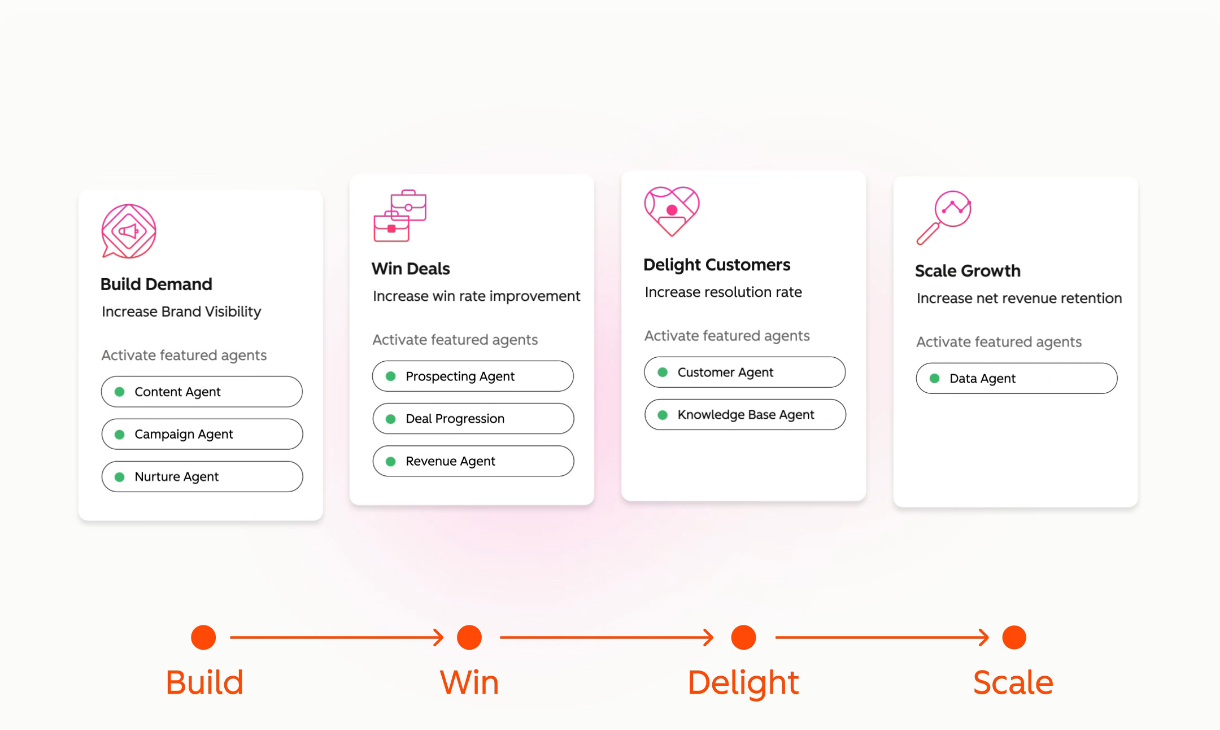
A quick map of what each vendor names and describes, so you can compare like with like:
| HubSpot | Salesforce | Pipedrive | |
|---|---|---|---|
| Prospecting and outreach | Prospecting Agent | Agentforce for Sales | AI email generator |
| Deal guidance | Smart Deal Progression | Built-in AI and Agentforce skills | AI Sales Assistant, win-probability alerts |
| Answering customers | Customer Agent | Agentforce | Not listed on the AI page |
| Asking questions of your data | Data Agent | Agentforce skills | AI Sales Assistant |
| Build your own | Agent Builder, no code | Add-on and platform tools | Not listed |
| Where agents are managed | Agent Hub | Agentforce | Within the CRM |
The mapping is ours, based on the names and descriptions on each vendor’s pages. Where a cell says “not listed”, the page does not mention it, which is not the same as the feature not existing.
HubSpot publishes performance claims for these agents, such as 65 percent more sales leads created per month for the Prospecting Agent and 77 percent more tickets closed per month for the Customer Agent. Treat these as the vendor’s own figures. The page does not show the sample or the method, so they are a reason to test, not a forecast for your business.
What does Salesforce Einstein and Agentforce do?
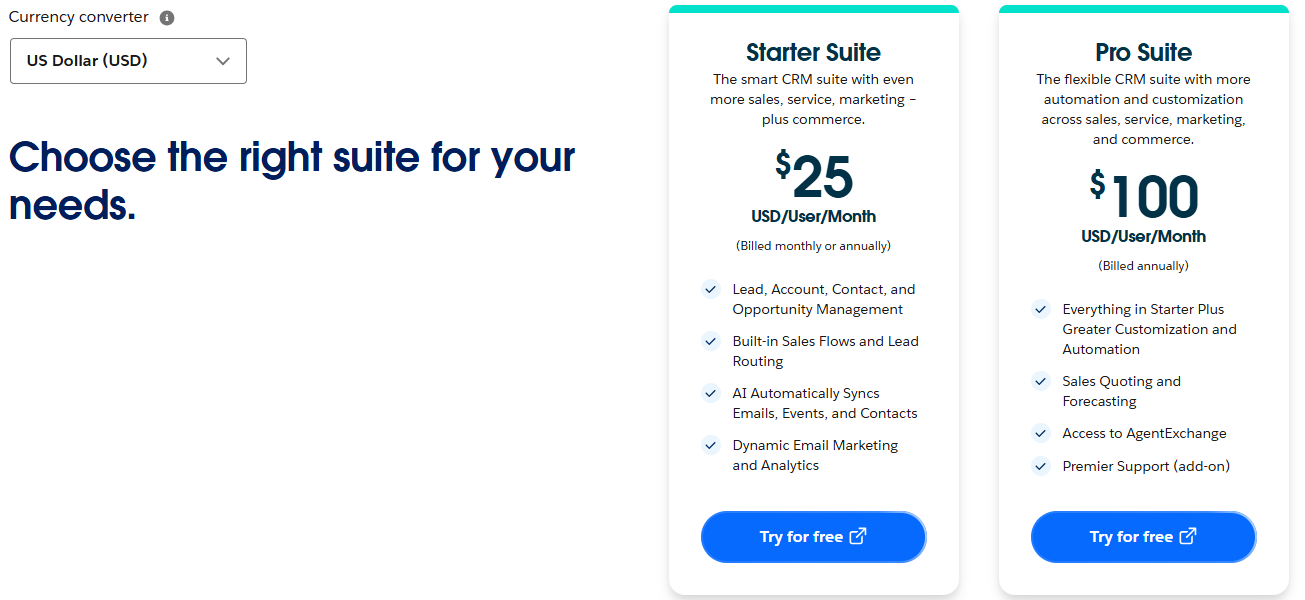
Salesforce has moved its AI branding from Einstein to Agentforce. Its pricing page shows Sales Cloud editions with “built-in AI and Agentforce skills” from the Core edition up, and lists Agentforce for Sales and Agentforce Coworker in the Max edition. The page also says AI can be added to Core and above, and shows Agentforce for Sales as an add-on from $125 per user per month. The Starter Suite is described more modestly, with AI that syncs emails, events and contacts automatically.
The part of Salesforce’s AI that matters most to a cautious buyer is its Trust Layer. Salesforce’s developer documentation says it has agreements with language model providers that include zero data retention, and lists masking of sensitive data, toxicity detection and an audit trail among the layer’s features. That is useful if you have to show a customer or a regulator what the AI did.
What does Pipedrive AI do?
Pipedrive’s AI page lists an AI Sales Assistant that analyses your data and suggests actions, AI notifications that predict the chance of winning a deal, an AI email generator and an email summariser. It also lists smart recommendations for marketplace apps and a natural-language search of that marketplace. Its pricing page names AI-powered report creation on the Lite plan and AI-powered multi-email tools on Premium. It does not make clear which plan holds the Sales Assistant, and Pipedrive’s own blog posts disagree with each other on that, so confirm the tier before you count on it.
How much do HubSpot, Salesforce and Pipedrive cost?
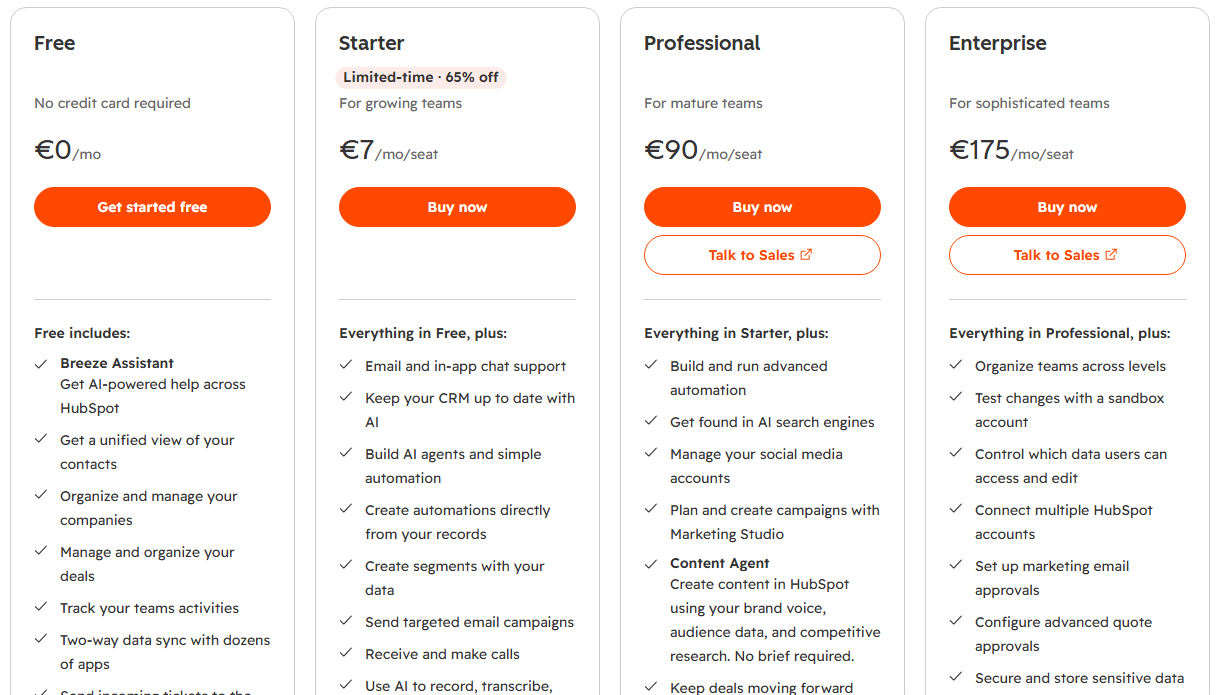
Per-seat prices tell you where each tool starts. They do not tell you what you will pay once AI is switched on. This is HubSpot’s pricing page as it showed to a visitor in the EU, with prices in euros.
Salesforce’s page shows its first two Sales Cloud suites, here in US dollars.
Pipedrive’s page shows four plans, here in euros as displayed to an EU visitor.
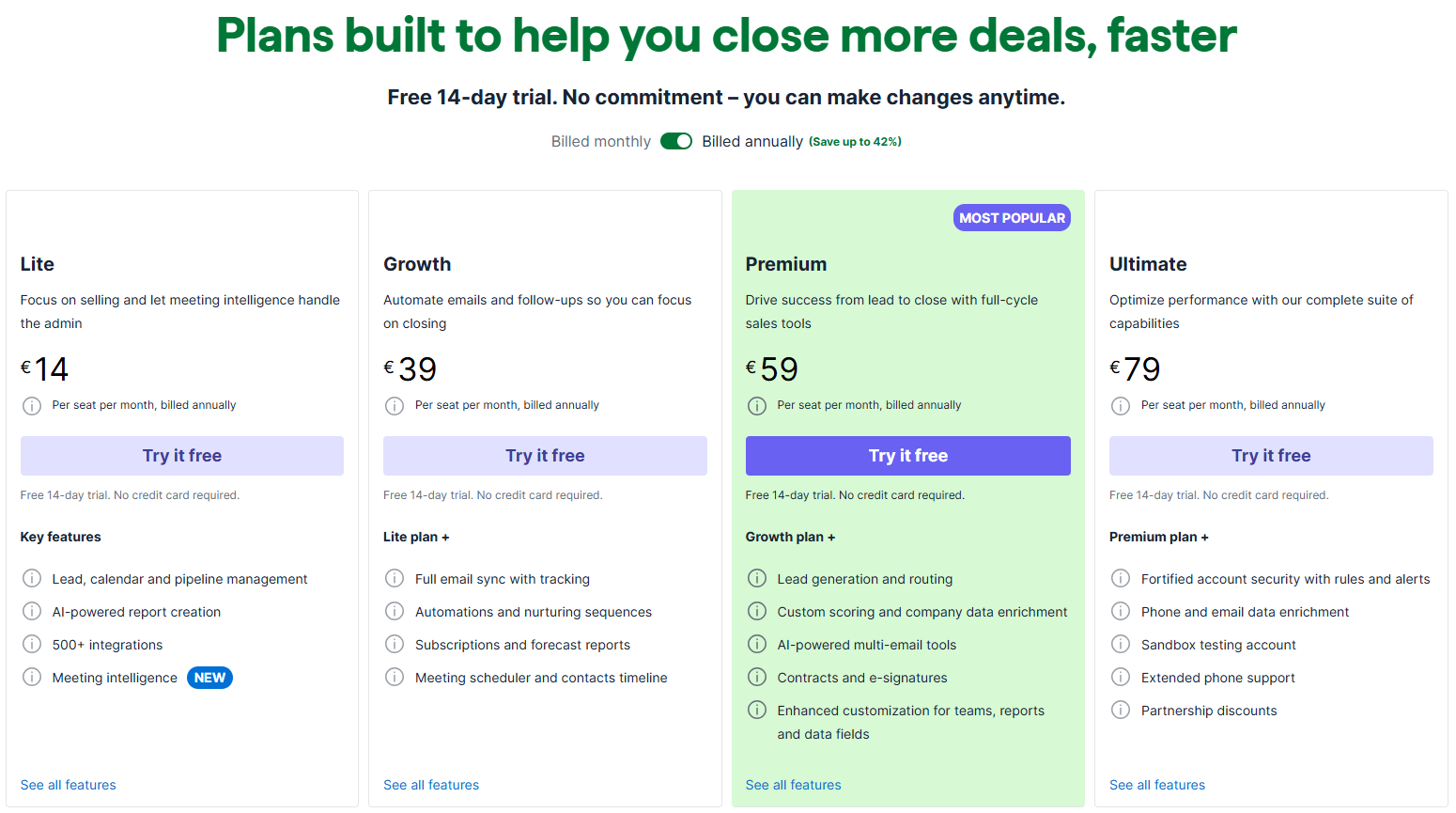
The table below sets out the headline figures from each vendor’s page, per user per month. HubSpot and Salesforce are in US dollars and Pipedrive is in euros, as each page was displayed to us. HubSpot’s own euro prices differ slightly from its dollar prices, for example Enterprise at €175 against $150, so check the currency you will actually be billed in.
| HubSpot Sales Hub | Salesforce Sales Cloud | Pipedrive | |
|---|---|---|---|
| Entry plan | Free for up to 2 users | Starter Suite, $25 | Lite, €14 (annual) |
| Middle plans | Starter $7 or $20, Professional $90 or $100 | Pro Suite $100, Core $195 | Growth €39, Premium €59 (annual) |
| Top plan | Enterprise, $150 | Advanced $395, Max $550 | Ultimate, €79 (annual) |
| How AI is billed | Monthly credits included, extra at $0.010 each | Add-on from $125 per user, or inside Max | Listed as part of the plans |
| Extra fees | Onboarding $1,500 (Professional), $3,500 (Enterprise) | Not listed on the page | Not listed |
HubSpot shows two rates for the Starter and Professional tiers without clearly labelling which is monthly and which is annual, and the lower figure appears to be the annual one. Salesforce bills Pro Suite and above annually. Pipedrive’s figures are for annual billing, and monthly billing is quoted higher. Add VAT where it applies.
What would five seats cost per month?
To make the list prices concrete, this table multiplies them for a five-person sales team. It is simple arithmetic on the headline prices above. HubSpot and Salesforce are in US dollars and Pipedrive is in euros, so treat the comparison as a rough guide. It leaves out tax, onboarding, extra credits and anything you buy later.
| Setup for five users | Seat cost per month | AI cost on top | Illustrative total |
|---|---|---|---|
| HubSpot Sales Hub Professional (at $90) | $450 | Included credits, extra at $0.010 each | $450 plus any extra credits |
| Salesforce Sales Cloud Pro Suite | $500 | AI added to Core and above only | $500, without the AI add-on |
| Salesforce Sales Cloud Core with the Agentforce add-on | $975 | From $125 per user, so $625 | $1,600 |
| Pipedrive Growth (at €39) | €195 | AI-powered reports on Lite and above | €195 |
| Pipedrive Premium (at €59) | €295 | AI-powered multi-email tools included | €295 |
The gap is wide, but so are the products. A cheaper total is only a saving if the cheaper tool does the jobs you bought it for.
What is the Real cost of AI in a CRM?
The honest answer is that the sticker price is the smallest part. Work out the total cost of ownership over a year: seats, the AI plan or add-on, credits you buy beyond the included allowance, onboarding or consulting, and the staff hours spent configuring and checking the tool. Our guide to what an AI workflow actually costs to run shows how to build that estimate.
Credits deserve a closer look. HubSpot says its credits reset each month and do not roll over, and that they are not additive across products. A busy month with an agent running on every new lead can use the allowance faster than a quiet month would suggest. Before you commit, ask each vendor how many credits a typical agent action uses and how you will be warned before you run out.
How do HubSpot, Salesforce and Pipedrive handle EU Data and GDPR?
This is where small European businesses most often get caught out. A CRM holds names, emails, call notes and sometimes health or financial details about customers. Adding AI means some of that data is sent to a language model to be processed. Our review of the EU AI Act versus GDPR explains why the data protection duties apply either way, and the guide to what the EU AI Act requires of a small business covers the newer rules.
Three questions matter for each vendor.
- Where is the data stored? This is data residency. HubSpot’s help centre says the sub-processors page lists each AI provider’s processing locations next to your own data centre location, which can be the United States, the European Union, Canada or Australia. Pipedrive’s help pages say client data is hosted across seven AWS regions, including Frankfurt and Dublin.
- Which sub-processors handle AI requests? HubSpot says it uses third-party AI providers such as OpenAI. Pipedrive’s sub-processor list names Amazon Web Services, Anthropic and OpenAI Ireland for AI features. Salesforce says it has agreements with its language model providers.
- Is your data used to train models? HubSpot says it does not permit its AI providers to use customer data. Pipedrive says its providers are prohibited from training on your data. Salesforce describes zero data retention.
This table pulls together what each vendor’s pages say on those three questions.
| HubSpot | Salesforce | Pipedrive | |
|---|---|---|---|
| Hosting choices | United States, European Union, Canada or Australia | Not covered on the pages we read | Seven AWS regions, including Frankfurt and Dublin |
| AI providers named | Third-party providers such as OpenAI, listed on its sub-processors page | Language model providers under agreement | Amazon Web Services, Anthropic and OpenAI Ireland |
| Training on your data | Providers not permitted to use customer data | Zero data retention agreements | Providers contractually prohibited from training |
| Transfer mechanism | Data processing agreement, Standard Contractual Clauses, EU-U.S. Data Privacy Framework | Check the contract | Data processing agreement with Standard Contractual Clauses for US providers |
| Audit trail for AI | Not stated on the pages we read | Trust Layer audit trail | Not stated on the pages we read |
HubSpot’s help article does not say whether AI processing for an EU-hosted account stays inside the EU. It says transfers from the EU to the United States are covered by its data processing agreement and by Standard Contractual Clauses. That is a lawful mechanism, but it is not the same as keeping data in the EU. If that matters to your customers, ask for the current sub-processor page in writing.
None of this makes you compliant by itself. You remain responsible for your customers’ data under GDPR, so sign the data processing agreement, record which AI features are switched on, and keep personal data out of free-text notes where you can. Our guide to what is safe to paste into AI tools gives a simple rule of thumb, and the overview of AI governance for small and mid-sized businesses shows who should own these decisions.
Which CRM is easiest to set up and use?
Pipedrive is built around a visual sales pipeline, and its AI page promotes a free 14-day trial with no credit card. That makes it the quickest to try. HubSpot also offers a free tier, and its Agent Builder is described as no-code, so a non-technical owner can adjust it. Salesforce is the most configurable, which means the most to learn.
Be wary of promises that any of these will run itself. HubSpot lists a one-time onboarding fee of $1,500 for Professional and $3,500 for Enterprise, which suggests the vendor expects the higher tiers to need guided set-up. Ask each vendor what a realistic first month looks like for a team your size.
Can the AI send messages to customers without a person checking?
It can, and that is the setting that needs the most care. HubSpot describes its Prospecting Agent as starting outreach when an account shows buying signals, and its Customer Agent as answering questions 24 hours a day. A message that goes out under your name is your message, whoever or whatever wrote it.
Keep a person in the loop at the start. Have someone approve every first outreach message for the first few weeks, read what the agent wrote, and only widen its freedom once the output has been good for long enough. Language models can state wrong things with confidence, a failure known as hallucination, so our checklist for checking AI output before it goes to a customer applies directly. Put the rules in writing too, using our guide to writing an AI use policy for your team.
HubSpot AI vs Salesforce Einstein vs Pipedrive: How do they compare side by side?
| HubSpot | Salesforce | Pipedrive | |
|---|---|---|---|
| Best for | Teams that want sales, marketing and service together | Businesses with an administrator and complex processes | Small teams that want a simple pipeline |
| AI style | Named agents plus an agent builder | Agents, skills and a Trust Layer | Assistant, email tools, win-probability alerts |
| AI billing | Included credits, extra at $0.010 each | Add-on from $125 per user or Max edition | Listed as part of plans |
| Lowest paid seat price | $7 or $20 | $25 | €14 |
| Strength | Breadth of agents | Control and audit trail | Simplicity and price |
| Watch out for | Credits running out; AI processing location | Cost and set-up effort | Which plan holds which AI feature |
Which one should a Small Business choose?
Choose HubSpot if your sales, marketing and customer service work all touch the same contacts and you want agents in one place. Choose Pipedrive if you have a small sales team, want to be live in days, and need only modest AI help. Choose Salesforce if you already have someone to run it, your process has real complexity, and the audit trail matters to you.
If you only need sales tooling and the rest of your stack already does the automation, you may not need a CRM’s own AI at all. Our review of off-the-shelf AI tools versus a custom AI workflow and the comparison of Zapier, Make and N8N help you decide whether to buy the AI inside a CRM or connect your own. Likewise, if your team lives in Microsoft or Google tools, compare Microsoft Copilot with Google Workspace AI before adding another paid layer.
How should you test a CRM with AI before you buy?
Run a 30-day pilot using the method in our guide to running a 30-day AI pilot in a small business. Four steps keep it honest.
- Write the pass mark first, for example “cuts time spent on call notes by a third” or “no wrong facts in any message sent”.
- Load a small, real set of deals, not a demo set.
- Record the hours saved and every credit or add-on charge.
- Compare the result with the full monthly cost, and decide on the evidence. Our guide to whether your AI tool is actually saving time gives a way to check.
Pick the first few tasks carefully. Our articles on AI for sales and on AI customer support for a small business list jobs that suit a first trial. If you want an outside view of whether a CRM’s AI is worth it, a short audit checks the tools you already pay for before you add another.
Our verdict
HubSpot has the broadest set of AI agents of the three and the most complicated bill. Salesforce has the strongest governance story and the highest cost. Pipedrive is the easiest and cheapest way in, with the lightest AI and the least clarity about which plan includes what.
For a typical small business we would start with HubSpot or Pipedrive, run the 30-day pilot, and keep a person approving customer messages until the output has earned trust. Read the sub-processor page and sign the data processing agreement before any customer records go in. Judge each tool by the hours it saves net of its full cost, not by the length of its feature list.
Further reading
- AI for sales: where AI helps a small sales team and where it does not.
- AI customer support for a small business: the service side of the same decision.
- How to choose an AI vendor: questions to ask before you sign.
- MCP vs API: how AI tools connect to the systems you already use.
- AI agents vs prompting: when an agent is worth it over a well-written prompt.
- Cloud AI vs on-premise AI: where your data runs and what that changes.
- The glossary entry for SMEs: what we mean by a small and mid-sized business.
Sources
- Sales Hub pricing: the Free, Starter, Professional and Enterprise tiers, included monthly credits, the $0.010 extra credit price and onboarding fees, as read on 9 November 2026.
- HubSpot AI agents: the Agent Hub, Prospecting Agent, Data Agent, Customer Agent and Agent Builder, with the vendor’s own performance claims.
- HubSpot AI cloud infrastructure FAQ: AI providers, processing locations on the sub-processors page, no customer data use by providers, and transfer mechanisms.
- Sales Cloud pricing: the editions from Starter Suite to Max, per-user prices and the Agentforce for Sales add-on, as read on 9 November 2026.
- Trust Layer documentation: zero data retention agreements, data masking, toxicity detection and the audit trail.
- Pipedrive pricing: the Lite, Growth, Premium and Ultimate plans, per-seat prices in euros and the AI features named on each plan, as read on 9 November 2026.
- Pipedrive AI Sales Assistant: the assistant, win-probability notifications, email generator and summariser, and the 14-day trial.
- Pipedrive sub-processors: the providers used for AI features.
- Pipedrive Nova FAQ: AWS hosting regions including Frankfurt and Dublin, and the ban on providers training on client data.
- General Data Protection Regulation (EUR-Lex): the legal text of the data protection duties that apply to any CRM holding customer data.
FAQ
Questions we get asked
Which CRM has the Best AI for a Small Business?
For most small businesses with a handful of salespeople, HubSpot or Pipedrive is the safer starting point. HubSpot suits a team that wants sales, marketing and service in one place and does not mind a credit-based AI bill. Pipedrive suits a team that wants a simple deal pipeline with light AI help. Salesforce suits a business that already has an administrator and complex processes.
Is HubSpot AI Free?
Partly. HubSpot's pricing page lists a free Sales Hub for up to 2 users, but credits are shown only for paid plans: 500 on Starter, 3,000 on Professional and 5,000 on Enterprise. Agents and some AI tools run on those credits. Extra credits are listed at $0.010 each, and unused credits do not roll over to the next month.
What is Salesforce Agentforce and is it the same as Einstein?
Agentforce is the name Salesforce now uses for its AI agents, and its developer documentation says the Trust Layer was formerly called the Einstein Trust Layer. Einstein is the older brand for Salesforce's AI features. On the Sales Cloud pricing page, Agentforce for Sales appears as an add-on from $125 per user per month, and as part of the top Max edition.
How much does Pipedrive cost compared with HubSpot and Salesforce?
Pipedrive is the cheapest of the three at the per-seat level. Its pricing page, viewed from the EU, shows Lite at €14, Growth at €39, Premium at €59 and Ultimate at €79 per seat per month on annual billing. HubSpot Sales Hub paid plans start at $7 or $20 per seat on Starter, and Salesforce Sales Cloud starts at $25 per user for Starter Suite. The currencies differ, so compare the live pages in the currency you will be billed in.
Are HubSpot, Salesforce and Pipedrive GDPR Compliant?
All three publish data processing terms and say they support GDPR, but being compliant is not something a vendor can do on your behalf. You are still the controller of your customer data. Check where the data is hosted, which sub-processors handle AI requests, whether transfers outside the EU rely on Standard Contractual Clauses, and sign the data processing agreement.
Does the CRM vendor use my customer Data to train AI Models?
Each vendor says no for its third-party AI providers. HubSpot says it does not permit its AI providers to use customer data, and Pipedrive says its providers are contractually prohibited from training on your data. Salesforce's documentation describes zero data retention agreements with its model providers. These are vendor statements, so read the current terms and your own contract.
Do I need a consultant to set up Salesforce?
Not strictly, but most small businesses find it easier with someone who knows the platform. Salesforce is the most configurable of the three, which is its strength and its cost. HubSpot's Professional and Enterprise tiers list one-time onboarding fees of $1,500 and $3,500, so check what set-up help each vendor expects you to buy.
Can an AI Agent in a CRM Email my customers without anyone checking?
It can, if you switch it on that way, and that is the setting to be careful with. HubSpot's Prospecting Agent is described as starting outreach when an account shows buying signals. Keep a person approving first messages until you have read a few weeks of output, and follow our guidance on checking AI output before it reaches a customer.
How long should a Small Business trial a CRM with AI?
Run a 30-day pilot with real deals and a written pass mark. Pipedrive lists a 14-day free trial, so you may need to pilot in two stages. Count the hours saved on notes, follow-ups and data entry against the full monthly cost, including credits and add-ons.
Ready to Put This to Work?
Tell us where your team is with AI and we will tell you honestly what would make the biggest difference.