How to write a Good Prompt
How to write a good prompt for any AI tool: the four parts, a step-by-step method, before-and-after examples and the mistakes that waste the most time.
A good prompt tells the AI what you want, why you want it, what to work from and what a good result looks like. Most weak answers come from a prompt that left one of those out, not from a tool that cannot do the job.
This guide explains what a prompt is, the four parts every good one contains, a step-by-step method you can use today, before-and-after examples for ordinary work tasks, and the mistakes that waste the most time. It is written for people at work who use an AI tool most days and want better answers on the first try.
Key takeaways
- A prompt is the only thing an AI tool has to go on. If the background is not in the prompt, or in a document you attach, the tool does not have it.
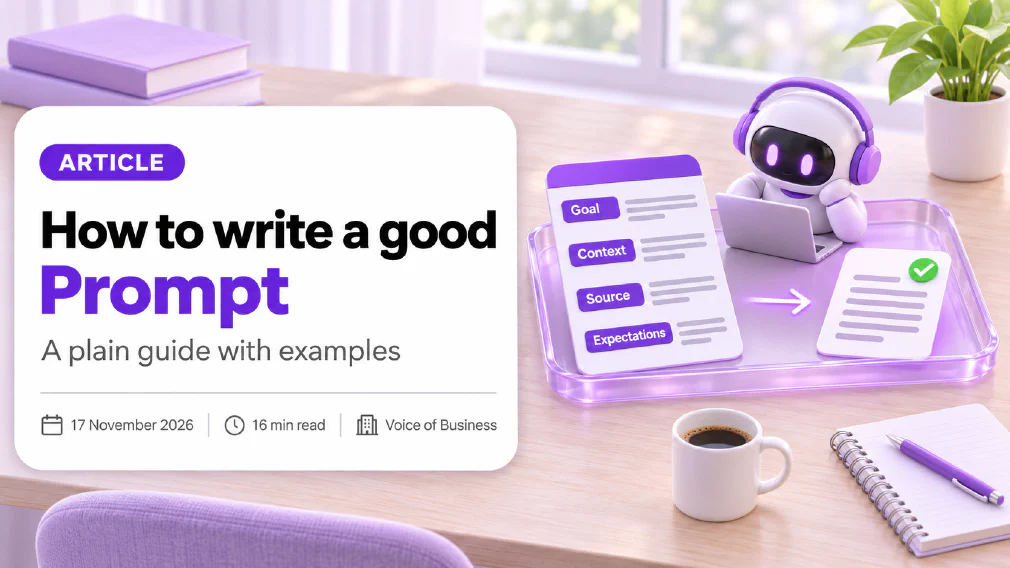
- Four parts cover almost every task: goal, context, source and expectations. A prompt with all four beats a clever one-liner.
- Write the prompt the way you would brief a capable new colleague who has never seen the task. Wording tricks matter far less than missing information.
- Examples work better than adjectives. One sample of a result you liked tells the tool more than a paragraph describing it.
- Treat the first answer as a draft. Say what to change, and ask the tool to explain what it assumed.
- A prompt improves the odds of a good answer. It does not replace checking the result, and it does not make it safe to paste sensitive data.
- Keep the prompts that work. A saved prompt is reusable work, and a team that shares them stops starting from a blank line.
What is a Prompt in AI?
A prompt is an instruction you give an AI tool to get a result. It can be a short question, a paragraph of background followed by a task, or a document with a request attached. Whatever its length, it is everything the tool knows about what you want. Our glossary defines a prompt as the one part of an AI tool a person controls directly on every request, which is why it repays practice. The wider craft of designing prompts for repeatable systems is called prompt engineering, but the everyday skill covered here is the part most people need.
Underneath most of these tools sits a large language model. It reads your prompt, predicts the most likely next word, adds it to the text so far, and repeats the step until the answer is finished. It does not look the answer up, and it cannot see your inbox, your last meeting or the way your team likes a report set out unless the prompt supplies that. A vague prompt starts a vague pattern and gets a generic reply. A specific one starts a narrower pattern, so the reply lands closer to what you needed.
What makes a Good Prompt?
A good prompt leaves the tool nothing important to guess. In practice that means four things, and it is worth checking them in this order.
Goal. What you want done and what the result is for. “Summarise this” is a task. “Summarise this for a director who has two minutes before a meeting” is a goal.
Context. The background a newcomer would need. Who will read the result, what happened last time, what the situation is, and anything that is obvious to you but invisible to the tool.
Source. The material the answer should come from, such as a document, a set of notes or a table, attached or pasted into the prompt. Without a source, the tool answers from whatever it learned in training, which may be out of date or beside the point.
Expectations. What good looks like: the format, the length, the tone, what to include and what to leave out.
These four are the same ideas that run through our guide on how to brief an AI tool like a new hire. The wording of the sentence you type is the smallest part of a good prompt. The paragraph nobody wrote before it is usually the largest.
How do you write a Prompt step by step?
Here is a method that works in any tool, and takes about two minutes once it is a habit.
- Start with the result, not the task. Decide what you want in your hands at the end: a three-paragraph email, a table, a list of five options, a one-page summary. Say that first.
- Say who it is for. The reader changes everything. A customer, a board member and a new starter need different language and different detail.
- Add the background. Two or three sentences on the situation. If you would explain it to a new colleague, explain it to the tool.
- Attach the source. Paste or upload the material, and tell the tool to rely on it. “Use only the attached notes” is a short instruction with a large effect.
- Describe a good result. Format, length, tone, and one or two things to avoid.
- Add a rule for gaps. Tell it what to do when it does not know, for example “if the notes do not say, write ’not stated’ instead of guessing”.
- Ask it to check itself. A closing line such as “list any assumptions you made” turns hidden guesses into something you can read.
- Read the result, then refine. Reply with the change you want, not a new prompt from scratch.
Not every prompt needs all eight steps. A quick question needs one or two. The more the result matters, the more of the steps are worth the minute they take.
What are some Good Prompt examples for work?
Seeing the same task written badly and well is the quickest way to learn the difference. Here are three, drawn from ordinary jobs.
A client update.
Weak: “Write the client update.”
Better: “Write a short update for a client who reads on their phone. The goal is to show progress on the website project this month and flag the one delay. The reader is a busy manager who dislikes jargon. Use the attached meeting notes only. Keep it under 150 words in a friendly, direct tone, with the delay in the last line. If the notes do not mention a date, say ‘date to be confirmed’.”
The task is identical. The second version names the reader, the source, the length and the tone, and says what to do when something is missing. There is nothing left to guess.
A summary of a long document.
Weak: “Summarise this report.”
Better: “Summarise the attached report for a finance director who needs to decide whether to approve the plan. Give me five bullet points, then a single sentence on the biggest risk. Quote the page number for each point so I can check it. Do not add anything that is not in the report.”
A customer reply.
Weak: “Reply to this complaint.”
Better: “Draft a reply to the attached complaint. We are a small company, the customer is upset about a late delivery, and our policy is to apologise once, explain the cause in one sentence and offer a replacement. Use a calm, respectful tone and no more than 120 words. Do not promise a refund. I will review it before it is sent.”
In each case the better prompt is only a few lines longer. The extra lines are the decisions you had already made in your head and had not yet written down.
Should you give AI a Role in your Prompt?
Sometimes. Starting with “You are an experienced HR adviser” or “Act as a plain-English editor” can shift the tone, the vocabulary and the level of detail. It is a quick way to change style.
What a role cannot do is add knowledge or accuracy. Telling a tool it is an expert does not make its facts more reliable, and a confident expert voice can make a wrong answer sound more convincing. Use a role for style and audience, and rely on real context and an attached source for substance.
A more useful role is the reader’s. “Explain this as you would to a manager with no technical background” gives the tool a target to aim at, and it is often worth more than naming the tool’s own job.
What is few-shot Prompting, and when should you use examples?
Few-shot prompting means showing the tool a small number of examples of the output you want, then asking for a new one. With a single example it is called one-shot prompting. The idea is old in the research: a well-known 2020 paper on large language models reported that giving a model a few examples inside the prompt improved its performance on many tasks without any extra training.
For everyday work the lesson is practical. Describing a style in words is slow and imprecise. Pasting in one email you were happy with and saying “write the next one in this style” is faster and gets closer. Examples work especially well for tone of voice, report layouts, the structure of a product description, and any format you have to repeat.
Two cautions. The tool will copy the example closely, including its flaws, so choose one you would be content to see again. And remove anything private from the example before pasting it, for the reasons covered below.
Does “think step by step” still work?
For tasks that need reasoning, such as a calculation, a comparison or a plan with several parts, asking the tool to work through the problem in steps can improve the answer. Research published in 2022 found that prompting large models to produce intermediate reasoning steps improved their results on arithmetic and logic problems, and a follow-up paper found that even a simple line such as “let’s think step by step” made a measurable difference on some tasks.
Things have moved on. Many current tools include a reasoning model, which works through a problem internally before it answers, so spelling out the steps matters less than it did. The advice that still holds is more basic: for a multi-part task, break it into parts. Ask for the options first, then ask the tool to compare them, then ask for a recommendation. Each stage is something you can read and correct before the next one is built on top of it.
How long should a Prompt be?
Long enough that nothing important is left to guess, and no longer. There is no ideal word count.
A simple factual question can be a single sentence. Anything that produces work other people will read usually needs a short paragraph of context and, often, an attached source. That is not padding. Padding is repeating the same instruction three times, adding polite filler, or including background that has nothing to do with the task.
Two practical limits apply. The first is the context window, which is the amount of text a tool can hold in view at once. Your prompt, any attached documents and the tool’s own answer all share it, so a very long prompt leaves less room for everything else. Research on long inputs has also found that models can pay less attention to material buried in the middle of a long text than to material at the start or the end, so put the instruction and the most important details where they are easy to see. The second limit is your own time. If you retype the same background every day, put it in custom instructions, so it travels with every request.
If length of the answer matters, say so. A sensible word limit is one of the simplest expectations to set, and it saves a round of trimming.
Why is AI giving me bad Answers?
When the answer is poor, the cause is usually one of five things. Working through them in order is faster than rewording the prompt at random.
- The tool did not have the information. Add the missing background or attach the source.
- The goal was unclear. Say what the result is for and who will read it.
- The expectations were missing. Name the format, length and tone.
- The task was too big. Split it into stages and check each one.
- You expected a fact the tool cannot know. It cannot see your files, your customers or anything after its training unless you supply it.
A sixth cause is chance. Language models vary their wording from one run to the next, which is why you can get different answers to the same question. Specific prompts narrow that variation, and they never remove it, so a result that matters is always worth a second look.
Resist the urge to type “that’s wrong, try again” with nothing else. Tell the tool what is wrong, for instance “this is too formal and the second paragraph repeats the first”, and it has something to correct.
What are the most Common Prompt mistakes?
Most people repeat the same handful of mistakes, and each one is quick to fix.
- Writing a task with no reader. The result is generic because the tool has to guess who it is for.
- Assuming the tool knows your business. It does not know your customers, your history or your house style unless you say so.
- Asking for too much at once. One prompt that requests research, analysis, a draft and a presentation will do each part badly.
- Skipping the source. The tool then answers from memory, which is where invented details come from.
- Treating the first answer as final. A first draft is a starting point. The second message is where most of the quality arrives.
- Describing quality with adjectives. “Professional but friendly” means different things to different readers. An example of what you mean is clearer.
- Not checking the result. A fluent answer is not evidence that it is right.
That last point matters most. A prompt can lower the chance of an invented answer, because a named reader, a clear standard and an attached document give the tool something real to follow. It cannot remove the problem. If you want practical ways to reduce hallucinations, the answer combines a better prompt with a check, and our guide to checking AI output before it goes to a customer sets out a short routine for that.
Is it Safe to put company Data in a Prompt?
Not automatically. Everything you type into an AI tool is data, and the rules for what the provider does with it depend on the tool and the type of plan. Business and enterprise plans often state that inputs are not used to train the provider’s models by default, while personal accounts can work differently. That is a policy each provider publishes, and it can change, so read the current terms of the tool you are using.
Good prompting habits and safe habits go together. Before pasting anything, ask what is in it. Customer names, staff records, contracts and health details need a clear rule, not a guess. Where you can, strip out names and identifying details and keep the substance. Our article on what is safe to paste sets out how to sort data into kinds and decide what may go where, and an AI use policy turns the answer into a rule people can follow.
There is also a security side. If you ask a tool to read a web page or an email, the text inside it can contain instructions the tool may follow. That attack is called prompt injection, and it is one more reason to keep sensitive material out of prompts unless the tool is approved for it and a person reviews what it produces.
How do you save Prompts that work?
A prompt that gave you a good result once will probably give you a good result again. Keep it.
Start small. Save the three or four prompts you use most in one shared document, with a line on what each is for and what to attach. Turn the variable parts into gaps, for example “[client name]” and “[month]”, so that the prompt becomes a template. Over time this grows into a prompt library, which is a kept set of prompts already shown to work, reused instead of rewritten. A team that shares one stops starting from a blank line and spends its time improving prompts, not reinventing them.
For rules that apply to every request, such as your preferred spelling, your usual reader or a tone you always want, use custom instructions. They are set once and applied to every conversation, so the prompt itself only has to carry what is specific to the task.
Can AI write a better Prompt for me?
Yes, and it is one of the most useful shortcuts. There are two ways to do it.
The first is to ask the tool to interview you. Try: “I want to write a monthly report for my manager. Ask me up to five questions you need answered before you write it, then write it.” The tool collects the missing context itself, and you answer in plain language.
The second is to hand over a rough prompt and ask for a stronger one: “Turn this into a clear brief with a goal, context, source and format.” Read what comes back. The tool will fill any gap with a plausible guess, and you are the one who knows which guesses are wrong.
Used this way, AI is a good drafting partner for prompts. It still cannot know your business better than you do.
Where can you learn Prompting properly?
Reading is a start, and practice with your own work is what makes the habit stick. If a team wants to build the skill together, our prompting workshop teaches the four-part method, personas, examples, step-by-step approaches and prompt debugging on the team’s own documents, so people leave with prompts they can use the next morning.
Teams that are not sure where prompting fits among their other AI tasks can start with an AI audit, which looks at the work already running in the business and says where a better prompt is enough and where a different tool or workflow is the better answer.
What follows
Choose one task you do every week. Write the prompt with all four parts: goal, context, source and expectations. Read the first result, say exactly what to change, and then save the version that worked. Do that for three tasks and you have the start of a prompt library, and a clear sense of which small additions make the biggest difference.
Sources
- Language Models are Few-Shot Learners (research paper, 2020): the researchers show that giving a large language model a few examples inside the prompt, with no further training, improves its performance on many tasks.
- Chain-of-Thought Prompting Elicits Reasoning in Large Language Models (research paper, 2022): the authors show that prompts which include intermediate reasoning steps improve results on arithmetic, common-sense and symbolic reasoning tasks.
- Large Language Models are Zero-Shot Reasoners (research paper, 2022): the study finds that adding a simple instruction to reason step by step improves performance on several reasoning tasks without any examples.
- Lost in the Middle: How Language Models Use Long Contexts (research paper, 2023): the authors find that models tend to use information at the start and end of a long input better than information in the middle.
- Prompt engineering guide from a major AI lab: the provider’s own advice to write clear instructions, supply reference text, split complex tasks into simpler steps and test changes systematically.
- Prompt engineering overview from a second major AI lab: the provider’s guidance to be clear and direct, use examples, give the model a role and let it think before answering.
- Prompting strategies from a third major AI provider: the provider’s recommendations to give clear instructions, include examples, add context and specify the format of the response.
FAQ
Questions we get asked
What is the Best Prompt to give an AI Tool?
There is no single best prompt, because the right one depends on the task. A reliable shape is the same for almost every job: say what you want done and what it is for, give the background a newcomer would need, attach the material the answer should come from, and describe what a good result looks like. A prompt with those four parts will beat a clever one-line prompt nearly every time.
How long should a Prompt be?
As long as it needs to be to remove guessing, and no longer. A quick factual question can be one sentence. A task that produces something other people will read, such as a client update or a policy summary, usually needs a short paragraph plus any source material. If you find yourself repeating the same background every time, move it into custom instructions instead of retyping it.
Do I need to learn Prompt Engineering to use AI at work?
No. Prompt engineering is the wider craft of designing prompts for repeatable systems, and most people at work need only the everyday part: stating a goal, giving context, attaching a source and describing the result they want. Those four habits take an afternoon to practise and carry across every AI tool, because they all work from the same kind of input.
Why does the AI give me a Different Answer every time I ask?
A language model builds its answer one word at a time, with some built-in variation, so the same prompt can produce different wording on each run. A vague prompt leaves more room for that variation. A specific prompt with a named reader, a format and a source narrows the range, so the answers look much more alike. It will never be perfectly identical, so check each result.
Should I tell the AI to act as an expert?
A role can change the tone and level of detail, which is useful for style, such as asking for a plain explanation for a non-specialist. It does not give the tool knowledge it lacks or make its facts more reliable. Pair a role with real context and a source document, and treat anything factual as something to check.
Is it Safe to put company Information into a Prompt?
It depends on the tool and the plan. Everything you type is data, and some personal accounts treat it differently from business plans. Before pasting anything about customers, staff or contracts, read what your approved tool does with inputs, and follow your organisation's rule on what may go where. When in doubt, remove names and identifying details first.
How do I stop the AI making things up?
You cannot stop it entirely, but you can reduce it. Attach the document the answer should come from, tell the tool to use only that source, and tell it to say when the source does not cover the question. Then check the result before it is used. A better prompt lowers the risk of an invented answer; it does not replace a person reading the output.
Can AI write a Prompt for me?
Yes, and it is a useful shortcut. Describe the task and ask the tool to interview you with a few questions before it writes anything, or ask it to turn your rough request into a fuller brief. Read the result before you use it, because the tool will fill any gaps with guesses, and you are the one who knows what the real context is.
Ready to Put This to Work?
Tell us where your team is with AI and we will tell you honestly what would make the biggest difference.