Claude Free vs Pro
Claude Free vs Pro for a small business: usage, Models, Projects, Claude Code, Research, data training settings, and who should stay on Free.

Claude Pro is worth it for a small business only if you hit one of the Free plan’s limits. If you use Claude for a few short tasks a week, Free does the job. Pro earns its place when you run out of usage in the middle of work, need the Opus Model, want Claude Code or Research, or keep more than five Projects.
This review is based on Claude’s own pricing page as we read it on 21 October 2026 and on Anthropic’s privacy page, last updated on 16 March 2026. We have not run a hands-on test of Pro. Prices are shown in the screenshots below as the page displayed them that day. They change and differ by billing period, so check the pricing page for today’s figures.
Key takeaways
- Free covers everyday questions. It lists the Sonnet and Haiku Models, web search, file creation, memory and up to 5 Projects.
- Pro lists at least 5x more usage per 5-hour session than Free, plus the Opus Model, Claude Code, Research and Claude in Chrome and Microsoft 365.
- The pricing page gives a multiple for usage, not a message count, so judge the upgrade on your own work.
- Max is for heavy individual use. Team is listed for 2 to 150 seats with central billing, SSO and admin controls.
- Anthropic can use your chats for model improvement if you allow it. Check the setting before anyone pastes in client work.
- Keep customer personal data out of any plan unless you have a lawful basis.
- Work out whether Pro pays for itself with three numbers: the hours it saves, the value of an hour and the plan’s current price.
- Test it for a week on real work and keep a tally of how often you hit a limit.
Is Claude Pro worth it for a Small Business?
It depends on how you use Claude. A simple test is to ask which of these describe you.
Stay on Free if
You ask a few questions a week
Your tasks are short
Sonnet is good enough for you
You rarely hit a usage limit
Move to Pro if
You run out of usage mid-task
You want the Opus Model
You need Claude Code or Research
You keep more than five Projects
If you find yourself on the right-hand side more than the left, Pro is likely to pay for itself in time saved. If you are on the left, you may be paying for capacity you do not use. Our guide on whether your AI tool is actually saving time gives a simple way to check.
What is the difference between Claude Free and Claude Pro?
Claude’s pricing page lists the plans side by side. This is how it looked on 21 October 2026.
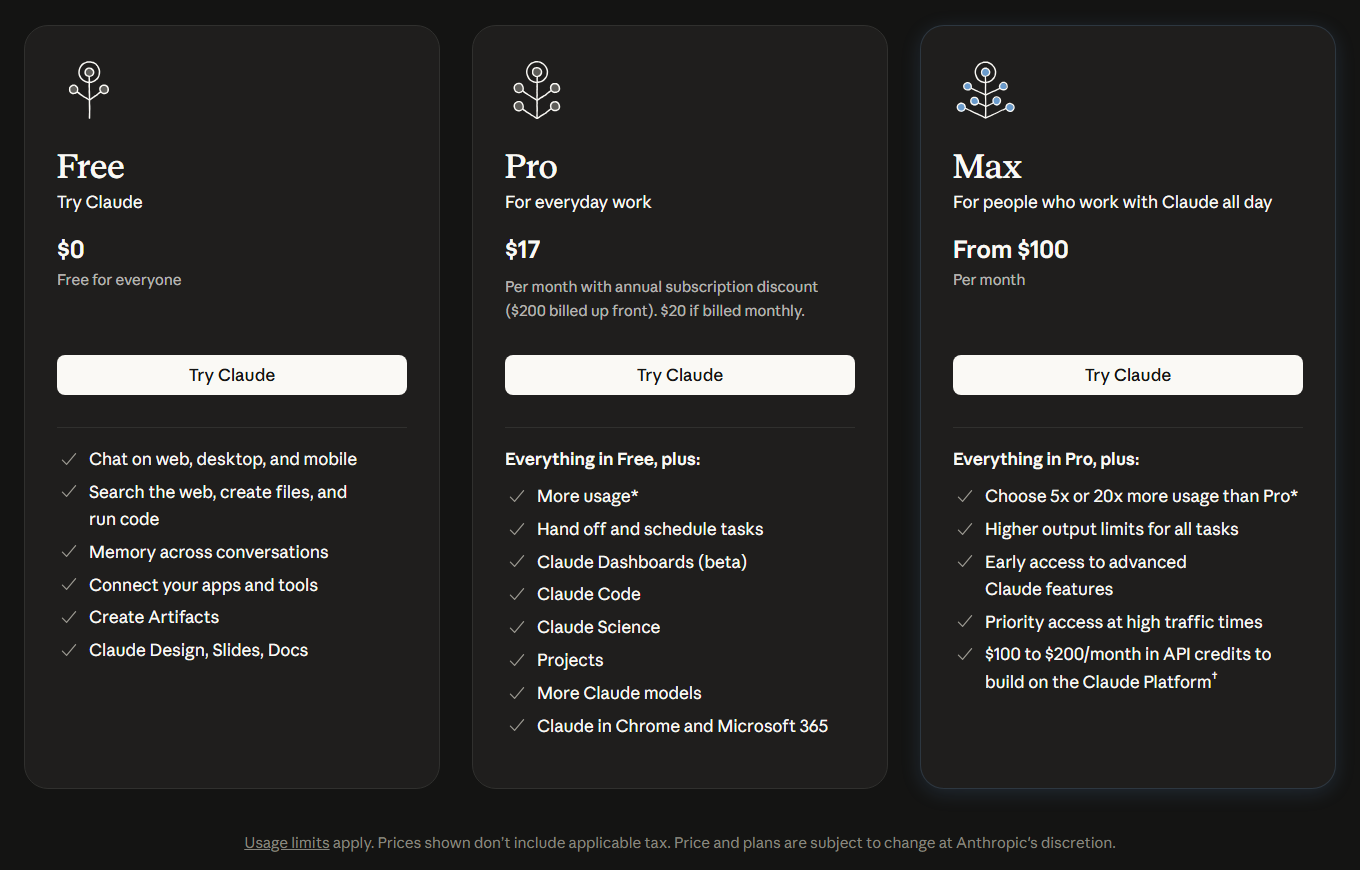
This table sets out the differences that matter most to a small business.
| Free | Pro | |
|---|---|---|
| Usage | Covers everyday questions | At least 5x more per 5-hour session |
| Models | Sonnet, Haiku | Opus, Sonnet, Haiku (Fable through usage credits) |
| Projects | Up to 5 | Listed without a cap |
| Claude Code | Not included | Included |
| Research | Not included | Included |
| Claude in Chrome and Microsoft 365 | Not included | Included |
| Claude Dashboards (beta) and Claude Science | Not included | Included |
| Hand off and schedule tasks | Not listed | Included |
Claude’s own feature table shows the same split row by row. A cross means the feature is not included on that plan, and a tick means it is.
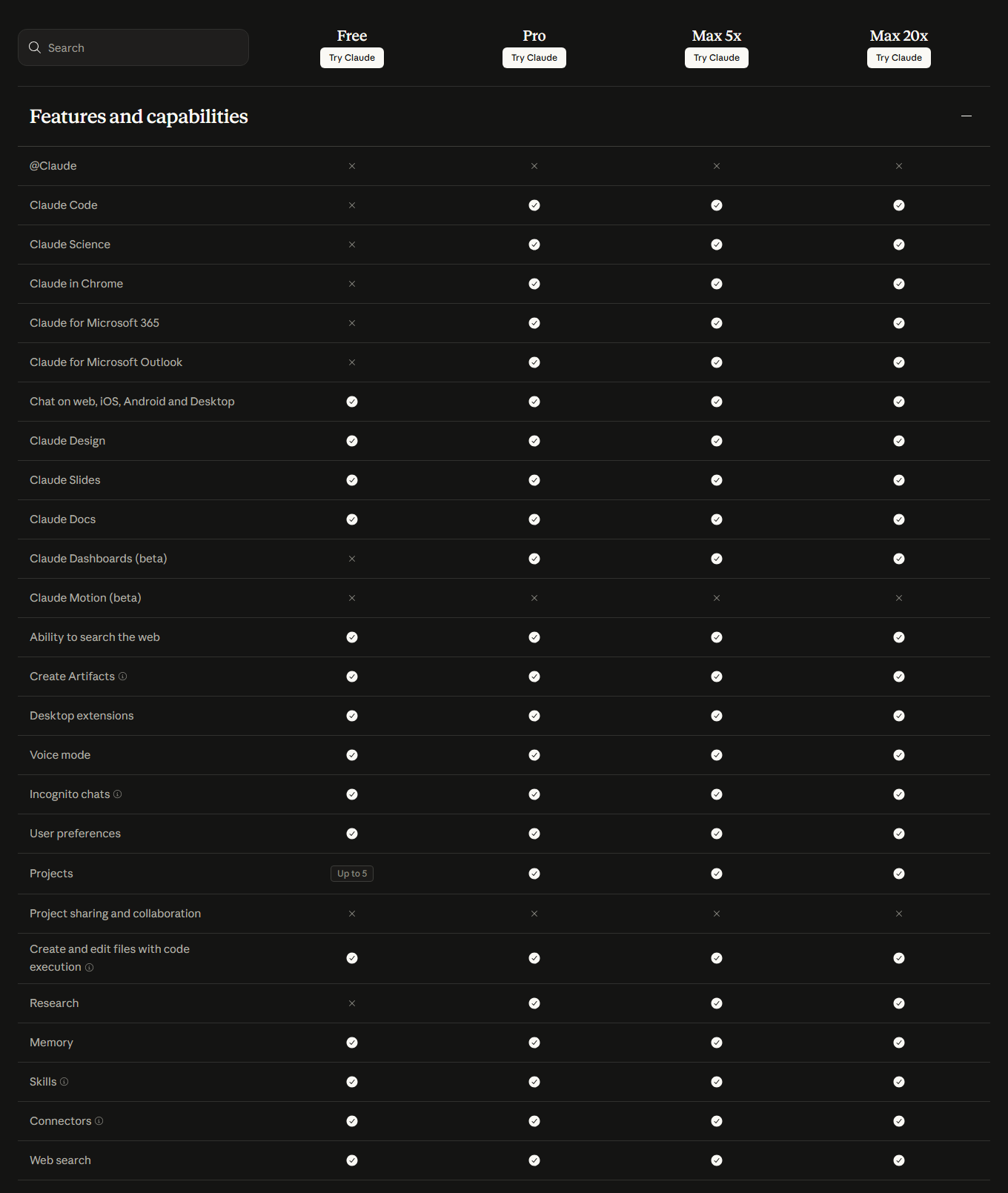
Usage is the headline difference, and we cover it in the next section.
What Free already gives you. Free is not a stripped-down demo. It lists chat on web, desktop and mobile, web search, file creation, code execution, memory, connectors, skills and Artifacts. For a lot of day-to-day writing and summarising work, that is plenty.
How much more usage does Claude Pro give you?
The pricing page says Pro gives you at least 5x more usage per 5-hour session than Free, and that usage limits apply on every plan. It gives a multiple, not a number of messages, so you cannot work out your daily allowance from it. The asterisk against Pro’s usage line is not explained in the text we read, so check the conditions on Claude’s own page.
In practice, how fast you use up an allowance depends on the Model you choose, the size of the files you upload and how long a conversation runs. A long document with a long back-and-forth costs more than a short question. The honest test is to notice how often you are stopped on Free. If it is never, you do not need Pro for usage. If it is most weeks, you do.
Which Claude Models can you use on Free and Pro?
Free lists the Sonnet and Haiku Models. Pro lists Opus, Sonnet and Haiku. Our review of Claude Sonnet 5.5 vs Opus 5.5 covers the difference in detail: Sonnet is the faster, everyday Model, and Opus is the stronger one for complex, open-ended work that needs sustained judgement.
For many small-business tasks, such as drafting an email, tidying notes or summarising a report, Sonnet is enough. Opus matters when the task is hard enough that a weaker answer costs you real time, for example a long analysis or a piece of reasoning you will act on. If you are not sure which side you are on, try the same task on both during a Pro trial week and compare the answers.
What extra Features does Claude Pro include?
Beyond usage and Models, Pro adds a set of working tools.
- Claude Code. For work on code. Not included on Free.
- Research. For longer, multi-step investigation of a question. Not included on Free.
- Projects. Free is capped at 5. Pro lists them without a cap on the page.
- Claude in Chrome and Microsoft 365. For working inside your browser and your office documents.
- Claude Dashboards and Claude Science. Both listed under Pro. Dashboards is marked beta.
- Hand off and schedule tasks. For work you want Claude to carry on or run later.
Not all of these will matter to you. A business that only writes and summarises may never touch most of the list. A business with a developer, an analyst or a researcher is more likely to find one feature that pays for the plan on its own.
Does Claude use your chats to train its Models?
It can, and you control part of that. Anthropic’s privacy page says it will use your chats and coding sessions for model improvement if you choose to allow it, if your conversations are flagged for safety review, or if you explicitly opt in to training. The setting is called Model Improvement in your privacy settings. The page also says Incognito chats are not used for improvement, even when Model Improvement is switched on.
The page we read does not split Free from Pro, so check the setting on each account rather than assuming. If you manage a team, tell everyone what the setting should be, so the decision is yours and not an accident. Claude’s pricing page lists no training on your content by default as a Team plan feature, which is worth knowing if several people use Claude for work. Our entry on large language models explains why training on your content matters.
Is it Safe to put customer Data into Claude?
Treat Claude like any cloud tool. Setting the privacy option is the first step, not the last.
- Check Model Improvement first. Decide deliberately whether to allow it.
- Keep personal data out. Do not paste customer names, contracts or personal details unless you have a lawful basis. Our entry on data protection covers the basics.
- Use one account per person. Shared logins make it impossible to know who pasted what.
- Write down what must never go in. Customer personal data, contract terms and unreleased figures are the usual list.
If your staff are already using personal Claude accounts for work, see our entry on shadow AI. That is the more common risk than a badly configured paid plan.
Should you pick Pro, Max or Team?
Claude’s pricing page lists three paid tiers worth comparing.
| Pro | Max | Team | |
|---|---|---|---|
| Built for | One person | Heavy individual use | 2 to 150 seats |
| Usage as listed | At least 5x Free per 5-hour session | 5x or 20x Pro per session | Standard seats more than Pro, Premium seats 5x Standard |
| Also lists | Extra tools, Opus Model | Higher output limits, priority access, early access to new features | Central billing, SSO, admin controls, no training on your content by default |
The practical rule is simple. One person: start with Pro. Heavy solo use that still hits the limit: look at Max. More than one person using Claude for work: compare Team before you buy several separate Pro accounts, because central billing and admin controls are what stop usage spreading out of sight.
Free
Start here, hit a limit
Pro
One person, more usage
Max
Heavy solo use
Team
More than one person
Our review of Claude vs ChatGPT for business covers the Team plan against its closest rival.
How do you work out if Claude Pro pays for itself?
You do not need a spreadsheet. You need three numbers, and you can collect all of them in a week.
- Hours saved. Note how long a typical task takes you now, then how long it takes with Pro, whether that is fewer interruptions from usage limits or a task Opus handles better.
- The value of an hour. Use what an hour of your own time, or your team’s, is worth to the business.
- The plan’s current price. Read it on Claude’s pricing page, because the figure changes and differs between monthly and annual billing. If you pay yearly, divide it by twelve.
Pro pays for itself when the hours you save in a month, multiplied by the value of an hour, come to more than the plan’s monthly price. Count only time on work you would have done anyway. A task you would never have started does not count as a saving.
How do you test Claude Pro in one week?
The best evidence is your own. Use Pro on a normal week of real work, not a demo.
Pick real work
A normal week, not a demo
Count the limit hits
Keep a simple tally
Try Opus
Same task on both Models
Check the settings
Model Improvement and sharing
Decide in time
Before you pay again
Keep a tally of how many times you hit a usage limit on Free, which Pro tools you reach for, and where Opus gave you a clearly better answer. Write down anything you wanted and could not find. Then check the Model Improvement setting and note the date you will next be charged, so that you decide before the next payment, not after. Our guide to checking AI output before it goes to a customer applies to a better Model as much as a weaker one.
When is Claude Pro not worth it?
Pro is not worth it if you use Claude occasionally, your tasks are short, and Sonnet gives you answers you are happy with. It is also the wrong plan if several people need to use Claude for work, because Team is built for that. And it is not worth paying for if the real problem is unclear instructions, since a bigger allowance does not fix a vague prompt.
Our verdict
Claude Pro is a good fit for a small business that regularly runs out of usage on Free, needs the Opus Model, or wants Claude Code or Research. For everyone else, Free covers the basics, and Team is the plan to compare if more than one person is involved.
Before you pay, open the privacy settings and choose the Model Improvement option on purpose, and keep customer personal data out of your chats. Judge the plan by how often you would hit the Free limits, not by the length of the feature list.
Further reading
- Claude Sonnet 5.5 vs Opus 5.5: which Model fits which kind of work.
- Claude vs ChatGPT for business: how the two assistants compare for a team.
- Is your AI tool actually saving time?: a simple way to check whether a paid tool earns its place.
- How to check AI output before it goes to a customer: the review step that applies to every plan.
Sources
- Claude pricing: the Free, Pro, Max, Team and Enterprise plans, with Models, usage multiples and features, as read on 21 October 2026.
- Is my data used for model training?: when chats and coding sessions are used for model improvement, the Model Improvement setting and Incognito chats, last updated 16 March 2026.
FAQ
Questions we get asked
Is Claude Pro worth it?
For most small businesses that use Claude a few times a week for short tasks, the Free plan is enough. Pro is worth paying for when you hit a specific limit: you run out of usage in a working session, you need the Opus Model, you want Claude Code or Research, or you keep more than five Projects. If several people share the work, look at the Team plan instead.
What is the difference between Claude Free and Claude Pro?
On Claude's pricing page, Free covers everyday questions and includes the Sonnet and Haiku Models, web search, file creation, memory and up to 5 Projects. Pro adds at least 5x more usage per 5-hour session than Free, the Opus Model, Projects with no cap listed, Claude Code, Research, Claude in Chrome and Microsoft 365 access.
How much more usage does Claude Pro give you?
Claude's pricing page says Pro gives you at least 5x more usage per 5-hour session than Free. It gives a multiple, not a message count, and usage limits apply on every plan. How far that stretches depends on the Model you pick and the size of the files and conversations you send.
Which Models are on Claude Free and Claude Pro?
Claude's pricing page lists Sonnet and Haiku on Free. Pro lists Opus, Sonnet and Haiku, and the newest Fable Model is available on Pro through usage credits. Opus is the Model Anthropic positions for complex, open-ended work, so it is the main reason a business would move up from Free.
Can you use Claude Code on the Free plan?
No. Claude's pricing page lists Claude Code under Pro and above, and shows it as not included on Free. If your developers or technical staff want Claude to work on code in a project, Pro is the cheapest plan that includes it.
Does Claude use your chats to train its Models?
It can. Anthropic's privacy page, last updated on 16 March 2026, says it uses chats and coding sessions for model improvement if you choose to allow it, if a conversation is flagged for safety review, or if you explicitly opt in to training. The setting is called Model Improvement in your privacy settings, and Incognito chats are not used.
Is it Safe to put customer Data into Claude Pro?
Treat it like any cloud tool. Check the Model Improvement setting, keep customer personal data out unless you have a lawful basis, and do not paste anything confidential into an account you have not configured. Claude's pricing page lists no training on your content by default as a Team plan feature, which is the safer route for a business.
Should a Small Business choose Claude Pro, Max or Team?
Pro suits one person who needs more usage and the extra tools. Max is for heavy individual use and lists 5x or 20x the usage of Pro. Team is listed for 2 to 150 seats and adds central billing, SSO, admin controls and no training on your content by default. If more than one person uses Claude for work, compare Team before buying several Pro accounts.
How do you work out if Claude Pro pays for itself?
Multiply the hours Pro saves you in a month by what an hour of your time is worth, then compare the result with the plan's current price on Claude's pricing page. If you pay annually, divide the yearly figure by twelve. Count only time saved on work you would have done anyway.
Ready to Put This to Work?
Tell us where your team is with AI and we will tell you honestly what would make the biggest difference.