Otter vs Fireflies vs Copilot for AI meeting notes
Otter, Fireflies and Microsoft Copilot all write up your meetings. How they differ on plans, languages, data training, storage and consent, from their own pages.
Otter, Fireflies and Microsoft Copilot can all turn a meeting into a summary and a list of actions. They do it in two different ways, and the difference decides which one suits your business. Otter and Fireflies are standalone notetaker services with their own apps and cloud storage. Copilot is built into Microsoft Teams and works with the rest of your Microsoft 365 content.
This comparison is based on each company’s own pages as they stood on 16 October 2026: Otter’s pricing page and privacy policy, Fireflies’ pricing page, security page and privacy policy, and Microsoft’s support and privacy documentation. We have not run all three on the same recorded meeting, so we say where a claim comes from and where you should test for yourself. We also leave out prices on purpose, because they change: each company’s plan page has today’s figures.
Key points from the video
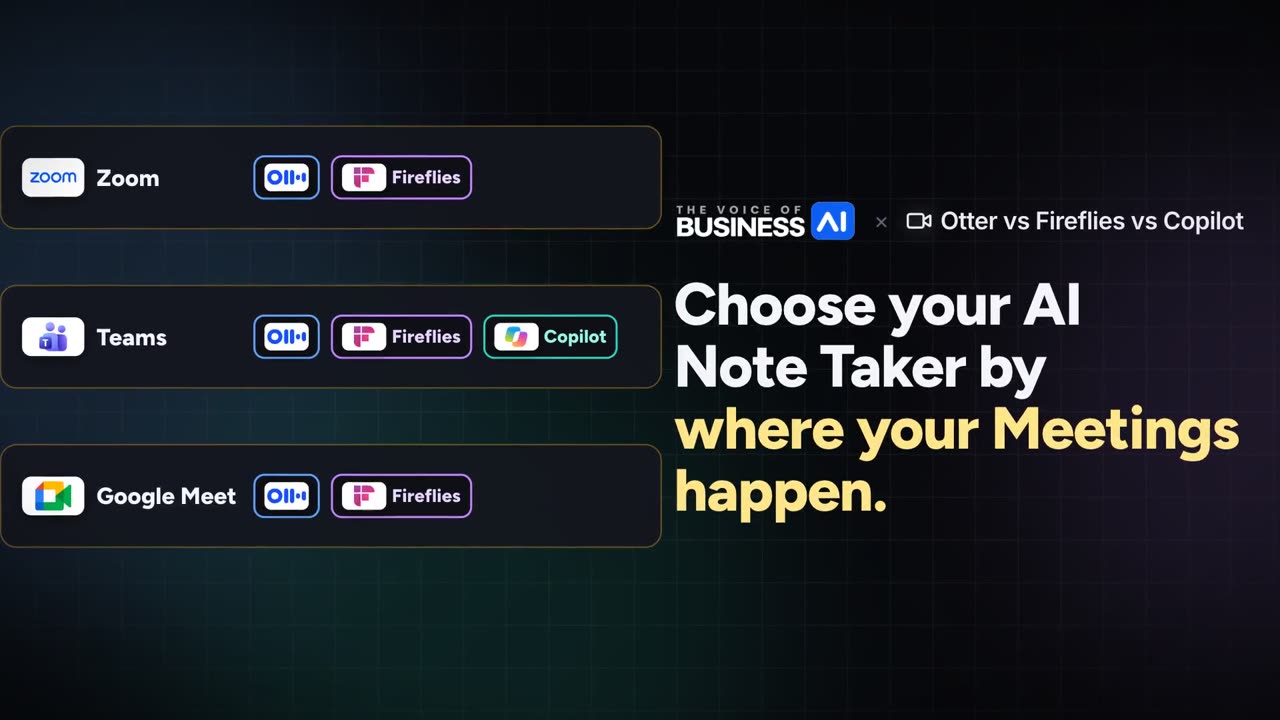
- Choose your AI note taker by where your meetings happen.
- Otter and Fireflies work in Zoom, Teams and Google Meet, while Copilot works in Teams only. Copilot is built into Microsoft Teams, so there is no new supplier.
- Copilot won't work in meetings hosted outside your organisation. So a call in a client's Teams is out of reach.
- Otter Basic and Fireflies have free plans, while Copilot needs a licence. Otter Basic gives 300 minutes a month and stops each conversation at 30 minutes.
- Copilot and Fireflies say they don't train on your meetings, while Otter may, to improve its service. Otter's policy lists de‑identified audio and transcripts.
- Test Otter, Fireflies and Copilot on one real meeting, and trust the one with the fewest errors. Read on: How do you test all three in one afternoon?
Key takeaways
- All three produce a transcript, a summary and action items. The route to them is different: Otter and Fireflies are standalone services, Copilot lives inside Teams.
- Otter’s pricing page lists a free Basic plan limited to 300 monthly transcription minutes and meetings of up to 30 minutes.
- Copilot only works inside your Microsoft 365 setup. Microsoft’s support page says it does not work in meetings hosted outside your organisation.
- Data handling is the sharpest difference. Microsoft says prompts and responses are not used to train its foundation models. Fireflies says it does not train on your meeting data by default. Otter’s privacy policy says it may train on de-identified audio and transcripts.
- Otter and Fireflies both say they process data on servers in the United States. Microsoft says Copilot is covered by the EU Data Boundary for EU users.
- Whoever runs the meeting is responsible for telling people it is being recorded. No tool does that job for you.
- No vendor we read publishes an accuracy figure we could verify, so test accuracy on your own meetings.
What is the Best AI note taker for Business?
There is no single winner, because the three tools start from different places. A fair way to compare them is to ask what you want to avoid. If you want to avoid a new supplier and a new data contract, Copilot is the natural choice for a business already on Microsoft 365. If you want to avoid being tied to one video platform, Otter and Fireflies work across several. If you want to avoid long meetings being cut off, check each plan’s meeting length before anything else.
The table below sets out what each company says about its own product.
| Question | Otter | Fireflies | Microsoft Copilot |
|---|---|---|---|
| What is it at heart? | A standalone transcription and notes service | A standalone meeting notes service with CRM and team tools | An AI assistant built into Microsoft 365 and Teams |
| Where does it work? | Zoom, Microsoft Teams and Google Meet, per its pricing page | Check Fireflies’ integrations page for your platform | Microsoft Teams meetings in your own organisation |
| Is there a free plan? | Yes, Basic, with 300 monthly minutes | Yes, with limits not stated on its pricing page | No separate plan: needs a Copilot licence or Teams Premium for recaps |
| Languages | English, Spanish, French, German, Japanese, Chinese | English, Spanish, French, Portuguese, Italian, 100+ others in beta | Not listed on the page we read |
| Does it train on your data? | May train on de-identified audio and transcripts, per its policy | Says it does not train on your meeting data by default | Says prompts and responses are not used to train foundation models |
| Where is data processed? | AWS in the United States, plus partners | Servers in the United States | EU Data Boundary for EU users, with a stated exception for Anthropic models |
Read the table as a starting point, not a verdict. The row that matters most to you will differ from the row that matters most to someone else, and the sections below take them one at a time.
Capture
Audio from the meeting
Transcribe
Speech turned into text
Summarise
Key points and actions
Store
Where the notes live
Check
A person reads before sharing
Otter vs Fireflies vs Copilot: Which one is better?
It depends on the shape of your week. Here is how the three compare on the things that usually decide it.
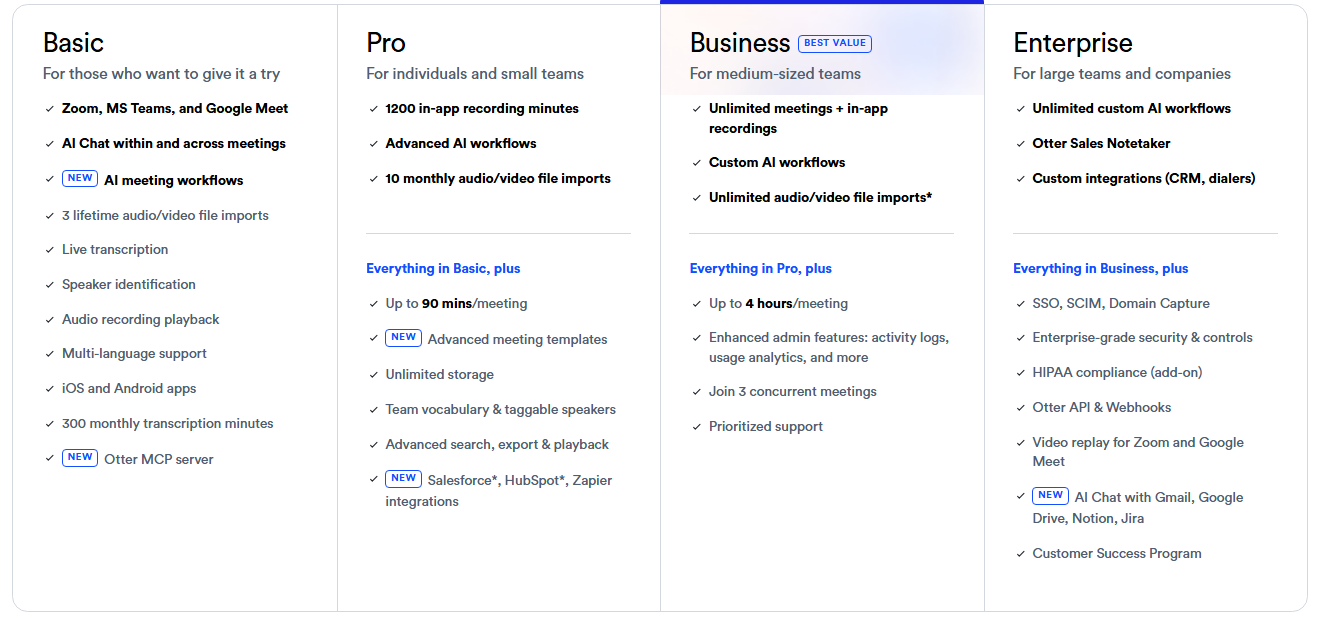
Otter is the easiest to understand from its pricing page, because the limits are printed in numbers. Basic lists 300 monthly transcription minutes and up to 30 minutes per conversation. Pro lists 1,200 minutes and up to 90 minutes per meeting, plus Salesforce, HubSpot and Zapier integrations. Business lists unlimited meetings and recordings, up to 4 hours per meeting, activity logs and usage analytics. Enterprise adds single sign-on, SCIM and domain capture.
Fireflies is built around teams. Its security page lists a super admin role, audit logs, team workspaces and custom data retention, and its pricing page lists a rules engine and team insights. The catch, as we read it, is that its pricing page does not print the free plan’s limits or the allowances for AI summaries, so ask Fireflies before you plan around a number. Language support is wide: English as the primary language, Spanish, French, Portuguese and Italian, and more than 100 others in beta.
Microsoft Copilot is different in kind. Microsoft’s support page says it summarises key discussion points, including who spoke and what they said, suggests action items and answers questions in real time or after the meeting. Because it is a Teams feature, it uses the permissions and the content you already have. The limit is the same fact seen from the other side: it does not work in meetings hosted outside your organisation, so a call on a client’s platform or a client’s Teams tenant is out of reach.
Which AI note taker works with Zoom, Google Meet and Microsoft Teams?
Platform support is the first practical filter, and the three are not equal here.
| Platform | Otter | Fireflies | Microsoft Copilot |
|---|---|---|---|
| Microsoft Teams | Yes, per its pricing page | Check its integrations page | Yes, built in, for meetings in your organisation |
| Zoom | Yes, per its pricing page | Check its integrations page | Not covered: Microsoft describes it as a Teams feature |
| Google Meet | Yes, per its pricing page | Check its integrations page | Not covered: Microsoft describes it as a Teams feature |
| Meetings hosted by another organisation | Not stated on the page we read | Not stated on the page we read | No: Microsoft says it does not work in them |
| In-person meetings | Not stated on the page we read | Not stated on the page we read | Not covered by the support page we read |
We did not find a platform list for Fireflies on the pages we read, so the table points you to its integrations page rather than guessing. If your meetings run on Zoom or Google Meet, that rules Copilot out before any other comparison starts.
Otter and Fireflies
Connect the service to your calendar
The service records the meeting
Audio is processed in the vendor's cloud
Notes arrive in the vendor's app
Copilot in Teams
The organiser sets Allow Copilot for the meeting
Copilot works inside the Teams meeting
Interactions are stored with your Microsoft 365 content
The recap appears in the meeting chat and Recap tab
Notice where the data lives. With a standalone service, your meeting audio goes to a new supplier. With Copilot it stays with a supplier you already have a contract with. Neither is automatically better, but the second needs far less new paperwork.
Is Otter AI Free?
Yes, with limits. Otter’s pricing page lists a Basic plan described as free forever. The limits are the point: 300 transcription minutes per user per month, a cap of 30 minutes per conversation, and 3 lifetime audio or video file imports. For a person who sits in a few short calls a week, that can be enough. For a team with hour-long meetings it is not, because a 60-minute call is cut off at 30.
Paid plans raise the limits rather than change what the tool does. Pro lists 1,200 monthly minutes and 90-minute meetings, and Business lists unlimited meetings and recordings and meetings of up to 4 hours. Check Otter’s own plan page for today’s price and terms before you decide.
What is the Best Free AI note taker?
Of the three, only Otter prints its free limits, so it is the one you can judge from the page. Fireflies also has a free plan, but its pricing page does not state the limits, so you would have to sign up to find out. Copilot has no free tier of its own: Microsoft’s support page says intelligent recap comes with the Teams Premium add-on or the Microsoft Copilot licence.
A free plan is best used as a test, not as a system. Run it on two or three real meetings with a colleague, compare the notes with what was said, and decide from that. Any tool that works on a free plan can become the way client conversations get recorded, so the data questions further down apply to the free plans as much as the paid ones.
How Accurate are AI meeting Summaries?
We could not find an accuracy figure from any of the three vendors that we can verify, and we have not measured it ourselves. That is worth saying plainly, because third-party comparisons often print a percentage with no method behind it.
What the sources do say is useful. Microsoft’s privacy page says the responses generative AI produces are not guaranteed to be 100 per cent factual and that users should review the output before sending it to others. Copilot’s own support page adds a practical limit: to ask questions about a meeting after it ends, there must be a transcript. Without one, Copilot cannot answer.
The kinds of mistake to look for are the same in every tool:
- a name or company spelled wrongly, especially for unusual names;
- a number heard wrongly or attached to the wrong item;
- two speakers merged into one, so a decision is credited to the wrong person;
- an action item that was suggested in passing and listed as agreed;
- a summary that sounds confident about something that was left open.
A ten-minute test settles it for your own meetings. Record one real meeting, then read the summary against the transcript with the person who led it. Count the corrections. The tool with the fewest corrections on your kind of meeting, accents and jargon included, is the one to trust.
Do Otter, Fireflies and Copilot train on your Data?
This is where the three differ most, so it is worth taking in the vendors’ own words. All three statements were read on 16 October 2026.
| Question | Otter | Fireflies | Microsoft Copilot |
|---|---|---|---|
| Is your meeting content used for AI training? | Its policy lists training on de-identified audio recordings and transcriptions, with consent or legitimate interests as the basis | Its security page says it does not train on your meeting data by default. Its privacy policy says it does not use personal information for AI model training | Microsoft says prompts, responses and data accessed through Microsoft Graph are not used to train foundation models |
| Where is data stored? | Cloud storage including Amazon Web Services in the United States | Servers in the United States, with Private Storage listed on Enterprise | Within the EU Data Boundary for EU users, with Anthropic models noted as excluded |
| Can you delete it? | Not described on the page we read | Customers can delete their data at any time, per its security page | Users can delete their Copilot activity history, and admins can set retention policies |
| Compliance claims | HIPAA compliance listed as a paid add-on | GDPR, SOC 2 Type II and HIPAA claimed | GDPR, ISO 27001, HIPAA and ISO 42001 listed |
Three cautions apply. First, Fireflies’ security page says it does not train on your data “by default”, and the page does not explain whether a non-default setting exists. Its privacy policy also says its statements may not cover all business-customer data, which is governed by its terms of service and data processing agreement. Ask which document governs your plan. Second, Otter’s policy, which is effective from 16 June 2026, does not describe an opt-out from training that we could find, only that you can withdraw consent you gave. Third, a vendor’s compliance claim is not an audit of your use. Ask for the report.
Is Fireflies AI Safe to use at work?
Fireflies’ security page lists 256-bit AES encryption for notes and transcripts at rest, TLS for data in transit, and says it holds GDPR, SOC 2 Type II and HIPAA compliance. Those are real claims worth reading. They describe how the data is protected, which is only half of “safe”.
The other half is where the data goes and who can see it. Its privacy policy, last updated on 28 September 2026, says it processes and stores personal information on servers in the United States. If you are a European business, that is a transfer outside the EU that your data protection records need to cover. The policy also says Voice Data, which may count as biometric information in some places, is used to tell speakers apart and not to identify them. And people who were in a meeting without a Fireflies account must ask the host to delete the recording, which puts the work on your team.
For a general sales call, that may be an acceptable trade. For a meeting about a named employee, a client’s finances or a legal matter, it deserves a conversation with whoever owns your data protection, first. Our guide to what is safe to paste into an AI tool covers the same judgement for chat assistants, and the principle carries across: the sensitivity of the content decides the tool, not the other way round.
Do you need consent to use an AI note taker under GDPR?
In the EU and the UK, usually yes, in one form or another, and the details matter. This section is general information, not legal advice.
The GDPR lists six lawful bases for processing personal data in Article 6. Consent is the first. Legitimate interests is another. Article 4 defines consent as “any freely given, specific, informed and unambiguous indication” of a person’s wishes. A voice recording of a meeting is personal data, so a note taker that records one needs a lawful basis for every person on the call, not only the account holder.
Two practical points follow.
- Who gets permission? Otter’s privacy policy says a recording “may contain the Personal Information of third parties” and tells users to make sure they have the necessary permissions. Fireflies’ policy addresses consent for sharing, not for recording. Neither tool takes over the job of asking people.
- Silence is not consent. A person who stays on a call after a bot joins has not necessarily agreed to anything. Say at the start of the meeting that it is being recorded and summarised, say why, and give people a chance to object before the recording starts.
Copilot changes the picture slightly rather than removing it. The organiser controls whether Copilot is allowed, and Microsoft’s support page describes an Allow Copilot setting with three options: during and after the meeting, only during the meeting, or off. That gives an organiser a clear lever, but it does not replace telling participants.
For a business, the simplest rule is a short written one: who may record, which meetings must never be recorded, and what is said at the start of every recorded call. That belongs inside your wider AI governance approach, and it is exactly where shadow AI begins, when someone connects a notetaker to their calendar on a personal account because it is quicker.
Does Microsoft Copilot take meeting notes in Teams?
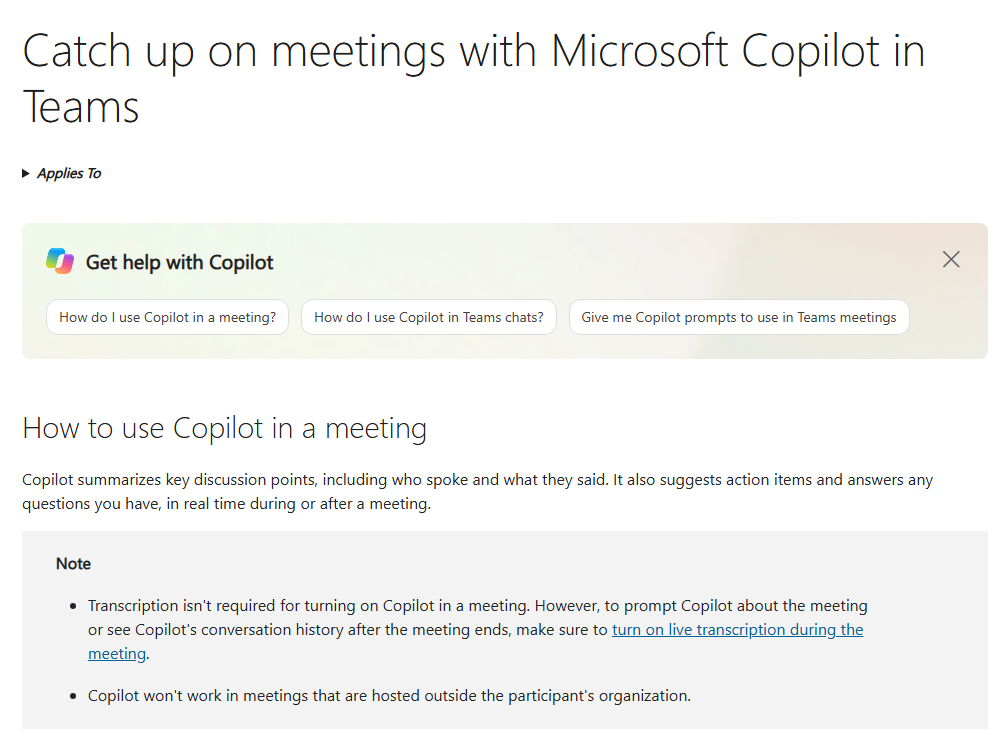
Yes. Microsoft’s support page says Copilot summarises key discussion points, including who spoke and what they said, suggests action items, and answers questions you have in real time or after a meeting. Microsoft’s pages now call the product Microsoft Copilot, where they used to say Microsoft 365 Copilot.
A few details decide whether it does what you need:
- Transcription. Microsoft’s support page says transcription is not required to turn Copilot on. You need live transcription to prompt Copilot about the meeting afterwards or to see its conversation history. If the transcript is no longer available, Copilot becomes unavailable for that meeting and its history is removed.
- The Allow Copilot setting. The setting offers during and after the meeting, only during the meeting, or off. With only during the meeting, speech-to-text data that was not transcribed is not available afterwards.
- Licences. The page says intelligent recap is available as part of Teams Premium, an add-on licence, and also as part of the Microsoft Copilot licence.
- Recurring meetings. Earlier conversation history is lost if a later meeting in the same series is transcribed.
- Permissions. Microsoft’s privacy page says Copilot only surfaces organisational data the individual user already has at least view permission to see. That makes your SharePoint and Teams permissions worth a tidy before you switch it on.
Microsoft’s privacy page also says Microsoft Copilot is compliant with its existing commitments to commercial customers, including the GDPR and the EU Data Boundary, and that prompts, responses and data accessed through Microsoft Graph are not used to train foundation models. It notes that models provided by Anthropic as a subprocessor are currently excluded from the EU Data Boundary, so ask your administrator which models are switched on.
How do the plans compare?
We leave out prices, as above, but the shape of each plan is worth knowing because it changes how you will actually use the tool.
| Plan question | Otter | Fireflies | Microsoft Copilot |
|---|---|---|---|
| Is there a free tier? | Yes, Basic: 300 minutes a month, 30-minute meetings | Yes, with limits not printed on its pricing page | No. Needs Teams Premium or the Copilot licence for recaps |
| What limits use? | Monthly minutes and meeting length by plan | Check Fireflies’ own page for AI summary and credit limits | Your licences and your administrator’s settings |
| What do paid tiers add? | Longer meetings, more minutes, integrations, admin logs, SSO on Enterprise | App and CRM integrations, team workspaces, admin and retention features | Recaps, Copilot chat in meetings, and the rest of Copilot in Microsoft 365 |
| Where to check today’s price | Otter’s pricing page | Fireflies’ pricing page | Microsoft’s Copilot and Teams Premium pages |
The word free hides different things. In Otter it caps minutes and meeting length. In Fireflies the limits are not printed where we looked. In Copilot there is no free tier, so the cost question is really about the licences you already hold.
Which one should you choose?
Start with where your meetings happen, then ask what you are willing to share with a new supplier.
| If this describes you | Start with |
|---|---|
| Your meetings are all in Microsoft Teams and you already have Microsoft 365 | Copilot |
| You meet on Zoom or Google Meet as well as Teams | Otter, or Fireflies after you check its integrations |
| Your meetings regularly run past 30 minutes | Check Otter’s plan limits first, or Copilot |
| You need meetings in Spanish, French, German, Japanese or Chinese | Otter lists these six. Fireflies lists many more, some in beta |
| Several people need shared workspaces and admin tools | Fireflies or Otter Business, tested on a real team |
| Client or employee conversations are the main concern | Whichever your organisation has reviewed and approved, and probably Copilot if you are already on Microsoft 365 |
| You want to test with no commitment | Otter Basic or the Fireflies free plan, on non-sensitive meetings only |
The last two rows matter more than the others. A tool the business has checked is worth more than a better tool nobody has looked at.
How do you test all three in one afternoon?
The best evidence is your own, and it costs one afternoon. Pick one recorded meeting that was real work, not a demo, with a mix of speakers and a few numbers and names in it. Where your platform allows it, run each tool on it.
Then measure what happened, not how it felt:
- Read each summary against the transcript with the person who led the meeting.
- Count the errors: wrong names, wrong numbers, misattributed decisions and actions that were never agreed.
- Check how long it took each tool to produce the notes after the meeting.
- Check where the notes are stored and who can see them by default.
- Delete one test recording and check that it really goes.
- Ask the person who attended which notes they would rather forward.
You will probably find that the tool with the neatest summary is not the one with the fewest errors. That is the number to trust.
Our verdict
If your meetings are in Teams and your organisation already runs Microsoft 365, Copilot is the lowest-friction choice, because it adds no new supplier and uses permissions you already manage. Otter is the clearest to evaluate, since its limits are printed in numbers, and it works across the main video platforms. Fireflies is the most team-oriented of the three, with a long language list and admin features, but its free-plan limits and its US-only processing need checking before you use it for anything sensitive.
None of them removes the need for a person to read the notes. They write confidently, they miss context, and they format everything to look finished. Read every summary before it reaches a client. Our guide to checking AI output before it goes to a customer sets out a simple routine.
If your team is still deciding which tools to adopt, that choice is what an audit is designed to answer, weighed against how your people actually work. Once a tool is chosen, a core AI course is what turns it into a habit.
Further reading
- Customer data and AI tools: what is safe to paste: a short guide to what stays out of any AI tool.
- Is it Safe to connect ChatGPT to Gmail, Google Drive or SharePoint?: the same permission questions for a different kind of connection.
- How to check AI output before it goes to a customer: the review step that applies to every generated summary.
Sources
- Otter: plans: the four plans, the monthly minute limits, meeting length per plan, languages and integrations, as read on 16 October 2026.
- Otter: privacy policy: training on de-identified audio and transcripts, storage on Amazon Web Services in the United States and the user’s responsibility for third-party permissions, effective 16 June 2026.
- Fireflies: pricing: plan names, the free plan, languages and the features listed without limits, as read on 16 October 2026.
- Fireflies: data security and privacy: encryption, compliance claims, the no-training-by-default statement, Private Storage and custom data retention on Enterprise.
- Fireflies: privacy policy: storage on servers in the United States, no use of personal information for AI model training, Voice Data and deletion by the host, last updated 28 September 2026.
- Microsoft: Copilot in Teams meetings: what Copilot does in a meeting, the transcription rules, the Allow Copilot setting and the recap licences.
- Microsoft: data, privacy and security for Microsoft Copilot: no training on prompts and responses, permissions, the EU Data Boundary, the Anthropic exclusion and the advice to review output.
- GDPR Article 4: definitions: the definition of consent.
- GDPR Article 6: lawfulness of processing: the six lawful bases, including consent and legitimate interests.
FAQ
Questions we get asked
Is Otter AI Free?
Yes, up to a point. Otter's pricing page lists a Basic plan described as free forever, with 300 monthly transcription minutes, meetings of up to 30 minutes, and support for Zoom, Microsoft Teams and Google Meet. Pro raises the monthly minutes to 1,200 and the meeting length to 90 minutes, and Business raises the meeting length to 4 hours. Read Otter's own page for the current conditions.
Is Fireflies AI Safe?
Fireflies says on its security page that it encrypts notes and transcripts at rest with 256-bit AES and in transit with TLS, and that it does not train on your meeting data by default. Its privacy policy says data is processed and stored on servers in the United States, and that people who were not account holders must ask the host to delete a recording. Whether that is safe enough depends on your data and your rules, so check them against your own policy.
Can Copilot take meeting notes without a bot?
Copilot in Teams works inside the Teams meeting, so there is no separate notetaker to invite or remove. Microsoft's support page says it summarises key discussion points, suggests action items and answers questions during or after the meeting. For questions after the meeting a transcript has to exist, and Copilot does not work in meetings hosted outside your organisation.
Where do Otter and Fireflies store your Data?
Otter's privacy policy names Amazon Web Services in the United States for cloud storage and says it may also use partners outside your country. Fireflies' privacy policy says it and its service providers process and store personal information on servers in the United States. Fireflies lists Private Storage on its Enterprise plan to keep meeting data at a location you choose, without naming an EU region.
Can an AI note taker record a meeting without people knowing?
It should not. Under the GDPR, consent has to be freely given, specific, informed and unambiguous, and a notetaker that is not announced does not meet that. Otter's privacy policy puts the job of getting permission from other people on the user, and Fireflies' policy does not describe asking participants. Tell everyone before the recording starts, whichever tool you use.
Do you need Teams Premium for Copilot meeting recaps?
Not necessarily. Microsoft's support page says intelligent recap is available as part of the Teams Premium add-on and also as part of the Microsoft Copilot licence. It also says transcription is not required to turn Copilot on in a meeting, but you need a transcript to ask Copilot about the meeting after it ends.
How long can a meeting be on Otter's plans?
Otter's pricing page lists up to 30 minutes per conversation on Basic, up to 90 minutes on Pro, and up to 4 hours on Business and Enterprise. If your meetings regularly run long, the plan limit matters more than the feature list.
Do you need to check AI meeting notes before sharing them?
Yes. Microsoft's own privacy page says generative AI responses are not guaranteed to be factual and that users should review the output before sending it to others. Check names, numbers, decisions and who owns each action against what was actually said, and read the notes before they reach a client or leave the team.
Ready to Put This to Work?
Tell us where your team is with AI and we will tell you honestly what would make the biggest difference.