ChatGPT for Small Businesses
What a small business can use ChatGPT for, which plan to pick, what is safe to paste, and a first week plan that gets a team using it well.

A small business gets the most from ChatGPT by using it for a handful of repeatable writing and thinking tasks, on a business account, with a clear rule about what may be pasted into it. Most owners do the opposite. They try it once on something hard, get a mediocre answer, and write it off, or they let every employee use a personal login and never find out what went into it.
This guide covers what ChatGPT is, what small businesses actually use it for, which plan to choose, whether it is safe for business data, how to write prompts that work, where it goes wrong, and a plan for your first week.
Key takeaways
- ChatGPT is a general-purpose assistant for text. It drafts, summarises, rewrites, explains and brainstorms, and it is most useful on tasks you repeat every week.
- The best first uses are low risk and easy to check: reply drafts, meeting summaries, job descriptions, social posts and rewriting rough notes.
- Account type matters more than anything else for data. The maker’s published documentation says business and enterprise plans do not train on your inputs by default, while personal plans do unless the user opts out.
- A good prompt states the task, the audience, the format and the facts to use. Saved instructions stop you repeating that every time.
- It makes confident mistakes. Every fact, figure and quote needs a person’s check before it leaves the building.
- A one-page rule and a named person to ask will do more for your team than a ban or a long policy.
What is ChatGPT for Small Businesses?
ChatGPT is a conversational assistant built on generative AI. You type a request in plain language, and it replies with text, tables, code or an analysis of a file you upload. There is no special syntax to learn. If you can brief a new colleague, you can use it.
For a small business, the useful way to think about it is as a fast, tireless assistant that is good at language and weak at facts. It is a large language model that has read a vast amount of text, so it can produce a clear email, a tidy summary or a sensible outline in seconds. It has not met your customers, does not know your prices, and cannot see what happened in your business last week unless you tell it.
That framing explains almost every good and bad experience people report. Give it the facts and a clear job, and it saves time. Ask it to supply the facts, and it will fill the gap with something plausible. The tool is the same in both cases. The brief is different.
It also helps to separate the product from the plan you buy. The same assistant is sold under personal and business plans, and the differences that matter most to a company are about accounts, administration and data handling, not about intelligence. We come back to that below. If you want to see how it stacks up against other assistants, we have reviewed ChatGPT against other assistants for business use.
What can you use ChatGPT for at work?
The best uses share three features. The task comes round often, the output is easy for you to check, and a mistake is cheap to catch before anyone else sees it. Start there.
Writing and replying. Draft a reply to a customer email, a polite chaser for an unpaid invoice, a response to a negative review, or a quote cover note. Paste in the situation (with names removed), say who it is for and what tone you want, and ask for two versions.
Summarising. Turn a long email thread, a meeting transcript or a supplier document into a short list of decisions, actions and open questions. This is one of the strongest uses, because the source material is right in front of you and checking the summary is quick.
Marketing and content. Produce a first draft of a newsletter, a set of social posts from one announcement, product descriptions in a consistent voice, or a list of questions customers ask. Treat the result as a draft that needs your voice and your facts.
HR and hiring admin. Write a job description from rough notes, draft interview questions tied to the role, produce a welcome pack outline for a new starter, or turn a policy into plain language. Anything touching a decision about a person needs care, and a human makes the decision.
Spreadsheets and data tidying. Ask for a formula, explain what an unfamiliar formula does, clean a messy list, or suggest how to structure a tracker. Upload only data you are allowed to share, and check the results against a few rows by hand.
Planning and thinking. Ask it to challenge a plan, list what could go wrong with a launch, outline a pitch, or compare two options against criteria you set. It is a good sparring partner, because it will give you a structured view in a minute. It does not know which view is right for your market.
Learning and explaining. Ask it to explain a contract clause in plain English, a tax term, or an industry acronym, then confirm anything important with a qualified person. It is a good first read and a poor final word.
If you are unsure which to try first, our guide to the first AI tasks for a small business ranks safe starting points and explains how to choose one. A sensible pattern is to pick one task per team, run it for two weeks, and note the time saved before adding another.
Is ChatGPT worth it?
It is worth it when it returns more time than it costs in attention, and that depends on how it is introduced. A team that gets a short briefing, a few shared prompts and a rule about data tends to find real savings in drafting and summarising. A team left to work it out alone tends to get uneven results, with a few enthusiasts doing well and the rest abandoning it.
Judge it by hours, not impressions. Pick two or three tasks, time how long they take without the tool for a week, then with it for a week. Count the checking time as part of the cost. If a summary takes four minutes to produce and two minutes to verify, the saving is real. If a draft needs rewriting from scratch every time, it is the wrong task or the prompt needs work.
Be honest about what it will not do. It will not fix a process that is broken, replace judgement, or know your business unprompted. It is most valuable where the work is mostly language and the person doing it already knows what good looks like. It is least valuable where accuracy is critical and nobody has time to check.
There is a hidden benefit as well. Writing a clear request forces you to say what you actually want, and that discipline improves briefs, emails and delegation generally. Many owners find the habit more valuable than any single output.
Which ChatGPT plan should you choose?
Choose the plan by who needs access and who needs control, not by features alone. Plan names and terms change, so confirm the details on the maker’s own pages before buying. The decision usually comes down to three questions.
Who owns the account? On a personal plan, the account belongs to the individual. The history, the settings and the data all stay with that person, and they leave with them. On a business plan, the company owns the workspace, adds and removes users, and keeps shared work in one place. For anything involving customers, the company-owned route is the sensible one.
What happens to what you type? The maker’s published documentation says that on its business and enterprise plans, inputs and outputs are not used to train its models by default. On personal plans, data sharing for training is on by default and each user can opt out in settings. That difference alone is a strong reason to move work onto a business account.
Personal account
Belongs to the individual, so history leaves with them
Data sharing for training is on by default, with an opt-out
No company agreement covers what is typed in
Business account
The company owns the workspace and adds or removes users
Inputs and outputs are not used for training by default
Shared work and settings sit in one place
What do you need to administer? A team of two or three may only need shared access and a clear rule. A growing team will want user management, sign-in controls, and a way to see which tools are in use. If you cannot answer who has access and what they are putting in, you have a shadow AI problem, however small the team.
A practical way to decide: if more than one person will use it for work involving clients, staff or finances, use a business plan. If one person is exploring with public or invented material only, a personal plan is fine for now. Review the choice every six months, because the products move quickly.
Is ChatGPT Safe for Business Data?
It can be, when the account type, the settings and your own rules line up. Safety is not a property of the product on its own. It is the combination of the contract behind the account and what your staff choose to paste.
Start with the account. As noted above, the maker’s published documentation says business and enterprise plans do not use inputs or outputs for training by default. Personal plans differ. A company that lets staff use personal logins for work has no agreement covering that data and no way to see it. Banning the tool rarely fixes this. As we explain in why banning tools does not work, people move to personal accounts where nobody can see what is happening.
Then look at the data. Under the GDPR, a customer’s name and contact details are personal data, and your business remains responsible for it even when a supplier’s tool is involved. The UK regulator’s guidance on AI and data protection states the principle of data minimisation plainly: only process the personal data you need for your purpose. For most office tasks, the person’s name is not needed, so remove it.
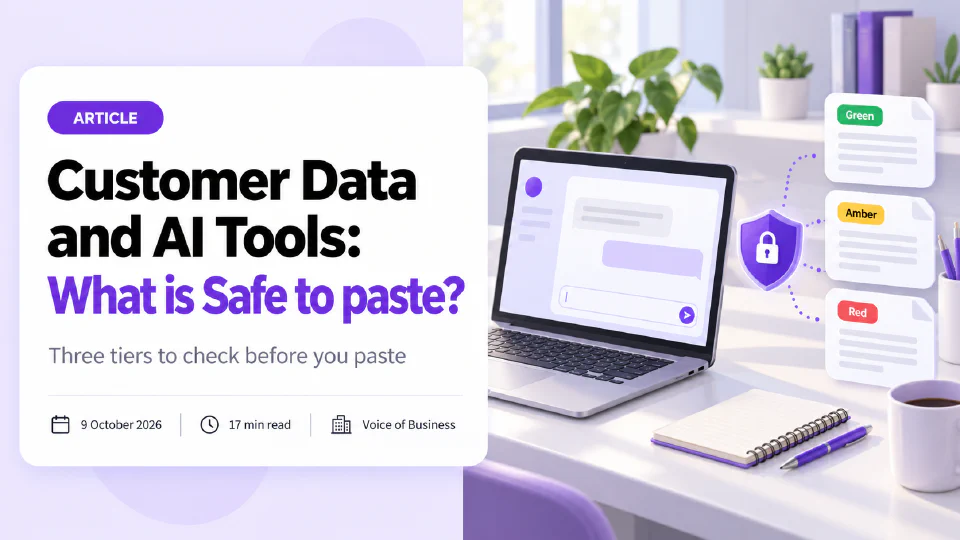
A simple three-tier rule works well:
- Green. Public or invented text with no personal or confidential detail. Safe anywhere.
- Amber. Real business or customer detail. Only in an approved business account.
- Red. Passwords, payment details, identity numbers, health information, privileged legal material. Keep out of general AI tools.
Green. Public or invented text with no personal or confidential detail. Safe anywhere.
Amber. Real business or customer detail. Only in an approved business account.
Red. Passwords, payment details, identity numbers, health information. Keep out of general AI tools.
Our full guide on what is safe to paste walks through the tiers, shows how to swap names for placeholders, and gives a one-page rule your team can follow. If you handle personal data at any scale, also read up on data protection and write down who decides in doubtful cases. A one-page rule like this is the smallest useful form of AI governance.
How do you get started with ChatGPT?
Start small, on one task, with one person responsible. A first week plan:
Day one
Decide the rule
Day two
Pick one task
Day three
Write the first prompt
Day four
Set up saved instructions
Day five
Run it live, with a check
Next week
Review and share
Day one. Decide the rule. Choose the account type, write down the three-tier rule on one page, and name the person staff ask when unsure. Ten minutes of writing here prevents most later problems.
Day two. Pick one task. Choose something your team does weekly that is mostly writing, such as customer reply drafts or meeting summaries. Write down how long it takes now.
Day three. Write the first prompt together. Use the structure in the next section, test it on three real examples (with identifying detail removed), and save the version that works.
Day four. Set up saved instructions. Add custom instructions so the tool already knows your business type, your tone and your preferred format. Keep them short and review them monthly.
Day five. Run it live, with a check. Use it on real work, with a person reading every output before it goes anywhere. Note the time saved and the mistakes caught.
The following week. Review and share. Keep the prompts that worked in a shared document. Drop the ones that did not. Add one more task only when the first is working.
A short, practical session works better than a long document nobody opens. If your team is new to the tool, a hands-on ChatGPT basics course gets people confident on real examples from their own work, rather than generic demonstrations.
How to write Good Prompts for work
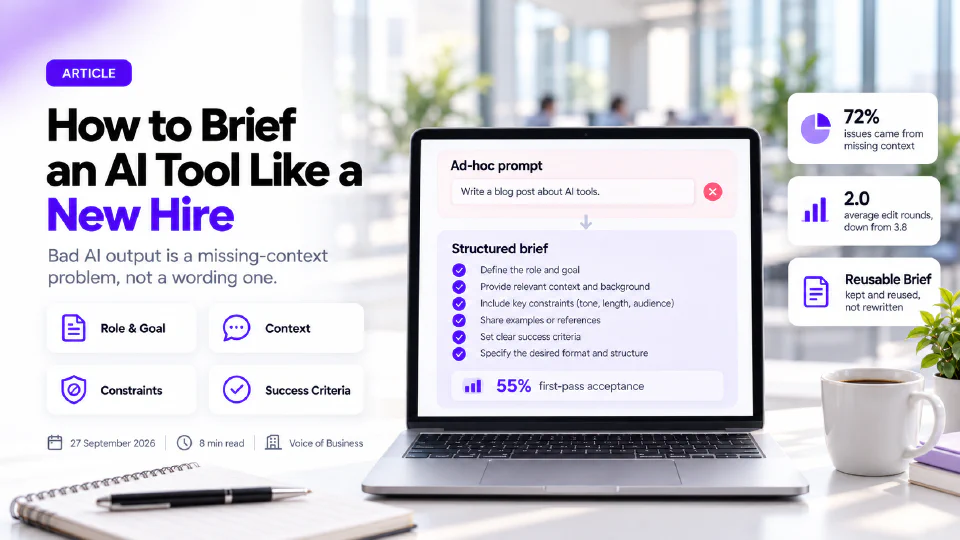
A prompt is the instruction you give the tool, and most disappointing answers trace back to a thin one. The reliable fix is to brief it the way you would brief a capable new starter on their first day, which is the idea behind briefing it like a new hire.
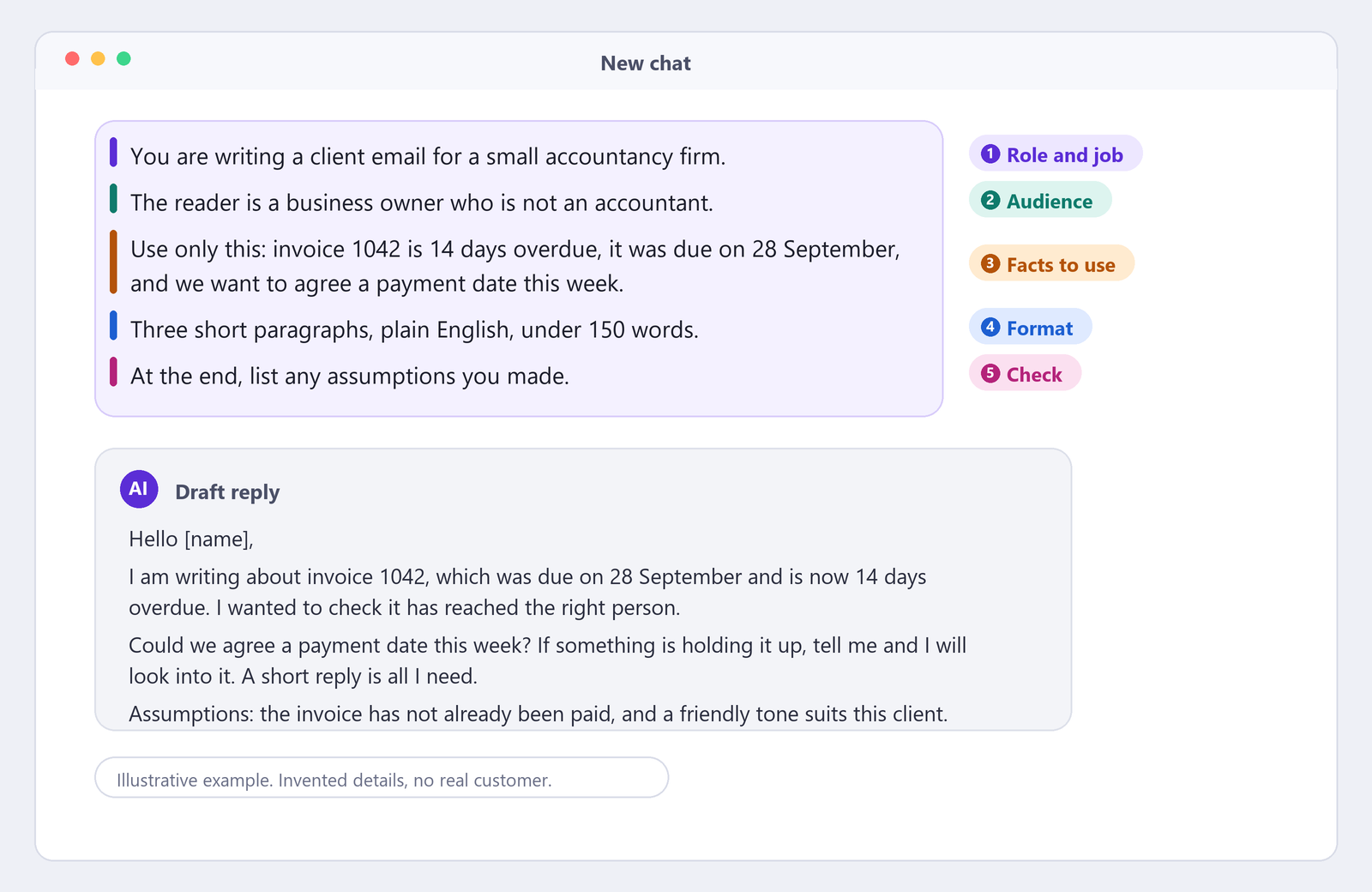
A strong work prompt has five parts:
- The role and the job. “You are writing a client email for a small accountancy firm.”
- The audience. “The reader is a business owner who is not an accountant.”
- The facts to use. Paste or describe the material, and say “use only this information”.
- The format. “Three short paragraphs, plain English, no jargon, under 150 words.”
- The check. “List any assumptions you made and anything you could not confirm.”
Compare “write an email about late payment” with the five-part version. The first returns something generic. The second returns something you can send after a light edit.
Four habits make prompts better over time. Give an example of the style you want, because showing beats describing. Ask for two or three options, so you can choose and combine. Reply to the answer with corrections, such as “shorter, warmer, and mention the 14 May deadline”, instead of starting again. And save the prompts that work, since a shared library is the cheapest training a small team can have.
Custom instructions let you store the standing parts, such as your business description, tone of voice and preferred spelling, so you do not repeat them. Keep personal and customer detail out of them, because they apply to every conversation.
Does ChatGPT make mistakes?
Yes, and it makes them in the same confident tone as its correct answers. The usual name is hallucinations: invented facts, invented sources, wrong figures, and quotations that were never said. They are a known property of how these systems work, not a fault that a setting removes.
The risk is highest where the output looks authoritative and nobody checks it: legal wording, tax statements, product specifications, statistics, and anything quoting a named person or organisation. It is lowest where you supplied the facts and ask only for rewording or summarising, though even then it can drop or distort a detail.
A practical checking routine takes under two minutes for most outputs:
- Verify every number, date, name and quotation against the original source.
- Ask the tool to list its assumptions and what it could not confirm.
- Read the draft once as the customer would, looking for anything that sounds off or too generic.
- For anything a customer will rely on, have a second person read it.
Verify
Every number, date, name and quote
Ask
For assumptions and what it could not confirm
Read as the customer
Anything off or too generic
Second reader
For anything a customer relies on
Our guide to checking its output before it goes to a customer sets out the routine in full. The principle is simple, and it is called keeping a human in the loop. The tool produces the draft, and a named person is accountable for what is sent.
What to do this week
You do not need a project to start. Today, decide which account your team will use and write the one-page data rule. Tomorrow, pick a single weekly writing task and time it. By Friday, run it with ChatGPT, check every output, and record the time saved. That is enough to tell you whether it earns a wider rollout, and enough to stop the well-meaning paste into a personal account.
If you would like your team trained on real examples from their own work, see our ChatGPT basics course. If you want an outside view on which AI tools your staff already use and what goes into them, an AI audit maps it in a structured way.
Sources
- ChatGPT data controls article, published by the maker of ChatGPT: states that on business and enterprise plans inputs and outputs are not used to train its models by default, and that personal plans share data for training by default with an opt-out under data controls.
- ICO, How should we assess security and data minimisation in AI?: the data minimisation principle, that you should only process the personal data you need for your purpose. The ICO notes this guidance is under review.
FAQ
Questions we get asked
Is ChatGPT any Good for a company our size?
Yes, for the right jobs. It is strong at drafting, summarising, rewriting, brainstorming and turning rough notes into clean documents, which covers a large share of small business admin. It is weak at anything that needs a verified fact, a current figure or a judgement about your own customers. Use it for first drafts and structure, and keep a person responsible for the final version.
What is the Best ChatGPT plan for a team?
The plan that puts your team on business accounts, with administration, shared workspaces and a default of no training on your inputs. Personal plans work for one person experimenting, but they leave the account, the history and the data settings in each employee's hands. Check the maker's current plan pages before you buy, because names and terms change.
Is ChatGPT Safe for Business Data?
It depends on the account and what you paste. The maker's published documentation says that on its business and enterprise plans inputs and outputs are not used to train its models by default, while personal plans share data for training by default unless the user opts out. Even on a business plan, customer names, credentials and health information should follow a written rule about what may be pasted.
Can ChatGPT replace an employee?
Not a whole role. It takes over parts of tasks, such as a first draft of a reply or a summary of a long thread, and leaves the judgement, the relationship and the accountability with a person. Treat it as a fast junior assistant that needs a clear brief and a check on its work, and measure success by hours returned to your team.
Does ChatGPT make mistakes?
Yes. It can state something false in a confident tone, invent a source, or misread a document. These errors are called hallucinations and no setting removes them. Check every fact, figure and quotation before it reaches a customer, and ask it to show its working when the answer matters.
Ready to Put This to Work?
Tell us where your team is with AI and we will tell you honestly what would make the biggest difference.