Reasoning Models
What a reasoning model is, how it differs from a fast AI model, why it is slower, and when a small business should switch it on.
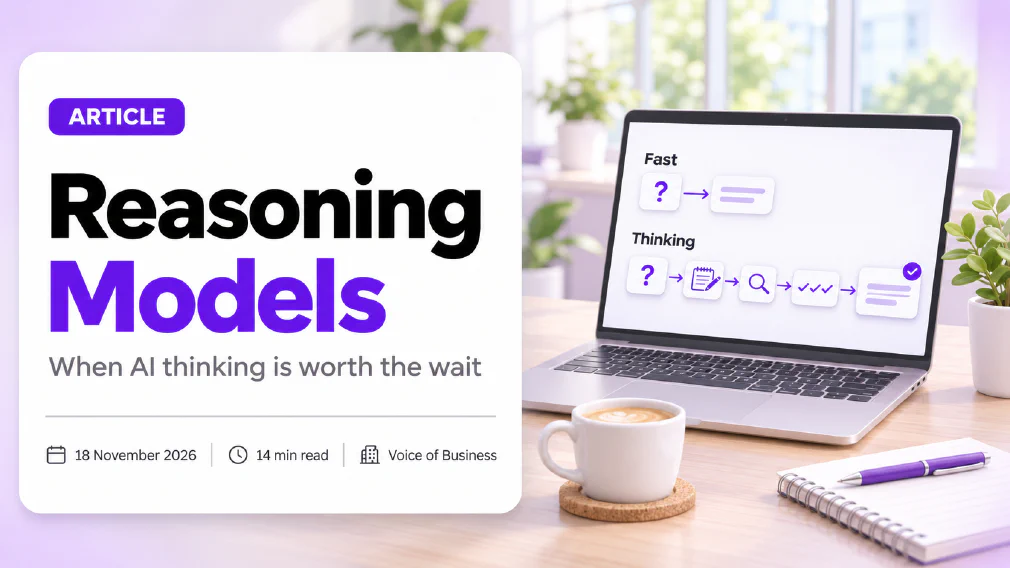
A reasoning model is an AI model that works through a problem step by step before it replies, instead of answering with the first likely response. It does not know more than a fast model. It spends longer thinking, which makes it slower and more costly to run, and better at problems that have several steps.
This article explains what a reasoning model is in plain English, how it works, how it differs from a normal AI model, and when a small business should switch one on. It also covers the limits that the marketing leaves out, so you can choose the model for each task and not leave the heaviest setting on all day.
Key takeaways
- A reasoning model thinks before it answers. A fast model replies straight away. Both are built on the same kind of technology.
- Thinking longer does not add knowledge. A reasoning model cannot supply a fact it was never taught, and it can still be wrong.
- The extra thinking pays off on problems with steps that depend on each other, such as analysis, planning, maths, code and long documents.
- It costs you time and allowance. Thinking is made of tokens, so a reasoning model replies more slowly and uses up your plan’s allowance sooner.
- For routine work, such as a short email, a translation or a summary, a fast model is quicker and good enough.
- The safest habit is to start fast, read the result, and move up to a reasoning model only when the answer skips a step.
What is a Reasoning Model?
A reasoning model is a type of AI model that is built or set up to think through a problem before it writes the answer. When you ask a question, a standard model begins writing at once. A reasoning model first produces a stretch of working, often hidden or shown only as a short summary, and then writes the reply.
Think of two colleagues given the same maths problem. One says the first number that comes to mind. The other asks for a minute with a notepad, writes out the steps and gives you the result. The second colleague is slower, and on a hard problem they are more likely to be right. They are also no more knowledgeable than the first. They used the same education and took more care.
That is the whole idea, and it is worth holding on to, because the name causes confusion. Both kinds of model are a large language model, trained on text to predict what comes next. “Reasoning” describes how much working the model does before it answers. It does not mean the model understands your business better, and it does not mean it has a different source of facts.
How does a Reasoning Model work?
A reasoning model produces a chain of intermediate steps before the final answer. Those steps are written out as text, the same way an answer is, and the model then uses its own working as part of what it reads next.
This idea did not start with the products. In 2022, a team of researchers at a large technology laboratory showed that prompting a model to write out intermediate steps improved its results on arithmetic, commonsense and symbolic problems. Another group found that adding the single instruction “let’s think step by step” lifted accuracy on a set of arithmetic problems from 17.7% to 78.7% in the model they tested, and on a school-level maths benchmark from 10.4% to 40.7% (Kojima and colleagues). Those figures come from an older model and a specific test, so read them as a demonstration of the principle and not as what to expect today.
Reasoning models turn that trick into a built-in behaviour. The model is built to think before answering, and the tool decides how much thinking to allow. A study from 2024 describes the underlying principle as spending more computation at the moment of answering, and found that on problems where a smaller model had a reasonable chance of success, giving it extra thinking time let it beat a model 14 times larger (Snell and colleagues). Extra thinking can stand in for extra size, but only for some problems.
What is the difference between a Reasoning Model and a Normal AI Model?
The difference is in the order of events, and in what you pay for it.
| Fast model | Reasoning model | |
|---|---|---|
| What it does first | Starts writing the answer | Works through the problem, then writes the answer |
| Speed | Seconds | Slower, sometimes much slower |
| Strongest at | Short, familiar, well-defined jobs | Multi-step problems where order matters |
| Cost of a reply | Lower | Higher, because the thinking uses tokens |
| Effect on your limit | Small | Larger |
| Risk | Skips a step and sounds sure | Can still be wrong, and the explanation can mislead |
Neither kind is better in general, and the biggest, most advanced model is not automatically the right default. A fast model is the right tool for a routine job, and a reasoning model is the right tool for a hard one. Most chatbots now let you choose from a menu beside the prompt bar, and many offer a “thinking” or “extended” option. Some tools decide for themselves how much to think based on how hard your question looks.
Are Reasoning Models more Accurate?
On the right kind of problem, yes. On the wrong kind, they add delay and nothing else.
The pattern is clearer than the marketing suggests. A 2025 study from a group of researchers tested reasoning models on puzzles whose difficulty could be dialled up. They found three zones. On easy puzzles, standard models did as well as or better than reasoning models. On medium puzzles, reasoning models pulled ahead. On the hardest puzzles, both kinds failed, and the reasoning models’ accuracy collapsed beyond a certain level of difficulty (Shojaee and colleagues). The same paper reports that the models’ reasoning effort rose with difficulty and then fell again, even though they had unused thinking budget left.
For a business, that translates into a simple rule. The gain comes from the middle band of difficulty. Below it, you are paying for thinking you did not need. Above it, the model fails whatever you choose, and a person has to take over.
This is also why a published benchmark score is a weak guide to your own work. A chart shows how a model did on someone else’s problems. Your invoices, contracts and customer emails are a different test.
Do Reasoning Models hallucinate?
Yes. Longer thinking reduces some errors and leaves others untouched, so hallucinations do not go away.
A reasoning model can still state a made-up fact with confidence, quote a source that does not exist, or follow a sensible-looking chain of steps to a wrong conclusion. A bad early step can also carry through the whole chain, so the answer looks carefully built and is still wrong.
There is a second problem, specific to this kind of model. It is natural to read the model’s written thinking as a window into how it reached its answer. A 2025 study tested that assumption by slipping hints into questions and checking whether the models said they had used them. Across the hints tested, the models mentioned a hint in at least 1% of the cases where they used it, and often in fewer than 20% (Chen and colleagues). In plain terms, the explanation you can read is not a reliable record of what drove the answer.
The practical advice does not change. Keep a human in the loop for anything that matters, check figures and names against your own source, and follow the routine in our guide to how to check AI output before it goes to a customer.
Why are Reasoning Models slower?
Because they write more before they answer. The thinking is not idle time. It is text, produced one piece at a time, and every piece takes time to generate.
That text is made of tokens, which are the small chunks a model reads and writes. Longer working also takes up room in the context window, and it brings a chat closer to its usage limit. A developer’s documentation for one model family says the thinking tokens are counted as part of the output that is billed, and the documentation lets developers set a budget for how much a model may think. Newer models in that family decide for themselves whether and how much to think, and may skip thinking altogether on an easy request at lower effort settings.
This matters to a small team in three ways.
- Waiting time. A hard question can take a minute or more. If someone is waiting on the reply during a customer call, that is too long.
- Your allowance. On a chatbot plan, a reasoning model reaches your usage limit sooner. A few heavy questions can leave you waiting for a reset.
- Space. Thinking takes up room in the conversation. Long working eats into the context window, which can matter in a long chat.
If you run a task many times through an automated tool, count the thinking in the cost. Our guide to what an AI workflow actually costs to run sets out how to count the whole cycle.
When should a Small Business use a Reasoning Model?
Use one when the problem has several steps that depend on each other and a fast answer has already fallen short. Four kinds of work tend to qualify.
- Analysis with many parts. Comparing three supplier proposals against a list of criteria, or finding where two clauses in a contract interact.
- Planning. Building a project schedule with dependencies, or working out the order of a rollout across teams.
- Maths and spreadsheets. Checking a calculation, finding the logic error in a formula, or working through a pricing scenario you set up yourself.
- Long or messy documents. Reading a long report and pulling out the points that conflict, or reviewing a draft against a detailed brief.
Reasoning models also sit inside a larger AI agent, where the model plans and checks its steps between actions. A research mode, such as the one described under deep research, is a related case. It spends a long time gathering and weighing sources, and it makes sense for a question that deserves that effort and not for a quick lookup.
A useful test is to ask whether a colleague would reach for a notepad. If they would, a reasoning model is a fair choice. If they would answer from memory, a fast model is enough.
When is a Fast Model the better choice?
For most everyday work, a fast model is the better choice. A short email reply, a translation of a paragraph, a tidy-up of a rough note, a summary of one document and a list of ideas are all quick jobs where speed matters more than depth.
A fast model also suits any task you repeat many times a day. Multiplying the extra wait and the extra allowance by a hundred runs turns a small difference into a real one.
There is a middle course for people who are unsure, and it is the one we recommend. Start with the fast model. Read the result. If it skipped a step, got the order wrong or missed the point, repeat the task on a reasoning model and compare. Over a few weeks you will learn which of your tasks need the heavier setting, and you will stop paying for thinking you did not need. Our comparison of a lighter and a heavier model from the same family follows the same logic.
How do you choose between a Fast Model and a Reasoning Model?
Run a short test on your own work. It takes an afternoon and needs no technical skill.
- Pick three real tasks. One easy, one medium and one hard, drawn from work you actually do.
- Use the same material. Give each model the same instructions and the same documents. Remove customer or personal data first unless your plan and contract allow it.
- Score blind. Ask someone who does not know which model wrote which answer to rate them for accuracy first, then tone, then how much editing each needs.
- Record the cost. Note how long each took and how much of your allowance it used.
- Decide by task. If the fast model matches the reasoning model on the easy and medium tasks, use it for those and keep the heavier model for the hard one.
Repeat the test now and then. Models and plans change, and a result that held in the spring may not hold in the autumn.
Can you make a Normal Model reason with a Prompt?
Partly. If your tool gives no choice of model, you can ask it to solve the problem one step at a time with a prompt, and to wait for you to say continue before it moves to the next step. The model then puts its attention on one step instead of trying to handle the whole problem at once.
This is the same principle that the early research demonstrated. It is not as strong as a model trained to reason, but complex answers noticeably improve, and it costs nothing to try before you pay for a different plan.
Good prompting also reduces how much a reasoning model has to think. State the goal, give the material, say what a good answer looks like and name the steps you want checked. Clear instructions are part of prompt engineering, and they matter just as much on the heavier setting. Our guide to how to write a good prompt covers the basics, and a prompting course goes further with practice on your own tasks.
Which Reasoning Model is Best for Business?
There is no single answer, and anyone who names one for every business is selling something. The best choice is the model that does your own tasks well, at a speed and allowance you can live with, under terms that suit your data.
Compare candidates on five points:
- Fit for your tasks. Test them on your own work, as above, and not on a published chart.
- Speed. Can your team wait for the reply during the moments when they need it?
- Allowance. How quickly does the heavier setting reach your usage limit on your plan?
- Data terms. What does the contract say about where your data goes and whether it is used for training? Settle this before anyone pastes in client information.
- Controls. Can an administrator set which model people use, so that the heaviest one is not the default for everyone?
Because every vendor changes models often, a comparison written today ages quickly. The method above does not.
Are Reasoning Models Safe to use with customer Data?
A reasoning model is neither safer nor riskier than a fast one because of how long it thinks. The risk comes from what you put in and where it goes.
Before anyone pastes in customer information, check what your plan and contract allow and what the supplier does with the content. Leave out personal data you do not need. Remember that data protection law still applies when information goes into a chat, and that the summary of the model’s thinking may hold some of what you pasted in. Treat that summary as content to be handled with the same care as the rest.
If your team is already using these tools without a clear rule, start there. An AI audit looks at the tools in use, the data they touch and the checks in place, and it is a sensible first step before choosing a model for a process.
What should you do next?
Pick one task that a fast model handles badly and run the three-task test on it this week. Name one person to check the results and write down what you find. If the reasoning model earns its extra minute, keep it for that task and leave everything else on the fast setting. If you want a second opinion on which tasks are worth it, start with our guide on which tasks to start with.
Sources
- Wei and colleagues, “Chain-of-Thought Prompting Elicits Reasoning in Large Language Models”: researchers showed that prompting a model with worked, step-by-step examples improved its accuracy on arithmetic, commonsense and symbolic reasoning tasks.
- Kojima and colleagues, “Large Language Models are Zero-Shot Reasoners”: adding the instruction “let’s think step by step” raised accuracy on one arithmetic test from 17.7% to 78.7% and on a school-level maths benchmark from 10.4% to 40.7% in the model studied.
- Snell and colleagues, “Scaling LLM Test-Time Compute Optimally can be More Effective than Scaling Model Parameters”: giving a model more computation at answer time let a smaller model outperform one 14 times larger on problems where the smaller model had a reasonable chance of success, and the best method depended on how hard the problem was.
- Shojaee and colleagues, “The Illusion of Thinking”: reasoning models beat standard models on medium-difficulty puzzles, lost their advantage on easy ones, and both kinds failed on the hardest, with accuracy collapsing beyond a certain level of difficulty.
- Chen and colleagues, “Reasoning Models Don’t Always Say What They Think”: across six kinds of hint, models disclosed using a hint in at least 1% of the cases where they used it and often below 20%, so a written explanation is not a faithful record of why an answer was given.
- Extended thinking, developer documentation: thinking tokens are counted within the billed output, a thinking budget can be set, and newer models decide for themselves whether and how much to think.
FAQ
Questions we get asked
Is a Reasoning Model the same as an AI Agent?
No. A reasoning model is a kind of AI model that thinks for longer before it replies. An AI agent is a system built around a model that takes several steps and uses tools to reach a goal. An agent can run on a fast model or a reasoning model, and a reasoning model on its own is still just answering what you asked.
Do Reasoning Models make fewer mistakes?
On multi-step problems they usually do, because they work through the steps in order. They still make mistakes, and some of those are confident ones. Research on these models also found that they sometimes fail to mention what really drove an answer, so a longer explanation is not proof that the answer is right. Read the result before it is used.
Why does my AI Chatbot say it is thinking?
The chatbot is running a reasoning model, or a thinking mode, and the pause is the model working through the problem before it writes the reply. Some tools show a short summary of that work. The wait is the cost of the extra effort, which is why the same question can take seconds on a fast model and much longer on a reasoning one.
Can I see how a Reasoning Model reached its Answer?
Often you can see a summary of its thinking, but treat it as a guide and not as a record. Researchers who tested several reasoning models found that the written explanation often left out the factor that had actually changed the answer. Use the summary to spot a wrong turn, and check the conclusion against your own source.
Does a Reasoning Model use up my usage limit faster?
Yes, usually. The thinking itself is made of tokens, and a developer's documentation for one model family confirms that thinking tokens count as part of the output that is billed. On a chatbot plan the same effect shows up as a limit that runs out sooner. Save the heavier setting for the few tasks that need it.
Are Reasoning Models better at maths and coding?
Generally yes. Maths and code are made of steps that depend on each other, which is where thinking before answering pays off. Research on step-by-step prompting showed large gains on arithmetic benchmarks. They are not a substitute for testing: run any code and check any calculation before it goes into real work.
Do I need a Reasoning Model for everyday Email and Summaries?
Usually not. A short reply, a tidy-up of a paragraph or a summary of one document is quick work, and a fast model does it well. A reasoning model adds waiting time and uses more of your allowance for little gain. Try the fast model first and move up only if the answer skips a step.
Is it Safe to put customer Data into a Reasoning Model?
The same rules apply as with any AI tool. A reasoning model is not more private or less private because it thinks for longer. Check what your plan and contract allow, leave out personal data you do not need, and remember that data protection law still applies when information is pasted into a chat.
Ready to Put This to Work?
Tell us where your team is with AI and we will tell you honestly what would make the biggest difference.