How much does an AI Workflow actually cost to run?
The AI model is the smallest line in a workflow's running cost. Here are the five that add up, and the questions to ask before you commit to a budget.
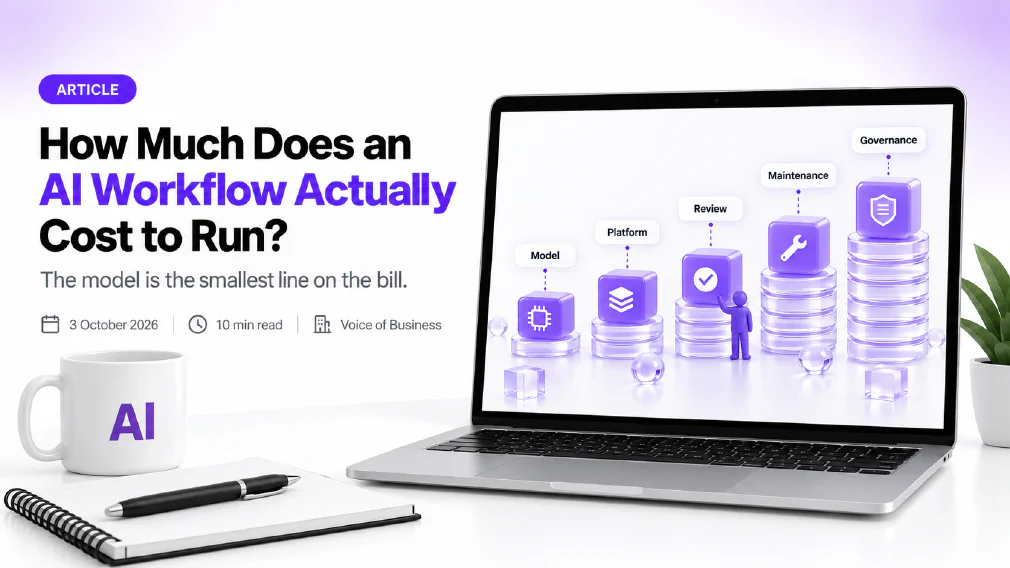
The AI model is the smallest line in what an AI workflow costs to run. The larger lines are the people who check its output, the upkeep that keeps it accurate, and the repairs needed when the systems around it change. Anyone who prices a workflow by the model alone will under-budget it.
This article breaks the running cost of an AI workflow into five parts, explains what pushes each one up or down, and ends with the questions to ask before a budget is agreed. It deliberately gives no price list. The honest answer to “how much” depends on one process, one volume and one level of risk, and a general figure would mislead more than it informed.
Key takeaways
- The running cost of an AI workflow has five parts: model usage, platform and hosting, human review, maintenance and governance.
- Model usage is usually the smallest part, because one business task processes very little text.
- Human review is the part most often left out of the estimate, and it can cancel the saving if checking takes nearly as long as doing the work.
- A workflow that is used more costs more to run, so a rising bill is a sign of success only if the value rises with it.
- The cheapest workflow to run is the narrow one: a single process, with a clear input, a clear output and a named owner.
- Ask for the cost per completed task, not the cost per model call. The first is what the business actually pays.
Why “how much does it cost?” has no single Answer
Most people ask the question as if an AI workflow were a subscription, with a fixed amount that arrives on a fixed date. Some of it is. A platform licence can be a flat fee. But a workflow is a running process, and a running process has the same character as any other operational cost in a business: it rises with volume, it needs people to look after it, and it changes when the work around it changes.
That is why two workflows that look alike on a diagram can differ widely in what they cost to run. One reads a short email and files it. The other reads a forty-page contract, checks it against policy and drafts a reply. They use the same kind of technology and have nothing else in common financially. The first is cheap at almost any volume. The second needs more model usage, a more careful review step and a more watchful owner.
So the useful question is not what an AI workflow costs. It is what this workflow costs, per finished task, at the volume you expect, with the review you can responsibly afford. The five parts below are the way to get there.
The five parts of the running cost
1. Model usage. Model providers bill by the amount of text the model reads and writes. A published explainer on token pricing notes that input and output are billed at separate rates, with output priced at roughly five times input, because every generated word needs its own pass through the model. The same source points out that in a long conversation the earlier turns are sent again with each new one, so a conversation of twenty turns reads its own history twenty times.
Two things follow for a business. First, a workflow that asks the model to write a lot costs more than one that asks it to decide a lot, so a step that classifies or extracts is cheaper than a step that drafts. Second, a design that keeps the model’s job short and bounded costs less than one that lets it ramble through a long chain of its own steps. An AI agent that chooses its own path can use many more calls than a fixed path would, which is one reason a fixed path is usually the cheaper design.
Providers also offer ways to lower this part, such as discounts when the same background material is reused, or lower prices when a task can wait rather than run instantly. Whether they apply depends on the workflow, which is a good reason to ask the person building it.
2. Platform and hosting. The model is rarely the only paid component. The workflow runs on something: an automation platform, a server, a database, a queue, a connection to the systems it reads from and writes to. These usually carry a licence or a usage charge of their own. The same cost breakdown lists hosting, storage and vendor fees alongside model usage as the recurring operations of a workflow.
This part is the easiest to compare and the most likely to be quoted, which is exactly why it gets mistaken for the whole bill.
3. Human review. This is the part that decides whether the workflow saves money. A well-built workflow does not trust the model blindly. Low-confidence results, unusual cases and consequential decisions go to a named person. That person’s time is a running cost, and it belongs in the estimate from the start.
The same cost breakdown warns that review labour can erode the return when the time spent checking outputs nearly equals the time the workflow saved. The practical lesson is to review by risk and not by habit. A low-risk step, such as tagging an enquiry, may need only a sample check. A step that touches money, a contract or a person’s data needs a human before anything is sent or changed. The question of automating a decision and not just a task is where this line is drawn.
4. Maintenance. An AI workflow is not finished when it goes live. The same source lists monitoring, model updates, prompt changes and user training as the ongoing work of keeping it useful, and notes that providers can change a model’s behaviour with an update, that source data can degrade, and that users find new edge cases after launch.
In plain terms, someone has to look at the output every week, notice when it drifts, and fix the connection when another system changes its format. If nobody is named to do this, the workflow decays quietly and the cost shows up later as a cleanup. A named owner is part of the price of running one safely.
5. Governance. Records of what the workflow did, controls on who can change it, and a plan for when it goes wrong are what make a workflow something an organisation can answer for. The cost-breakdown source groups these as governance and risk, naming audit logs, access controls, compliance and incident response. For a smaller organisation this can be light, a log, a named owner and a human in the loop on the risky steps. For a regulated one it is a real line of work. Either way it is cheaper to design in than to bolt on after an incident.
What pushes the cost up, and what keeps it down
Volume is the obvious driver, and the least interesting. More tasks means more model usage and more review. The drivers worth watching are the ones a business controls through design.
Scope. A well-scoped workflow does one job, with a defined input, a defined output and a defined point where a person steps in. Every extra branch adds model usage, review and maintenance. Broad, loosely defined workflows are expensive to run precisely because nobody can say what they are supposed to do.
Quality of input. A workflow reading clean, consistent documents needs less checking than one reading scans, photographs and unstructured emails. If the input is messy, either the cost of cleaning it or the cost of reviewing the mistakes it causes will arrive somewhere in the bill.
Change in the surrounding systems. Every integration is a promise that another system will keep behaving the same way. When it does not, the workflow breaks and someone repairs it. The more systems a workflow touches, the more of this upkeep to expect.
Success. A workflow that works gets used more, gets new channels added and collects extra checks. Per-task cost can fall while the total bill rises. This is not a problem, as long as the value rises with it. It is a problem when the bill is watched and the saving is not.
Notice what keeps the cost down in each case: a smaller, clearer job. This is the strongest argument for doing workflow design before building anything. The money saved by deciding what a workflow will not do is money that is never spent running it.
A worked example, with no prices
Take a small firm that wants to sort incoming supplier invoices. The workflow reads each invoice, pulls out the supplier, the amount and the due date, checks them against the purchase order and flags anything that does not match. No figures are needed to see where the cost sits.
Model usage is small: each invoice is a page or two of text and the answer is a few fields. The platform cost is a licence for the automation tool and a connection to the accounts system. Human review is where the decision sits. A mismatched amount goes to a named person in finance every time, while a clean match is only sampled. Maintenance is the weekly look at the flagged items, plus the repair when a supplier changes the layout of its invoice. Governance is a log of what was read, what was matched and who approved each exception.
Now change one thing. Suppose the firm decides the workflow should also draft replies to suppliers who query a payment. The model’s job has just moved from extracting to writing, the review step now covers outgoing messages, and the maintenance owner has a second kind of output to watch. Nothing about the technology changed. The scope did, and the running cost followed it. That is the pattern to expect: the bill tracks the size of the job far more closely than it tracks the price of the model.
Common mistakes when budgeting for a Workflow
Budgeting for the build and not the run. A build is a project with an end date. A running workflow has none, so the budget needs a recurring line and not just a one-off figure.
Counting the saving before the review. The hours a workflow saves are real only after the hours spent checking it have been taken off. Estimate both in the same units before deciding that it pays.
Leaving the owner unnamed. Maintenance and governance are both someone’s job. When that someone is not named, they become nobody’s job, and the cost returns later as an incident.
Starting wide. A workflow that tries to handle every kind of document and every exception on day one is the most expensive shape to run. Start with the narrowest process that is worth automating and widen it once the figures from real use are in.
Questions to ask before you agree a budget
Whether you are buying a product or commissioning a build, the same short list exposes most of what a quote leaves out.
- What is the cost per completed task, at my volume? Not the cost per model call, and not the platform fee on its own. The finished task is what the business is buying.
- Who reviews the output, how often, and how long does that take? If the answer is “nobody”, ask what happens when it is wrong.
- Who owns it after launch? Name a person. A workflow without an owner is a workflow nobody is paying to maintain.
- What happens when a connected system changes? Ask who is told, who fixes it and whether that work is in the price.
- What does it cost to change or stop? A workflow built on one provider or platform is harder to move later. Ask how portable it is.
- How will we know it is still working? The answer should name the measures: accuracy, escalation rate, time saved. It should not be a promise.
A vendor or builder who can answer all six in specifics has run one in production. One who answers with the model’s accuracy or the price of the platform has told you about the smallest part of the bill. The same habit of asking for mechanism over description applies when you want to tell a real workflow from a relabelled one.
The same logic applies when comparing options. A subscription tool and a custom build differ in the shape of their costs, not only the size, and the comparison is only fair when the total cost of ownership is set out for both. A chatbot bought for a process can look cheap to run, until the hours of copying its output into other systems are counted.
What to do next
Pick one process you are thinking of automating and write down the five parts for it: the model’s job, the platform it runs on, who reviews it, who owns it afterwards and what record it keeps. Then estimate its volume for a normal month and a busy one. If any of the five has no answer, that is where the surprise cost is hiding. If you would like a second pair of eyes on a specific process, a discovery call is the quickest way to find out what it would really cost to run, before any of it is built.
Sources
- LLM token cost: pricing per token explained: explains that input and output tokens are billed at separate rates with output priced at roughly five times input, that earlier turns of a conversation are re-read on each new turn, and that providers discount reused background material.
- AI automation total cost of ownership: costs leaders often miss: sets out the cost categories of an AI workflow (one-time implementation, recurring operations, governance and risk, optimisation and change), and warns that review labour can erode the return when checking takes nearly as long as the work saved.
FAQ
Questions we get asked
How much does an AI Workflow cost to run?
There is no single figure, because the running cost is made of five parts: model usage, the platform or hosting it runs on, the human review built into it, the maintenance it needs after launch, and the governance around it. The model usage is usually the smallest of the five. A reliable estimate comes from mapping one specific process, its volume and its review step, not from a general rate.
Why is the AI Model usually the Smallest cost in an AI Workflow?
Model providers bill by the amount of text processed, and a single business task, such as classifying an email or extracting an invoice, uses very little of it. The larger costs sit around the model: the people who check its output, the monitoring that keeps it accurate, and the integrations that need repairing when other systems change.
What are the hidden costs of AI Automation?
The costs most often missed are human review, monitoring, maintenance after launch and governance. One published cost breakdown groups them as recurring operations, governance and risk, and optimisation and change. They do not appear on a vendor quote, which is why a workflow can look inexpensive to buy and still be expensive to keep running.
Does an AI Workflow get cheaper to run over time?
The cost of each model call tends to fall, but total spend often does not, because a workflow that works gets more volume, more channels and more checks added to it. Plan for the running cost to track usage. Review it every quarter against the hours the workflow saves, so a rising bill is judged against rising value.
Ready to Put This to Work?
Tell us where your team is with AI and we will tell you honestly what would make the biggest difference.