What is RAG?
What RAG (retrieval-augmented generation) is, how it lets AI answer from your own documents, where it fails, and how a small business can start.
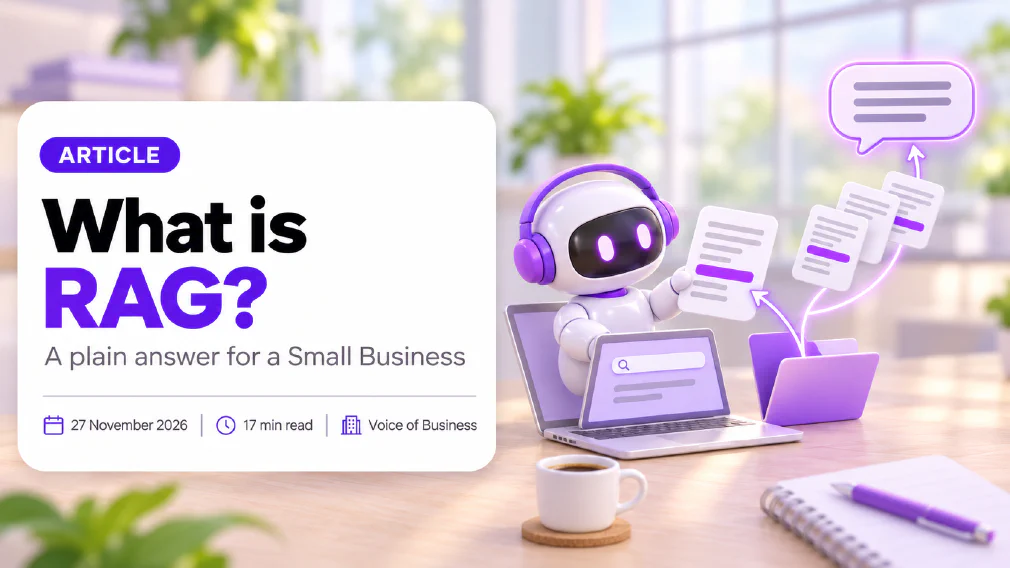
RAG is a way of making an AI tool answer from your own documents instead of from memory. Before it writes a reply, the tool searches a set of files you have chosen, picks out the relevant passages and uses them to write the answer.
This article explains what RAG is in plain English, how it works, why AI tools need it, how it differs from fine-tuning, what a small business can use it for, and where it goes wrong. It is written for owners and managers who keep hearing the term and want to know whether it matters for them before anyone spends time on it.
Key takeaways
- RAG stands for retrieval-augmented generation. The tool finds relevant passages in your documents first, then writes an answer from them.
- A language model on its own answers from patterns it learned in training. It does not know your handbook, your prices or last week’s decision. RAG is how you give it that knowledge without retraining it.
- RAG changes what the tool knows. Fine-tuning changes how it behaves. For most small businesses, RAG is the right first step.
- It reduces made-up answers but does not remove them. The answer is only as good as the documents behind it, so old, duplicated or contradictory files produce confident wrong answers.
- Connecting documents is a data decision. Settle what the tool may read, where it is processed and who can see the answers before you connect anything.
- Start with one set of documents, one owner and a two-week trial.
What is RAG in Plain English?
RAG is short for retrieval-augmented generation. Strip the name down and it describes two steps. Retrieval means looking something up. Generation means writing a reply. In RAG, the lookup happens first, and the reply is written from what was found.
A good way to picture it is the difference between an exam with the books closed and an exam with the books open. A normal AI tool sits the exam with the books closed. It answers from whatever it absorbed during training, which is broad but not specific to you. A RAG tool is allowed to open your folder, find the right page and then answer. It still writes in its own words, but it has the page in front of it.
The idea was set out in a 2020 research paper on retrieval-augmented generation for knowledge-intensive language tasks, which combined a language model with a searchable body of documents so that answers could draw on text the model did not already hold. It has since become one of the most common ways of building business assistants, because it solves a problem every business meets on day one: the tool does not know anything about the business.
If you have used an assistant that lets you attach a handbook and then asks questions about it, you have probably already used RAG, whether or not the product used the name. The site’s glossary entry for retrieval-augmented generation gives the short definition, and this article goes through the detail.
How does RAG work?
RAG has four working parts, and each one is a decision someone made in advance.
A set of documents. The material the tool is allowed to answer from, such as a staff handbook, a set of procedures, a product guide or a folder of past proposals. This is called the knowledge base. Someone has to choose what goes in it.
A search step. When a question arrives, the system searches the documents for the passages most likely to contain the answer. It does not read everything every time. It finds the few passages that look relevant to this question.
A prompt that joins them. The question and the retrieved passages are put together in one instruction to the model. In effect it says: here is a question, here are the passages from our documents, answer from these.
A language model. The engine that reads the question and the passages and writes the reply. It does the writing. The documents supply the facts.
When it runs, the sequence is the same each time: a person asks, the system searches, the best passages are attached to the question, the model answers, and a well-built tool shows which passages it used so that a person can check them.
That last point matters more than it looks. Because the answer comes from named passages, you can check it. A normal model gives you an answer and no trail. A RAG tool can give you the answer and the page it came from.
Why do AI Models need RAG?
A language model has three limits that RAG is designed to work around.
It does not know your business. Training data comes from the wider world. Your returns policy, your pricing rules, your onboarding steps and your client conventions were never in it. Asked about them, a model will often produce something plausible rather than say it does not know. That is how hallucinations start.
Its knowledge stops at a date. Every model has a cut-off after which it has learned nothing. A policy changed last month does not exist as far as the model is concerned.
It can only read so much at once. A model’s working space, its context window, holds a limited amount of text. You cannot paste a whole document library into every chat, and even if you could, it would be slow and unreliable. RAG solves this by searching first and passing in only the few passages that matter.
The common thread is that the model is good at language and weak at your facts. RAG keeps the model for the language and takes the facts from your documents. That is the same idea as grounding, which means tying an answer to source material. RAG is the usual mechanism for doing it.
What is the difference between RAG and Fine-Tuning?
People often mix these up, because both are described as “teaching the AI about your business”. They do different jobs.
RAG changes what the tool can see. The model stays the same. You give it a searchable set of documents, and it consults them at the moment of answering. Update a document and the next answer reflects it.
Fine-tuning changes how the model behaves. You train it further on examples so that its tone, format or habits shift. It is good for teaching a consistent style or a specialised way of responding. It is a poor way to teach facts, because what it learns is baked in and hard to correct. If the policy changes, you cannot simply edit a page.
| RAG | Fine-tuning | |
|---|---|---|
| What it changes | What the tool can look up | How the model behaves |
| Best for | Facts that change: policies, prices, procedures | Style, tone, format, specialised habits |
| Updating it | Edit or replace a document | Train again |
| Checking an answer | Point to the source passage | Hard to trace |
| Effort for a small business | Low to moderate | Usually high and rarely needed |
For a small business that wants answers from its own documents, the order is simple. Try a well-written prompt first. If the tool needs knowledge it does not have, add RAG. Consider fine-tuning only when you have a clear, repeated behavioural problem that neither fixes.
Is a Custom GPT the same as RAG?
Not exactly, but they overlap. A custom GPT, or any assistant you configure with instructions and attached files, is a product. RAG is a method that many of these products use to read the files you attach.
When you upload a handbook to a configurable assistant and it answers questions about it, the product is usually doing a form of retrieval behind the scenes. You do not need to understand the internals to use it. What you do need to understand is that the same weaknesses apply: the answer depends on the files, the search can pick the wrong passage, and the tool can still guess when the documents are silent.
The practical difference is control. A ready-made assistant with attached files is quick to set up and good for one team and a modest set of documents. A purpose-built RAG system gives you more say over what is searched, how results are ranked, who may see which documents and how answers are logged. If you want to start with the first, our guide to building a custom GPT for your business walks through it.
What can a Small Business use RAG for?
RAG earns its place where the answer already exists in your documents and people waste time finding it. The jobs that suit a small business fall into a few groups.
Answering staff questions. An assistant that answers questions about leave, expenses, equipment and procedures from the handbook, and says “not specified in the document” when the handbook is silent. It saves the person who keeps answering the same ten questions.
Supporting customer service. A tool that drafts replies to customer questions from your product guides and policies, for a person to approve before sending. The customer never sees an unchecked answer.
Finding things in past work. Proposals, reports and briefs from the last five years are usually unsearchable in practice. RAG lets someone ask “what did we propose to a client in this sector last time?” and get the relevant passages.
Onboarding new starters. A new colleague can ask the assistant instead of interrupting someone, and gets an answer from the current procedures.
Reading long documents. A set of contracts, policies or regulations that nobody has time to read end to end, searched by question. Our article on whether AI can summarise documents and contracts safely covers the care this needs.
Feeding an agent. An AI agent that works through several steps usually needs a source to work from. RAG is often the part that supplies it.
For most small teams, the first two are the right place to begin, because they stay inside the business until someone has read the result.
What are some examples of RAG?
Concrete examples are easier to judge than definitions. These are the shapes that appear most often:
- A policy assistant. Its knowledge base is the staff handbook. A member of staff asks how many days of notice a leave request needs, and the tool answers with the relevant paragraph quoted beneath.
- A product answer tool. Its knowledge base is the product guides and the returns policy. Someone on the support team asks whether a particular item is covered and gets a draft answer with the source.
- A proposal finder. Its knowledge base is the past proposals folder. A manager asks for examples of how the business has priced similar work and gets the passages, not a rewritten guess.
- A compliance checker. Its knowledge base is a regulation or a standard. A reviewer asks where a requirement is stated and gets the clause.
- A meeting memory. Its knowledge base is the notes from past meetings. Someone asks what was decided about a supplier and gets the note it was recorded in.
Each of these has a narrow job, a defined set of documents and a person who reads the result. None replaces the people. That narrowness is what makes them reliable.
Does RAG stop AI Hallucinations?
It reduces them. It does not stop them.
A model answering from supplied passages has far less reason to invent a fact, because the fact is in front of it. That is why RAG is one of the standard ways of improving reliability. But it fails in several ways that are easy to overlook.
The search picks the wrong passage. If the system retrieves a passage that looks similar but answers a different question, the model will write a fluent answer to the wrong thing.
The model misreads a good passage. It can summarise a clause incorrectly, drop a condition or mix two passages into a claim neither supports.
The documents disagree. If the handbook says one thing and an older policy says another, the tool may pick either, and sound equally sure of both.
The documents are silent. When nothing relevant is found, a poorly set up tool fills the gap with its own guess. A well-set-up one says it does not know.
You can reduce these risks with some habits. Tell the tool to answer only from the documents and to say when the answer is not there. Ask it to quote the passage it used. Check a sample of answers against the source every week. For more on these checks, see our guide to reducing AI hallucinations, which goes through these checks in more detail, and the same principle applies to every RAG tool: fluent is not the same as correct.
What can go wrong with RAG?
Beyond wrong answers, a few problems appear again and again in small business projects.
Messy documents. The most common cause of poor results is not the AI, it is the files. Three versions of the same policy, scanned pages that cannot be read, tables that turn to nonsense, and files nobody has looked at since 2019 all produce bad answers. This is a question of data readiness, and it is usually the largest part of the work.
Out-of-date material. A knowledge base is a snapshot. If nobody updates it when the policy changes, the tool will keep answering from the old version with complete confidence.
Wrong permissions. If the tool can search a folder, it can answer from it, whoever is asking. A junior member of staff who could not open the salary file might still get an answer drawn from it. Access has to be designed, not assumed.
Hidden instructions in documents. If the tool reads text from outside sources, such as emails or web pages, that text can contain instructions meant for the AI rather than for people. This is called prompt injection, and the OWASP project lists it as the first risk in its list of risks for applications built on language models. Limit what the tool reads to material you trust, and do not let it act on anything it finds without a person checking.
No owner. Someone has to notice when answers drift, update the documents and decide when to retire the tool. Without a named owner, quality decays quietly.
None of these is a reason to avoid RAG. They are the reasons to plan the project properly instead of attaching a folder and hoping.
Is RAG Safe for Business Data?
It can be, if you decide the rules before you connect anything. Connecting documents to an AI tool is a decision about data, not only about technology.
Ask four questions first:
- What is in the documents? If they contain personal data, customer records, contracts or anything confidential, treat them as sensitive and decide whether they belong in the first project at all.
- Where is the data processed and stored? Some tools process documents in the EU and some do not. Check data residency before you upload anything.
- Does the supplier use your documents to train its models? The answer should be in the contract and the settings, not assumed. Check it against the supplier’s current terms.
- Who can ask, and what can they see? Decide whether everyone gets the same answers or whether access differs by role.
A tool that reads your files through a connector, a live link to a mailbox or file store, needs even more care, because it can reach whatever the account can reach. Our article on connecting an AI tool to your email and file storage sets out what to check.
The safest first project uses a small set of internal documents with no personal data in them, such as a handbook or a procedures folder, and keeps a person reading every answer that matters.
Does GDPR apply to RAG?
Yes, whenever the documents contain personal data, because data protection law follows the data. The GDPR applies to the processing of personal data however the processing is done, and attaching a folder of customer or employee records to an AI tool is processing.
In practice that means a few things. You need a lawful basis for processing the data, you should only connect what the task needs, and you must be able to explain what the tool does with it. If a supplier processes the documents for you, there should be a data processing agreement in place. If the data is sent outside the EU, further rules apply. The text of the regulation is on the EU’s official legal portal, and the questions above are the practical version of it.
The EU AI Act adds duties for some uses, depending on the risk of the system and your role as the business that deploys it. A RAG assistant that answers staff questions about leave is a long way from the high-risk categories. One that screens job applicants is not. The Act is also published on the EU’s legal portal, and the rule of thumb is that the closer the tool gets to decisions about people, the more care it needs and the less it should be left to run unchecked.
Neither law is a reason to stay away. Both are a reason to know what you connected, why, and who is responsible.
What do you need before you build a RAG System?
Most of the work is preparation, and none of it needs code.
- A clear question. What will people ask, and who will ask it? “Answer staff questions about leave and expenses” is a project. “Use AI on our documents” is not.
- A defined set of documents. Choose them deliberately. Fewer, cleaner, current documents beat a large unsorted dump.
- A tidy source. Remove duplicates and superseded versions. Make sure files are readable and that each one has a clear owner and date.
- A named owner. One person accountable for the setup, the checking and the decision at the end.
- A list of test questions. Include the ones the documents can answer, the ones they cannot, and the ones where they contradict each other.
- A rule for sensitive material. What is excluded, and who decides.
If you are unsure whether your documents are ready, an AI audit looks at the material and the work already running in your business and tells you where a tool like this fits and where it does not.
Do you need RAG, or is uploading a Document enough?
For many small jobs, uploading a document is enough. If you want a summary of one report, or an answer about one contract, attach it to a chat and ask. There is no need to build anything.
RAG becomes worth the effort when the same documents are used repeatedly, by several people, and the set is too large or changes too often to paste in each time. The test is simple:
- One document, one job: upload it to a chat.
- A handful of documents, one team, repeated questions: attach them to a configured assistant.
- A large or changing set, many users, access rules or logging: build a proper RAG system.
Use the lowest option that does the job. Each step up adds setup, checking and ownership. If you cannot name the question, the owner and the way you will check the answers, do not build anything yet.
How do you start with RAG?
Start small and keep it internal.
- Choose one narrow job. Pick something frequent, where the answer exists in a document and a wrong first answer does no harm. A handbook assistant is the typical choice.
- Gather and clean the documents. Keep the current version of each, remove the rest and note who owns each file.
- Write the baseline first. How long does the task take now, how often does it happen, and what does a good answer look like? Without this you cannot tell whether anything improved.
- Write a proper brief. Tell the tool its role, to answer only from the documents, to quote its source and to say when the answer is not there.
- Test it against real questions. Include the ones it should refuse. This is where you find the gaps before your staff do.
- Keep a person on anything that matters. Anything that reaches a customer or affects a person is read first, so a person stays in the loop.
- Run it for about two weeks. Time the whole cycle, including the checking. Then keep it, widen it to a neighbouring set of documents, or stop.
Teams that want to build one with support can start with a bespoke build day that works from their own documents.
What follows
Choose one set of documents, name its owner, write the baseline and decide what the tool may read before you connect anything. Clean the files before you blame the AI. Leave customer-facing replies and decisions about people until you have a month of evidence about how your own team checks and corrects the output.
Sources
- Lewis and others, “Retrieval-Augmented Generation for Knowledge-Intensive NLP Tasks” (arXiv): the 2020 research paper that introduced the term, combining a language model with a searchable set of documents so that answers can draw on text the model did not already hold.
- Regulation (EU) 2016/679, the General Data Protection Regulation (EUR-Lex): the legal text that applies whenever documents connected to an AI tool contain personal data.
- Regulation (EU) 2024/1689, the Artificial Intelligence Act (EUR-Lex): the EU’s AI law, which sets duties that depend on how risky a use is and on the business’s role as deployer.
- OWASP, “LLM01: Prompt Injection”: the security project’s description of hidden instructions in text a model reads, listed first among its risks for applications built on language models.
FAQ
Questions we get asked
What does RAG stand for?
RAG stands for retrieval-augmented generation. Retrieval means the system looks up relevant passages from a set of documents. Generation means the language model then writes an answer using those passages. The name describes the order of the work: find first, then write.
Is RAG better than Fine-Tuning?
They solve different problems, so neither is better in general. RAG gives a model access to information that changes, such as policies, prices and procedures, and lets you point to the source of an answer. Fine-tuning changes how a model behaves, such as its tone or format. For a small business that wants answers from its own documents, RAG is almost always the first thing to try.
Does RAG stop AI from making things up?
It reduces the problem but does not remove it. A model that answers from supplied passages is less likely to invent facts than one working from general patterns. It can still pick the wrong passage, misread a good one or fill a gap with a guess. Ask for quotes from the source, tell the tool to say when the documents are silent, and keep a person checking anything that reaches a customer.
Can I use RAG with my own Documents?
Yes, and that is the most common reason to use it. Handbooks, procedures, product guides, contracts and past proposals can all be searched at the moment a question is asked. The quality of the answers depends on the quality of the files, so remove out-of-date versions and duplicates before you connect anything.
Is RAG GDPR Compliant?
RAG is a method, not a product, so it is neither compliant nor non-compliant by itself. What matters is which documents you connect, whether they contain personal data, where they are processed and who can see the answers. Settle those points, check your supplier's data processing terms, and leave personal data out of a first project.
Do I need a developer to set up RAG?
Not for a simple version. Many business tools now let you attach a set of documents to an assistant using plain-language instructions and no code. A developer becomes useful when you need to search a large or changing body of material, connect a system that has no ready-made link, or control exactly who can see what.
How long does it take to set up RAG?
A simple assistant that answers from one handbook can be running in a day. Most of the time goes on tidying the documents and testing the answers against real questions, including ones the documents cannot answer. Plan a two-week trial with a named owner before anyone relies on it.
What is the difference between RAG and a Chatbot?
A chatbot is the thing you talk to. RAG is a method that can sit underneath it. A basic chatbot answers from what the model learned in training. A chatbot built with RAG searches your documents first and answers from what it finds, which makes it more specific to your business and easier to check.
Ready to Put This to Work?
Tell us where your team is with AI and we will tell you honestly what would make the biggest difference.