NotebookLM (Gemini Notebook) Review for Business Documents
NotebookLM is now Gemini Notebook. What it does with your business documents, what the plans and limits are, how it treats your data, and who it suits.

NotebookLM is the Google tool that answers questions only from documents you give it, and since 16 July 2026 it is called Gemini Notebook. That one design choice is what makes it more useful for business documents than most chatbots: it reads your contracts, reports and meeting notes, answers from them and shows you where each answer came from.
This review covers what the tool does with a pile of company documents, what the plans and limits look like, how it treats your data, where it breaks, and which businesses should try it. It is written under the old name because that is still what most people search for, and the new name is used where Google’s own pages use it.
Key takeaways
- NotebookLM was renamed Gemini Notebook on 16 July 2026. It is the same product, and existing notebooks and shared links still work.
- It answers from the sources you upload and cites them, which makes checking its answers quicker than with a general chatbot.
- On a Google Workspace account, Google says uploads, questions and answers are not used to train AI models and are not seen by human reviewers.
- Google lists Gemini Notebook among services that Workspace data regions do not cover, so EU data location is not something to assume.
- Usage is a compute-based budget that refreshes every five hours with a weekly cap. Google publishes plan multiples such as 4 times for Pro, but no absolute number.
- It is a strong fit for reading and summarising a fixed set of documents, and a weaker fit for open-ended writing or connected workflows.
What is NotebookLM, and why is it now Gemini Notebook?
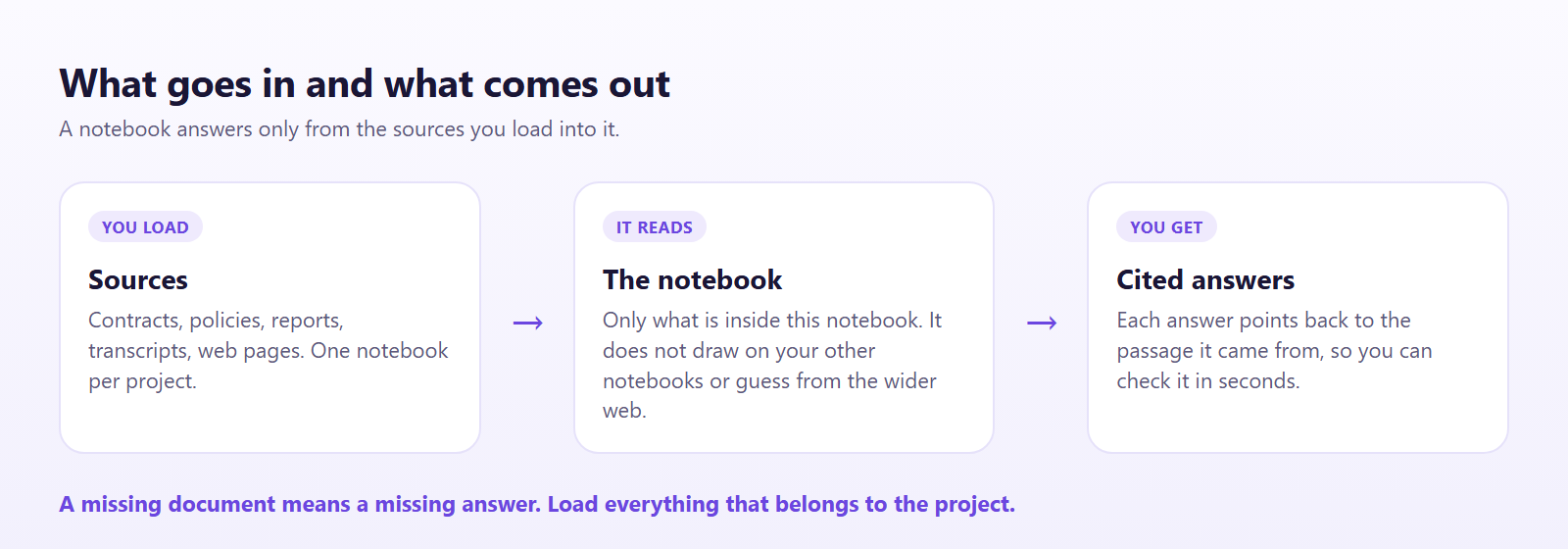
A notebook in this product is a collection of sources for one project. You add documents, and every question you ask is answered from those documents and nothing else. Google’s support page is blunt about the boundary: notebooks are separate, and Gemini Notebook cannot draw on information across several notebooks at once.
That is a different idea from a normal chatbot. A chatbot answers from everything it learned in training and fills gaps with a best guess. NotebookLM works on grounding: the answer is tied to the material in front of it, with a citation back to the passage. If you want the technical background, it is close in spirit to retrieval-augmented generation, which our RAG vs fine-tuning comparison explains in plain terms.
On 16 July 2026 Google announced that NotebookLM is now Gemini Notebook. TechCrunch framed it as the latest in Google’s run of renamings, and the Workspace Updates post says the change affects all Workspace customers, Workspace Individual subscribers and people with personal accounts. Three things came with it:
- Closer ties to the Gemini app. Notebooks can be created and opened in the Gemini app and stay in sync with the standalone site.
- Notebooks in Search. Google says it will “soon” bring notebooks into AI Mode in Search. That had not shipped when this review was written.
- Code execution. Each notebook gets a secure cloud computer so it can write and run code to analyse the data in your sources. Google says it is available now to Google AI Ultra users and will reach Pro users on the web over the following weeks.

There was nothing for admins to do. Google says automatic redirects keep existing links alive, and the new name and logo roll out over several weeks.
What does it do well with Business Documents?
Its best work is on a set of documents you already own and need to understand quickly. In practice that means a handful of jobs.
Reading a long document for you. Load a 90-page supplier contract or a tender and ask for the termination terms, the payment schedule or every date that creates an obligation. The answer arrives with numbered citations, and clicking one jumps to the passage. That is the feature that matters, because it turns checking from a re-read into a spot check.
Comparing documents. Put three quotes, two policy versions or a year of board papers into one notebook and ask where they disagree. Because all of it sits in one place, the comparison is far quicker than copying passages into a chat window.
Turning documents into something shareable. Studio outputs include audio overviews, summaries and reports. Google’s support page mentions data tables you can export to Google Sheets, with citations carried over into a second tab. Google’s own support menu lists audio overviews, video overviews, mind maps, flashcards and quizzes, infographics, slide decks and reports. We have not tested each one on a client file, so judge the quality on your own documents.

Onboarding and handover. A notebook holding a process manual, past emails and a style guide gives a new starter somewhere to ask questions without interrupting a colleague. This is also a modest answer to the knowledge that leaves with staff, as covered in knowledge retention.
Working with data. With code execution, a notebook can run analysis on the files you load rather than only describe them. That feature is new and limited to higher plans for now, so check it on your own files before relying on it.
A fair test is to take one real project, such as a contract renewal, load every document that belongs to it, and ask the five questions you would normally spend an afternoon answering. If the citations check out, the tool has earned a place.
Where does it fall short?
It only knows what you load. That is the point, but it also means a missing document produces a missing answer. If the key clause sits in an email nobody uploaded, the tool cannot find it, and it will not always say so.
It is not a drafting tool. It can summarise and answer, but it is not built for writing a proposal from scratch, running a multi-step workflow or connecting to your CRM. For that, a general assistant or a proper workflow is the better tool.
Notebooks do not talk to each other. Ten projects means ten separate notebooks, and you cannot ask a question across all of them. For a firm with a large archive that is a real limit.
It still gets things wrong. Citations narrow the problem but do not remove it. A model can misread a table, merge two similar clauses or answer confidently from a thin source. That is hallucination in a milder form. Google’s own guidance says not to rely on it for medical, legal or financial advice. Keep a human in the loop for anything a customer, a regulator or a court will see, and use our guide to checking AI output as the routine.
Scanned and messy files are risky. Poor scans, unusual layouts and tables inside images are where document tools tend to slip. Test your own worst file, not a clean sample.
Is it Safe for company Data?
This is the question that decides whether a business should use it, and the answer depends on the account type.
Workspace accounts. Google’s privacy page says that for Workspace users, uploads, queries and responses are not reviewed by human reviewers, even if you send feedback, and are not used to train AI models. NotebookLM became a Workspace core service in February 2025, which is why that promise exists.
Personal accounts. The same page does not make those two promises for personal accounts. It says feedback is reviewed by people, that the reviewer sees it disconnected from your Google Account, and that it can be kept for up to three years. Google asks you not to put confidential information in feedback. The practical rule is simple: do not put client or staff documents into a personal-account notebook.

Where the data sits. This is the part to check rather than assume. Google’s Workspace data regions page lists Gemini Notebook among services where data regions are not supported. If you chose an EU region for your Workspace data, that choice may not apply to your notebooks. A separate Google Cloud product, NotebookLM Enterprise, lets an administrator choose a location, but it is sold differently and we have not reviewed it here. Read our entries on data residency and GDPR before you decide, and ask your provider directly.
Sharing. A personal account can share a notebook with up to 50 users, and not with Google Groups. Sharing is where a private notebook quietly becomes a shared one, so treat it like sharing a folder.
None of this replaces your own rules. Decide which kinds of document may go in, using data classification, and check the tool is on your AI tool inventory so it does not turn into shadow AI. Our piece on what is safe to paste into AI tools gives a practical list.
What does it cost, and what are the limits?
Prices and limits are the least stable part of this review, so read the figures as a snapshot from 3 November 2026 and check Google before you buy.
- Standard plan. It costs nothing and gives 100 notebooks and, according to third-party guides, 50 sources per notebook.
- Google AI Pro. Listed at $19.99 a month in third-party guides. It raises the source limit to 300 per notebook and the usage budget to four times the standard one.
- Higher tiers. Google AI Ultra adds the newest features first, including code execution.
- Workspace. The tool is part of Workspace, and the data promises above apply to Workspace accounts. Which edition includes which features is not something Google’s rename announcement spells out, so check your own plan.
- Per source. Guides give about 500,000 words or 200 MB for a single source, whichever you hit first.
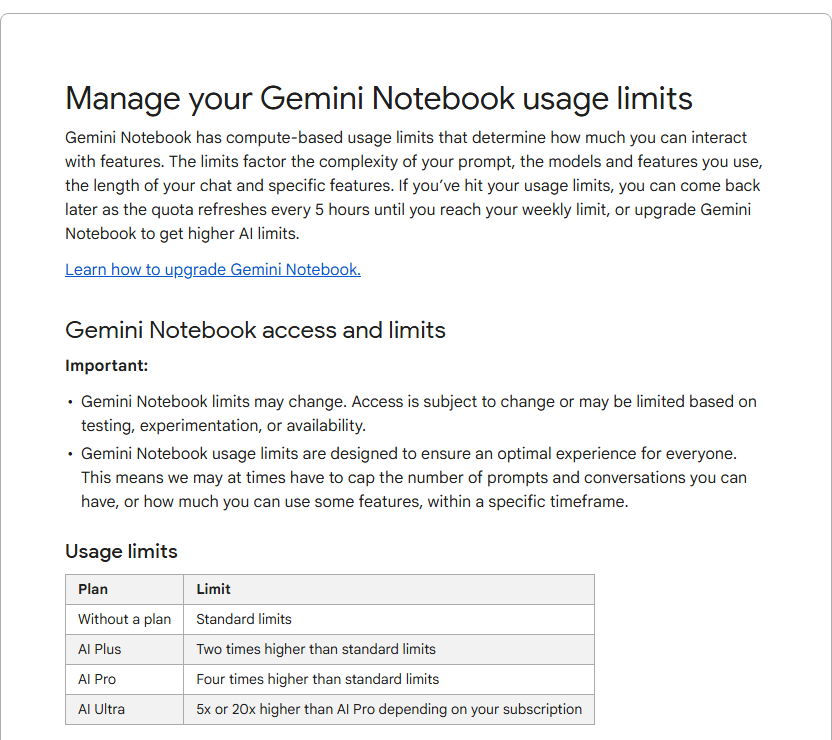
On usage, Google’s support page says limits are compute-based. They depend on the complexity of your question, the features you use and the length of your chat, and the quota refreshes every five hours until you reach a weekly limit. Google’s table gives plan multiples and no absolute figure: Google AI Plus is two times the standard limits, Pro four times, and Ultra 5x or 20x the Pro limits depending on the subscription. Third-party guides date the move from fixed daily counts to this budget at 2 September 2026. When you run out, the tool tells you when features return, or you can queue a Studio output for later. Because Google does not publish a number, you cannot plan a big batch of work against a fixed allowance.
How does it compare with the alternatives?
Against ChatGPT or Claude with uploaded files. The assistants do far more: they draft, reason, browse and connect to other tools, and our Claude vs ChatGPT comparison and Gemini vs ChatGPT comparison cover that ground. NotebookLM does less but stays inside your sources by design, which for a contract review is a feature. The assistants’ own project features, compared in ChatGPT Projects vs Claude Projects vs Gemini Gems, are the closest like-for-like.
Against Microsoft 365 Copilot. If your documents live in SharePoint and OneDrive, Copilot reaches them where they are. NotebookLM wins on simplicity and on citations; Copilot wins on integration with the Microsoft tools your team already uses. See the Copilot vs Google Workspace AI comparison for the wider picture.
Against a meeting-notes tool. If your documents are mostly recordings, a dedicated tool such as those in our meeting notes comparison is purpose-built, though NotebookLM can take audio and transcripts as sources.
Against building your own. A custom system over your documents gives you control over location and access, but it takes real work to build and maintain. For one team and one project, a notebook is far quicker.
Who should use it?
- Good fit: a small team that regularly reads long documents, such as contracts, tenders, policies, research or board papers, and needs quick, checkable answers. Add a Workspace account and the data position is clear.
- Good fit: onboarding, handover and “where did we say that?” questions on a fixed set of files.
- Poor fit: anyone who needs EU data location guaranteed, until Google confirms how it applies to notebooks.
- Poor fit: teams who want one assistant that drafts, browses and automates. Pair it with a general assistant instead.
- Poor fit: regulated advice given to clients without a person reviewing every answer.
How should a Business try it?
- Pick one real project with 5 to 15 documents and a Workspace account.
- Write down the five questions you would normally spend time on.
- Ask the same questions of the notebook, and check each citation.
- Note every wrong or missing answer, and what kind of document caused it.
- Agree who may upload what, and write it into your AI use policy.
If you want a neutral view of which tools fit your documents and your data rules, that is exactly what an AI audit covers.
Verdict
NotebookLM, now Gemini Notebook, is one of the more sensible AI tools for business documents precisely because it does less than a chatbot. It stays inside the sources you give it, shows its working and is quick to learn.
It is not a replacement for judgement, and it comes with two things to settle first: use a Workspace account rather than a personal one for anything confidential, and do not assume your data stays in the EU until Google says so for this product. If both are fine for you, run it on one real project this week. If it saves an afternoon with its citations intact, keep it.
Further reading
- Claude vs ChatGPT: Which fits your business best?: how the two main assistants differ on data, admin and access.
- What is safe to paste into AI tools: which customer data should never leave your control.
- What is a context window?: why a tool can only read so much at once.
Sources
- NotebookLM is now Gemini Notebook (Google): the rename, Gemini app and Search plans, code execution and plan availability.
- NotebookLM is now Gemini Notebook (Google Workspace Updates): rename date, rollout, redirects and who is affected.
- Google continues its renaming streak (TechCrunch): independent coverage of the rename.
- Privacy and your data in Gemini Notebook (Google support): human review, training and retention differences between Workspace and personal accounts.
- Gemini Notebook basics (Google support): notebooks as isolated collections, sharing limits and the advice not to rely on it for medical, legal or financial matters.
- Google Workspace data regions (Google): the list of services where data regions are not supported.
- NotebookLM now a Workspace core service (Google Workspace Updates): the February 2025 move that brought Workspace data protections.
- Manage your Gemini Notebook usage limits (Google support): compute-based limits, the five-hour refresh, the weekly cap and plan multiples.
- NotebookLM daily limits (Elephas): the September 2026 move to a five-hour usage budget and plan multiples.
- NotebookLM source limits by plan (Elephas): sources per notebook and per-source size caps.
- Is NotebookLM free in 2026? (Dupple): plan tiers and the rename.
FAQ
Questions we get asked
Is NotebookLM the same as Gemini Notebook?
Yes. Google renamed NotebookLM to Gemini Notebook on 16 July 2026. Google describes it as the same standalone product with a new name and deeper links to the Gemini app and Search. Existing notebooks and shared links keep working through automatic redirects, so most people still search for it under the old name.
Does NotebookLM train on my Documents?
On a Google Workspace account, Google says your uploads, questions and answers are not used to train AI models and are not reviewed by human reviewers, even if you send feedback. On a personal Google account those two promises are not made on the same page, and feedback you submit can be read by people. Use a Workspace account for anything confidential.
Is NotebookLM GDPR Compliant?
Google states that it meets its privacy and security commitments, but a tool is not compliant by itself, because compliance depends on how your business uses it. One point to check before relying on it: Google's data regions page lists Gemini Notebook among the services where Workspace data regions are not supported, so you cannot assume your notebooks stay in the EU. Confirm the current position with Google and your data protection adviser.
Can NotebookLM make things up?
Yes, less often than a general chatbot but not never. It answers from the sources in your notebook and shows citations, which makes mistakes easier to catch. It can still misread a table, merge two documents or answer with confidence from a thin source. Google itself says it should not be relied on for medical, legal or financial advice.
How many Sources can a notebook hold?
Guides based on Google's plan pages put the limit at 50 sources per notebook on the standard plan and 300 on Google AI Pro, with each source capped at about 500,000 words or 200 MB. Google changes these figures often, so check the current plan page before you plan a large project.
Is NotebookLM Free?
There is a standard plan that costs nothing, with the lowest usage budget. Paid access comes through Google AI plans and through Google Workspace, with Google AI Pro listed at $19.99 a month in third-party guides. Prices and bundles have changed several times, so confirm them on Google's own page.
Is NotebookLM better than ChatGPT for Business Documents?
For questions about a fixed set of documents you control, often yes, because it stays inside those documents and cites them. For open-ended drafting, brainstorming or work that needs the wider web and many connected tools, ChatGPT or Claude are usually the better fit. Many teams sensibly use both for different jobs.
Do I need a paid plan for Business use?
Not to try it. Many small teams can test it on one real project with the standard plan. A paid Google AI or Workspace plan makes sense once you hit the source limits or the usage budget, or once you need the data promises that come with a Workspace account.
Ready to Put This to Work?
Tell us where your team is with AI and we will tell you honestly what would make the biggest difference.