Copilot Studio vs ChatGPT Agents vs Claude Projects
Copilot Studio, ChatGPT Workspace Agents and Claude Projects compared for a small business: what each builds, who runs it, data controls and which to start with.
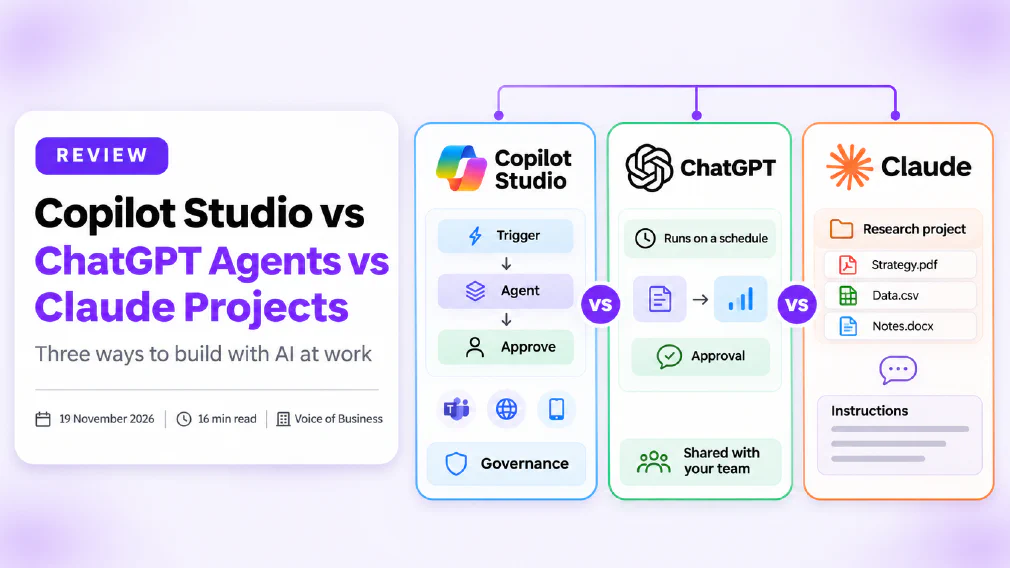
Copilot Studio, ChatGPT Workspace Agents and Claude Projects are not three versions of the same product. Copilot Studio is a builder for agents inside Microsoft 365. ChatGPT Workspace Agents are shared agents that run inside a ChatGPT workspace. Claude Projects is a workspace for repeat work with documents and instructions, and it is not an agent builder at all. A small business gets the best result by matching the tool to the job, not by picking a winner.
This review is based on the vendors’ own documentation as we read it on 19 November 2026. We did not run a hands-on build in each product. OpenAI’s support pages returned an access error when we tried to open them, so what we say about ChatGPT rests on OpenAI’s announcement, its description of the AgentKit wind-down and a trade report of the launch, all listed under Sources. Features, names and billing in this area change quickly, so check each vendor’s current page before you commit.
Key takeaways
- Copilot Studio is a low-code studio for building and managing agents and workflows, published to channels such as Microsoft Teams and Microsoft Copilot.
- ChatGPT Workspace Agents were announced on 22 April 2026 as an evolution of custom GPTs. They run in the cloud, on a schedule or from a chat.
- Claude Projects keep files and instructions together for repeat work. On Anthropic’s support page they are a workspace, not an agent builder.
- ChatGPT agent, the older browser-based mode, now carries a discontinued notice on OpenAI’s support page. Do not plan around it.
- Copilot Studio gives the most governance and asks the most of the person building. Claude Projects asks the least and governs the least.
- Copilot Studio and ChatGPT Workspace Agents bill by usage credits. Check the vendor’s page for rates, and set a cap before anyone builds.
- Whatever you choose, keep a person approving anything that sends, pays or deletes.
- Start with one narrow job, run it for 30 days and measure it.
What is the difference between Copilot Studio, ChatGPT Agents and Claude Projects?
The three tools sit at different points on a line from “a chat with memory” to “software that does work while you are away”.
| Copilot Studio | ChatGPT Workspace Agents | Claude Projects | |
|---|---|---|---|
| What it is | Low-code studio for agents and workflows | Shared cloud agents inside ChatGPT | Workspace with files and instructions |
| Who builds | A maker or admin-approved builder | Anyone your admin allows, by describing the workflow | Anyone, in minutes |
| Runs on its own | Yes, with triggers and workflows | Yes, on a schedule or from Slack | Not by itself |
| Where it lives | Teams, Microsoft Copilot, websites, mobile apps | ChatGPT and Slack | Claude |
| Central control | Strongest, through Power Platform and Microsoft 365 | Admin roles and a Compliance API | Sharing on Team and Enterprise plans only |
| Best for | Business processes that touch company systems | Repeatable team tasks across connected apps | Drafting, research and answers from your documents |
If you want the underlying idea first, our guide to what an AI agent is and our entry on AI agents set out the terms. A useful rule of thumb from our review of AI agents vs prompting is to prime a chat first and build an agent only once the task is clear.
What is Microsoft Copilot Studio?
Microsoft’s overview describes Copilot Studio as a graphical, low-code studio for building and managing AI-powered agents and workflows. You connect them to your organisation’s data and systems and publish them to the channels where people already work.
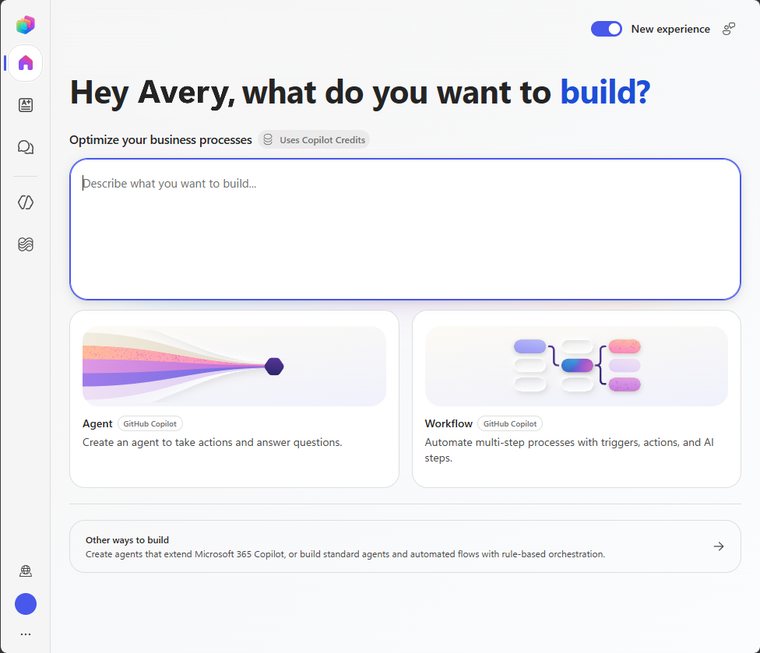
Microsoft’s page lists three building blocks.
- Agents. An AI assistant that follows your instructions, draws on the knowledge sources you connect and uses tools to take action. You can create one by describing it in plain language and test it before you publish.
- Workflows. Automations built in a drag-and-drop designer, where each step can combine agents, tools and logic. Microsoft lists built-in testing and human-in-the-loop controls.
- Agent flows. The established flow format, which you can run on its own or attach to an agent as a tool.
Agents can work with employees and customers in multiple languages across Microsoft Teams, Microsoft Copilot, websites and mobile apps. Teams that already use Microsoft 365 Copilot will find the surroundings familiar. If you are still deciding between the chat tools, our review of Copilot Chat vs Microsoft 365 Copilot explains the difference.
What a harness is. Everything built in Copilot Studio runs on a harness, which Microsoft describes as the runtime between your design and the model. It decides when to call the model and which tools to use.
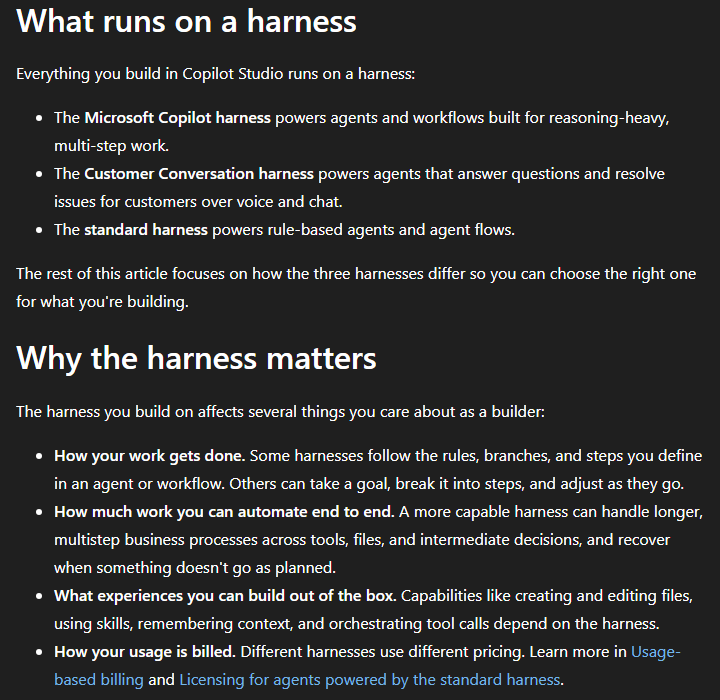
There are three: the Microsoft Copilot harness for reasoning-heavy, multi-step work, the Customer Conversation harness for agents that answer customers over voice and chat, and the standard harness for rule-based agents and structured, repeatable conversations. The choice affects how the agent reasons, how complex a task it can take on and how it is billed, so make it early.
What are ChatGPT Workspace Agents?
OpenAI announced workspace agents on 22 April 2026 and calls them an evolution of GPTs. In the trade coverage we read, they handle multi-step team workflows across tools, run on Codex in the cloud and keep working when the user is offline. Teams describe a recurring workflow or upload a file, and ChatGPT sets up the steps, tools and skills. Templates exist for finance, sales and marketing.
How they run is the main difference from a custom GPT.
- On a schedule or on request. Agents can run on a timetable or be connected to Slack, where they pick up requests as they arrive.
- With context. Agents can use files, code, connected apps and memory across sessions.
- With approvals. Sensitive actions, such as sending an email, can require a person to approve first.
- Under admin control. On Enterprise and Education plans, admins control which user groups can create and share agents and which tools each agent can use. Agents can be monitored through the Compliance API and paused if something goes wrong.
Three points to check before you rely on this.
- Plans. The launch was for ChatGPT Business, Enterprise, Education and Teachers plans. It was a research preview, and later notes describe wider availability. Confirm your plan in OpenAI’s current support page.
- Custom GPTs. The announcement says existing custom GPTs remain available for now and that a tool to convert them is in development. If you built one, read our guide to building a custom GPT for your business and our entry on custom GPTs with that in mind.
- Naming churn. OpenAI’s support page for the older ChatGPT agent now says it is discontinued and points to ChatGPT Work. Its AgentKit page says Agent Builder and Evals will no longer be available on the OpenAI platform from 30 November 2026. If you came across either name in a vendor pitch, ask which product is actually being sold.
That churn is not a reason to avoid the product. It is a reason to keep a record of what you built, why, and who owns it, which we cover in what happens when nobody owns the AI you have rolled out.
What are Claude Projects?
Anthropic’s support page describes Projects as self-contained workspaces with their own chat histories and knowledge bases. Within each project you upload documents, provide context and have focused chats with Claude.
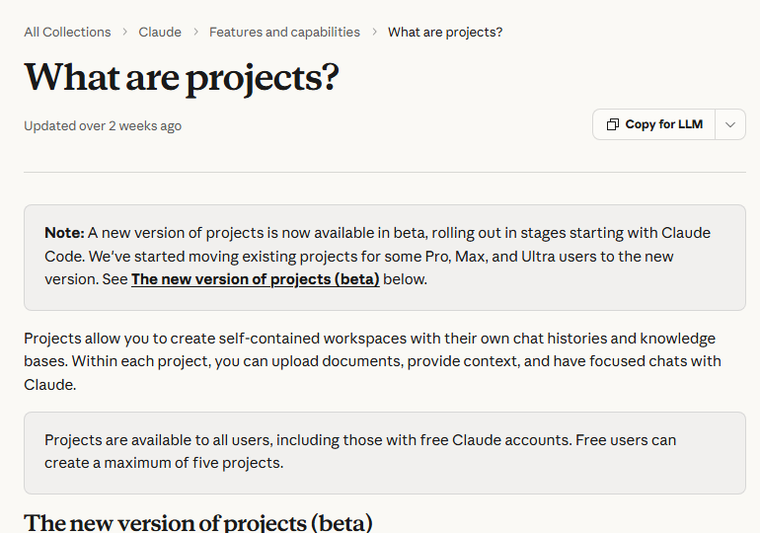
The same page lists what a project holds.
- A knowledge base. Documents, text, code and other files that Claude uses as background for chats in that project.
- Custom instructions. A tone, a role or a set of rules that applies to every chat in the project.
- Retrieval for large knowledge. As project knowledge nears the context limit, Claude switches to retrieval-augmented generation, which Anthropic says expands capacity by up to 10x. Our entry on the context window explains why that limit matters.
- Team sharing. On Team and Enterprise plans a project can be shared with specific people, groups or the whole organisation. Viewers can chat in it and editors can change its instructions and knowledge.
Projects are available on every plan, with up to five projects on the entry plan, and enhanced retrieval needs a paid plan. We cover the plan split in our review of Claude Free vs Pro. For a three-way look at the same feature across vendors, see ChatGPT Projects vs Claude Projects vs Gemini Gems.
Can Claude Projects build an Agent?
Not in the way Copilot Studio does. A Project gives Claude your context. It does not give Claude a trigger, a schedule or a set of approved actions. You open it, you ask, Claude answers.
Anthropic says that is changing at the edges. The same support page describes a new version of projects, in beta and rolling out in stages starting with Claude Code. In it, a project is one conversation, and Claude breaks the work into parallel threads that run in the cloud and carry on if you close your laptop. Anthropic also notes that running several threads uses your plan’s usage faster.
Claude does act as an agent elsewhere. Our review of Claude Cowork or Claude Code for non-developers covers the tools built for that, and our entry on the Model Context Protocol explains how Claude reaches outside systems, in the same way as the connectors in the other two products. For a plain comparison of connecting methods, see MCP vs API.
Which one is Best for a Small Business?
It depends on the job. This is how we would match them.
Reach for Claude Projects when
You re-paste the same documents
You want consistent tone and answers
One person or a small team uses it
A person always reads the output
Reach for an agent builder when
The work repeats on a schedule
It must touch company systems
Several people depend on it
You need approvals and an audit trail
Choose Copilot Studio if your business runs on Microsoft 365, you have someone who will own the build, and the agent will touch company systems such as SharePoint, Teams or line-of-business data. It asks the most and offers the most control.
Choose ChatGPT Workspace Agents if your team already works in ChatGPT, the task is a repeatable multi-step job across several connected apps, and you want people to build agents by describing them rather than by learning a designer. Confirm your plan first.
Choose Claude Projects if the real need is consistent answers from your own documents: a project holding your style guide, product notes or policy documents, which anyone drafting or researching can use. It is the fastest of the three to start.
If you are unsure which category your task falls into, our guide to telling a real AI workflow from a chatbot with extra steps gives a short test, and the difference between automating a task and automating a decision sets out where a person should stay in charge.
How do they compare on Data Protection and Governance?
This is where the three differ most, and where a small business should look before it looks at features.
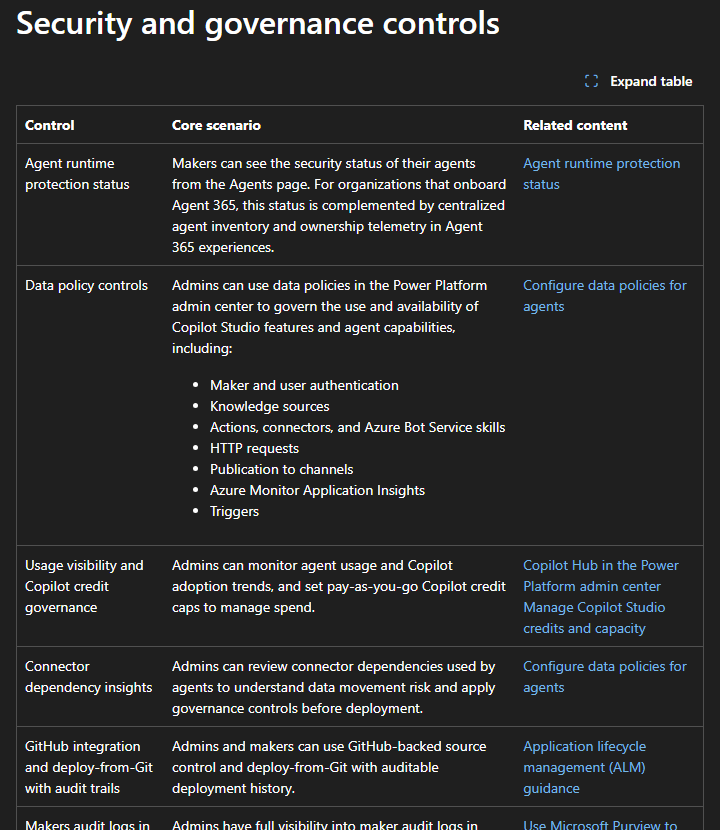
Microsoft’s page lists the most. Among the controls are data policies that govern knowledge sources, connectors and publication to channels, maker audit logs in Microsoft Purview, alerts through Microsoft Sentinel, a security scan before publishing, customer-managed encryption keys and caps on pay-as-you-go credits. An admin can also switch off publishing of agents that use generative AI features. Microsoft Agent 365 is described as a central control plane for observing and governing agents.
The ChatGPT description is shorter but covers the same ground: role-based control over which tools each agent can use, analytics on shared agents, safeguards aimed at prompt injection, the Compliance API and the ability to pause an agent. Claude Projects has the least to configure. Sharing is limited to Team and Enterprise plans, and the owner can turn sharing off.
Three questions apply to all of them.
- Where does the data go? Our entry on data residency and Microsoft’s own residency page cover Copilot Studio. Ask the other two vendors the same question.
- Is there a record? An audit trail is what lets you answer “who did this and when” after something goes wrong.
- What is allowed in? Our guide to what is safe to paste into AI tools gives a starting list, and our piece on connecting ChatGPT to Gmail, Drive or SharePoint covers the permissions side.
For the wider picture, see AI governance for small and mid-sized businesses and our guide to writing an AI use policy for your team.
What are the Security risks of an AI Agent?
An agent can act, so its mistakes cost more than a chatbot’s. A chat tool gives a wrong answer that a person reads. An agent with permission to send email, update records or call a payment system can act on a wrong answer before anyone looks.
Two risks matter most.
- Prompt injection. Text in a document, web page or email can contain instructions that the agent follows as if you had written them. Our guide to what prompt injection is explains how it works. OpenAI says workspace agents carry safeguards against it, and Microsoft’s security scan reviews knowledge, tools and actions before you publish. Neither removes the risk.
- Too much access. An agent that can read everything can leak anything. Give it the narrowest access that lets it do the job, and run it under the signed-in user’s own permissions where the product allows. Microsoft lists running tools with the user’s credentials as a setting.
Put guardrails in the design: an approval step before any message leaves the company, a spending cap, and a named owner. Our entry on agent washing is worth reading too, because some products sold as agents are scripted flows with a new label.
How much do they cost to run?
Rates change, so we give none here. What you can compare is the billing model.
| Billing model, as described by the vendor | |
|---|---|
| Copilot Studio | Copilot Credits, from prepaid packs or pay-as-you-go through an Azure subscription. Capacity is enforced monthly and unused credits do not carry over. |
| ChatGPT Workspace Agents | No charge during the launch period, then credit-based billing, per OpenAI’s announcement. |
| Claude Projects | Included in the plan. Project use draws from your plan’s usage limits. |
Microsoft’s licensing page adds two points worth knowing. A Microsoft 365 Copilot licence includes agent capabilities in Copilot Studio when used in Microsoft Copilot, Teams or SharePoint. And Copilot Credits measure the time and effort an agent needs, so a complicated task uses more than a simple one.
Usage billing is good for a pilot and risky for a surprise. Set a cap, check the first month’s bill against what you expected, and read our guide to what an AI workflow actually costs to run. Our entry on total cost of ownership covers the costs that never appear on the invoice, such as the hours someone spends maintaining the agent.
Which one works with your Existing Tools?
Copilot Studio is the strongest fit if your tools are Microsoft ones. Microsoft’s page says you can connect to other data sources through prebuilt or custom connectors, and agents publish to Teams and Microsoft Copilot. ChatGPT Workspace Agents connect to apps your admin enables, and to Slack for requests. Claude reaches outside systems through connectors and the Model Context Protocol, but a Project itself is a knowledge store and not an integration.
If the real need is simply moving data between apps on a trigger, you may not need an AI agent at all. Our reviews of Zapier vs Make vs N8N and no-code automation vs custom API integration cover that route, and off-the-shelf AI tools vs a custom AI workflow covers the build-or-buy question.
Which one is easiest to start with?
Claude Projects, by some distance. You create a project, write instructions and upload the documents you keep re-pasting. ChatGPT Workspace Agents sit in the middle, because you describe a workflow and ChatGPT proposes the steps, though an admin may need to enable it first. Copilot Studio asks you to learn a studio, choose a harness, connect knowledge and decide where to publish.
Ease is not the same as value. The easiest tool is a good place to learn what your team actually repeats. The most governed tool is a good place to put something the business depends on. Many small businesses end up using more than one, which brings its own risk: tools that nobody listed. Our entry on shadow AI explains why that matters, and our review of ChatGPT vs Copilot for business and Claude vs ChatGPT for business cover the assistants underneath.
How do you choose between them?
You do not need a long evaluation. Four steps are enough.
Pick one job
Narrow and repeated
Match the tool
Chat, shared agent or builder
Run a 30-day pilot
Real work, a named owner
Review the result
Keep, change or stop
- Pick one job. Something narrow that repeats, such as preparing a weekly report or answering the same customer questions.
- Match the tool. If a person asks and reads, use a Project. If it must run alone across several apps, use an agent builder. If it touches company systems and must be governed, lean towards Copilot Studio.
- Run a pilot. Our guide to running a 30-day AI pilot in a small business gives a plan, and how to choose an AI vendor covers the questions to ask before you sign.
- Review the result. Keep the tool only if it saved real time or removed a real error. If you want it built or reviewed properly, our AI agents in action course covers practical agent use, and an AI audit checks what you already have.
Our verdict
There is no single winner, because the three products solve different problems. Claude Projects is the best starting point for a small business that mainly wants consistent answers from its own documents. ChatGPT Workspace Agents suit a team that already lives in ChatGPT and wants shared agents that run on a schedule, once it has confirmed its plan. Copilot Studio is the one to choose when the agent touches company systems, because it offers the deepest governance, at the price of more setup.
Whichever you pick, give it one job, one owner and one approval step, and measure it for 30 days before adding anything else.
Further reading
- What is an AI agent?: the plain definition behind all three tools.
- AI agents vs prompting for business: when a chat is enough and when to build an agent.
- Copilot Chat vs Microsoft 365 Copilot: the Microsoft chat tools that sit alongside Copilot Studio.
- ChatGPT Projects vs Claude Projects vs Gemini Gems: the project feature compared across vendors.
- What is prompt injection?: the main security risk for any agent.
- How to run a 30-day AI pilot in a small business: a safe way to test one.
Sources
- Copilot Studio overview: agents, workflows, agent flows, harnesses and channels, as read on 19 November 2026.
- Copilot Studio licensing: Copilot Credits, prepaid packs, pay-as-you-go and what a Microsoft 365 Copilot licence includes, updated 4 November 2026.
- Copilot Studio security and governance: data policies, audit logging, encryption keys and Agent 365, updated 24 September 2026.
- Harnesses in Copilot Studio: the three harnesses and why the choice matters.
- What are projects?: knowledge base, instructions, retrieval, sharing, plan limits and the new beta version.
- Introducing workspace agents in ChatGPT: OpenAI’s announcement of 22 April 2026, read through search results because the page blocked automated access.
- OpenAI launches workspace agents: a trade report describing plans, scheduling, approvals, admin controls and the relationship to custom GPTs.
- Introducing AgentKit: OpenAI’s notice that Agent Builder and Evals are being wound down, read through search results.
FAQ
Questions we get asked
What is the difference between Copilot Studio, ChatGPT Agents and Claude Projects?
Copilot Studio is a low-code studio where you build, publish and govern agents and workflows, mostly inside Microsoft 365. ChatGPT Workspace Agents are shared agents that run in the cloud, on a schedule or from a chat, inside a ChatGPT workspace. Claude Projects are workspaces that keep files and instructions for repeat work. They are not an agent builder, although Claude can act as an agent in other products.
Is Claude Projects an AI Agent?
Not by itself. Anthropic's support page describes a Project as a self-contained workspace with its own chat history, knowledge base and custom instructions. You work with Claude inside it, and it does not run a process on its own. A newer beta version, starting with Claude Code, lets a project run parallel threads in the cloud, which moves it closer to agent behaviour.
What are ChatGPT Workspace Agents?
OpenAI announced them on 22 April 2026 as an evolution of custom GPTs. They are shared agents that run in the cloud, can work on a schedule, can take requests in Slack, and can use files, connected apps and memory. Admins control who can build and share them, and sensitive actions such as sending an email can require approval.
Does ChatGPT Agent still exist?
OpenAI's support page for ChatGPT agent now says it has been discontinued and points users to ChatGPT Work for longer, multi-step tasks, and to the cloud browser for supported browser workflows. If you read an older article that tells you to switch on agent mode, check the current support page before you plan around it.
Which is Best for a Small Business that already uses Microsoft 365?
Copilot Studio is the natural place to look, because agents can be published to Microsoft Teams and Microsoft Copilot, and governance sits in tools your admin already uses. Microsoft's licensing page says a Microsoft 365 Copilot licence includes some agent use in Copilot, Teams and SharePoint. It still takes someone willing to learn a builder.
Which one is easiest to start with?
Claude Projects. You create a project, add instructions and upload the documents you keep re-pasting, and you are working in minutes with no builder to learn. ChatGPT Workspace Agents sit in the middle, because you describe a workflow and ChatGPT sets up the steps. Copilot Studio asks the most of you but gives the most control.
Are these Tools Safe for customer Data?
Each can be used safely if you set it up on purpose. Copilot Studio lists data policies, audit logs and customer-managed keys among its governance controls. ChatGPT Workspace Agents are described with role-based admin controls and a Compliance API. Claude Projects can be shared only on Team and Enterprise plans. In all three, decide first what customer data may enter, and keep personal data out unless you have a lawful basis.
How are Copilot Studio and ChatGPT Agents billed?
Both bill by usage rather than by a flat licence. Microsoft's licensing page says Copilot Studio uses Copilot Credits, bought as prepaid packs or pay-as-you-go through an Azure subscription, and that unused credits do not carry over month to month. OpenAI's announcement says workspace agents moved to credit-based billing after a launch period. Check each vendor's page for the current rates.
Can I use more than one of them?
Yes, and many teams do. A common pattern is Claude Projects or a ChatGPT workspace for drafting and research, with Copilot Studio for the agents that touch company systems and need central governance. The risk is shadow AI, so keep one list of what is in use, who owns it and what data it can reach.
Ready to Put This to Work?
Tell us where your team is with AI and we will tell you honestly what would make the biggest difference.