Cursor vs GitHub Copilot vs Claude Code for Small Dev Teams
Cursor vs GitHub Copilot vs Claude Code compared for small dev teams: plans, daily workflow, data controls and which one to trial first.
Cursor, GitHub Copilot and Claude Code all do the same headline job now: they read your code, plan a change, edit files and prepare the result for a person to review. A small team has to choose one, or at most two, and the sales pages make that harder, because each tool describes itself with the same word, “agent”.
This comparison covers what each tool is, what it costs a team of two to ten, how it fits into daily work, what each one says about data, and where each falls short. The short version: GitHub Copilot is the safest default for a team that already lives on GitHub, Cursor is the one to try if you want an editor built around an agent, and Claude Code is the one to try if you want an agent that also runs in the terminal and in automated pipelines.
We did not run speed or quality benchmarks, and we do not rank the underlying models. Every fact below comes from the vendors’ own pages, read on 13 November 2026, and where two sources disagree we say so. Prices change often, so check each page before you buy.
Key takeaways
- All three tools can now work as an AI agent: they plan a change, edit several files, run commands and hand the result back for review.
- On the pages we read, the entry price for a managed team plan is lowest for GitHub Copilot Business, then Claude Team Standard seats, then Cursor Teams. Usage is metered or capped differently on each, so seat price alone does not tell you the monthly bill.
- GitHub Copilot is built into GitHub, so it works on your issues and pull requests. Cursor is its own editor. Claude Code runs in a terminal, IDEs, a desktop app and the browser.
- You do not have to choose only one. Claude Code installs into VS Code and Cursor, and GitHub Copilot’s paid plans can run third-party agents.
- Data handling differs by plan. GitHub says individual-plan data may be used for training unless you opt out, so a company should use a managed plan, whichever tool it picks.
- None of the three removes the need for a developer to read the code. Keep a human in the loop on every merge.
What are Cursor, GitHub Copilot and Claude Code?
All three are AI coding tools, which means software that uses a large language model to write, explain and change code. They differ in where they live.
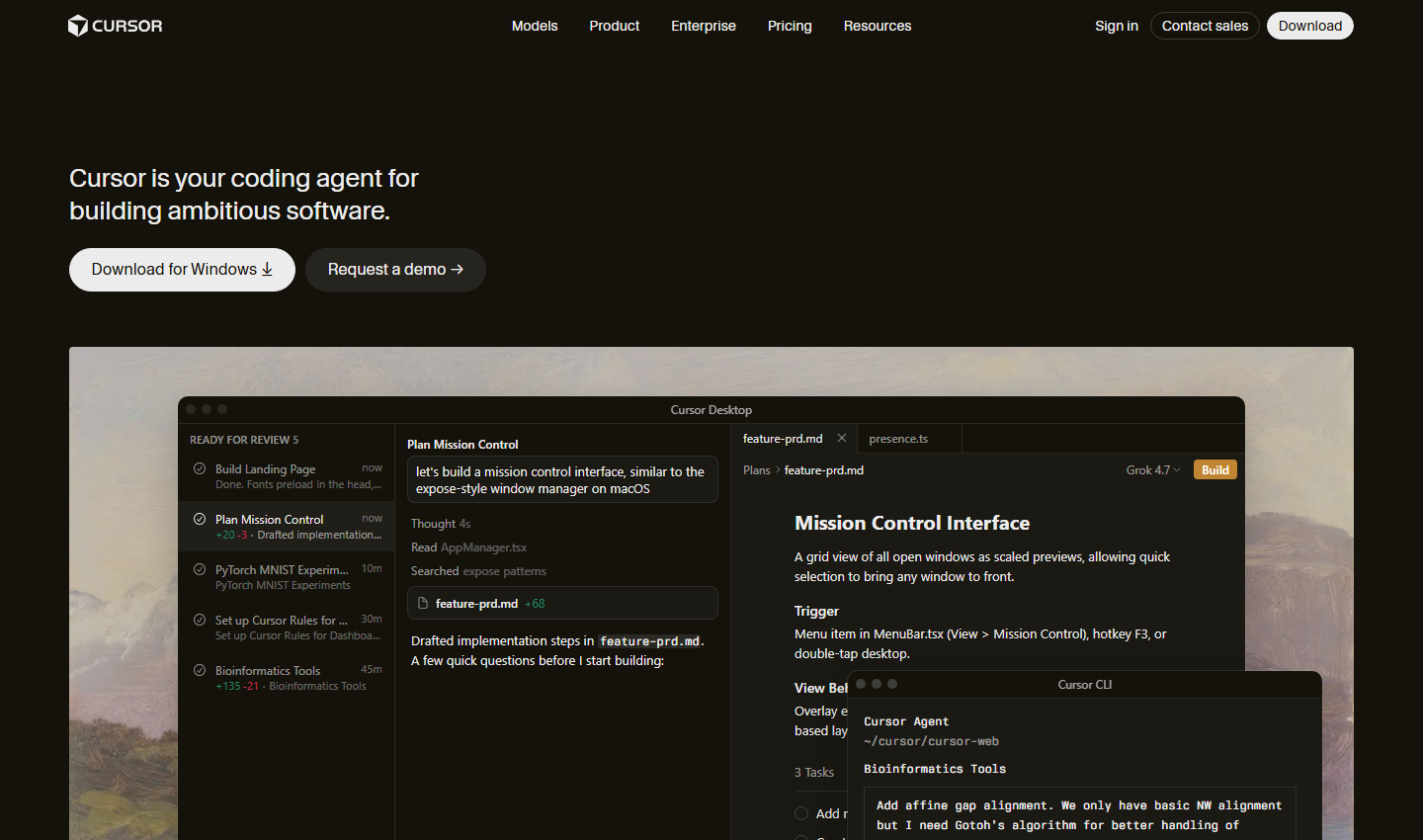
Cursor describes itself as “your coding agent for building ambitious software”. It is a desktop application, with a command-line version called Cursor CLI. Its product menu lists Agent, Cloud Agents, which run on their own machines to build and test features for review, and Code Review, which reviews pull requests on GitHub.
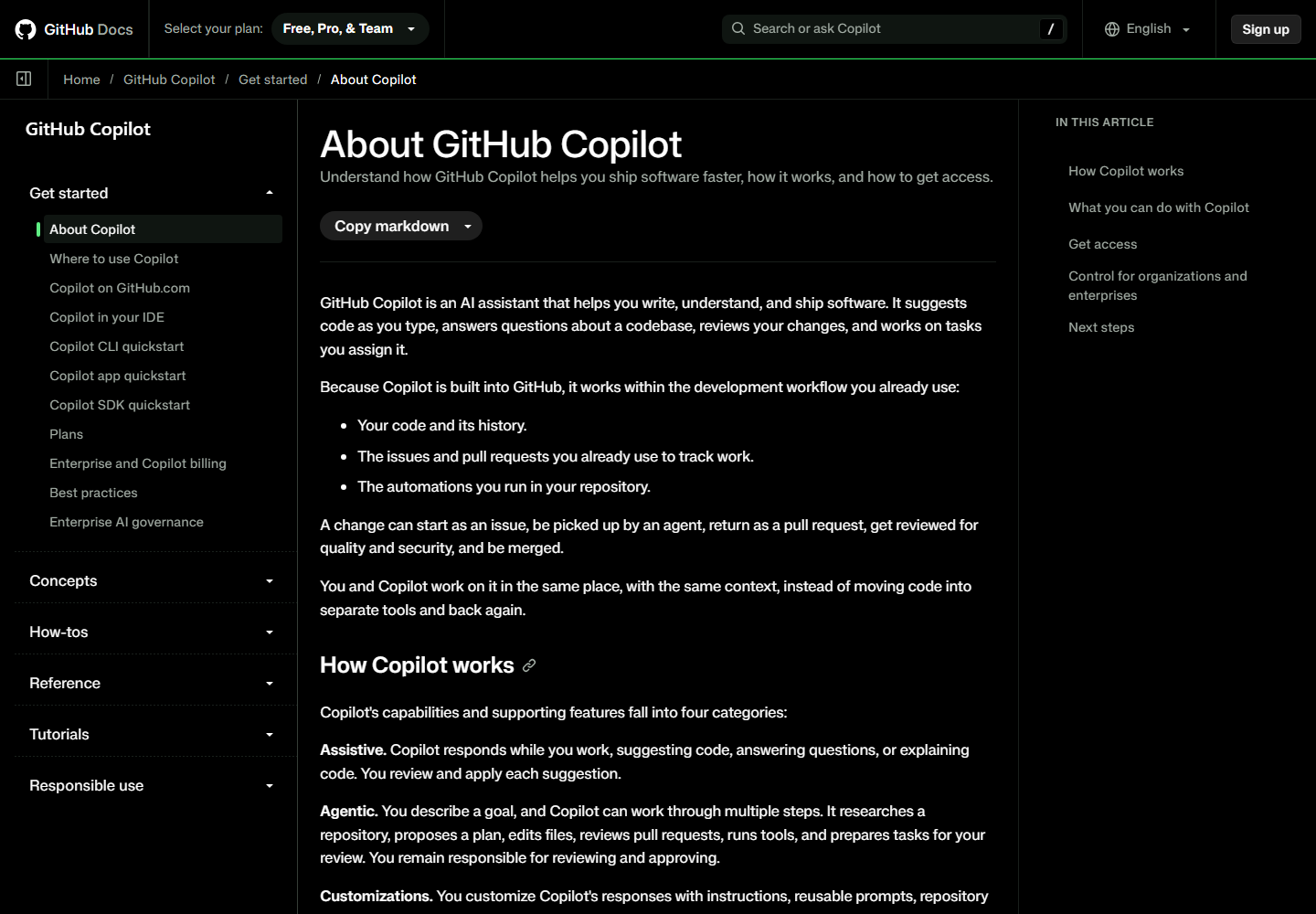
GitHub Copilot is an assistant built into GitHub. GitHub’s documentation says it works with your code, issues, pull requests and repository automations, so you and the assistant share the same context. A change can start as an issue, be picked up by an agent, come back as a pull request and be merged after review. It runs in the GitHub website, in IDEs and on the command line.
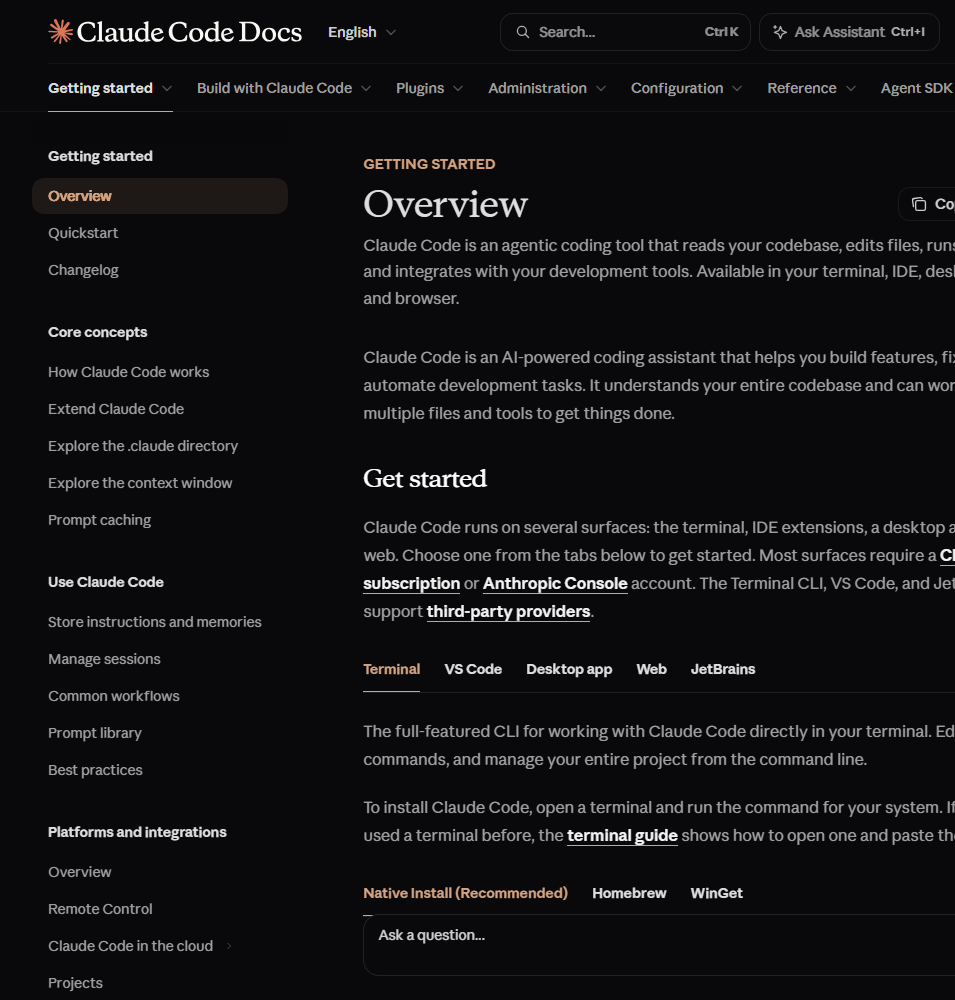
Claude Code is Anthropic’s coding tool. Its documentation calls it “an agentic coding tool that reads your codebase, edits files, runs commands, and integrates with your development tools”, available in a terminal, IDE extensions, a desktop app and the browser. It uses the same Claude models as the chat product. If you want the background on those, see our review of Claude Sonnet 5.5 and Opus 5.5, and for the company’s wider position, Claude against ChatGPT.
A quick note on names. GitHub Copilot is not the same product as Microsoft 365 Copilot, which works inside Word, Outlook and Teams. If you are weighing those, our comparison of Copilot Chat and Microsoft 365 Copilot covers it.
How much do they cost a Small team?
Prices below are list prices in US dollars as shown on each vendor’s own page on 13 November 2026. Vendors change their plans often, and GitHub changed how usage is billed during 2026, so treat this as a snapshot.
| Cursor | GitHub Copilot | Claude Code | |
|---|---|---|---|
| Free tier | Free, with limited agent and chat requests | Free, with 2,000 completions a month and limited chat and agent use | No free plan for Claude Code on the pages we read |
| Individual plans | Plus $8, Premium $30, Super $100, Ultra $200 | Pro $10, Pro+ $39, Max $100 | Pro $17 a month billed annually ($20 monthly), Max $100 |
| Team plan | Teams from $30 per user | Business $19 per user | Team Standard $20 per user billed annually ($25 monthly), Premium $100 ($125 monthly) |
| Enterprise | Custom, contact sales | $39 per user | $20 per user plus usage at API rates, 20 seats minimum |
| How usage is counted | Shared usage pools, multiples of the Plus plan | Monthly AI Credits, 1 credit = $0.01 | 5-hour and weekly limits on subscriptions |
Cursor. The pricing page lists Free, Plus at $8, Premium at $30 and Super at $100, with Ultra at $200 above them. The Plus plan is described as an introductory plan with a shared usage pool, and the page notes that only Grok models are available on it. Premium adds cloud agents and automations, code hosting, AI code reviews and third-party models at API list price. The Teams tab starts at $30 per user, with pooled usage, centralised billing, usage analytics, team-wide privacy settings, SAML and OIDC single sign-on and a team marketplace for shared rules and plugins. Enterprise adds invoice billing, SCIM seat management, audit logs and access controls by repository, model and MCP server.
One thing to flag. Cursor’s pricing page now shows its plans alongside X and Grok features, such as a Premium checkmark and Grok Chat, and several third-party price guides still list older plan names and figures. We have quoted only what the vendor’s own page showed on 13 November 2026, and you should check the page again before you sign.

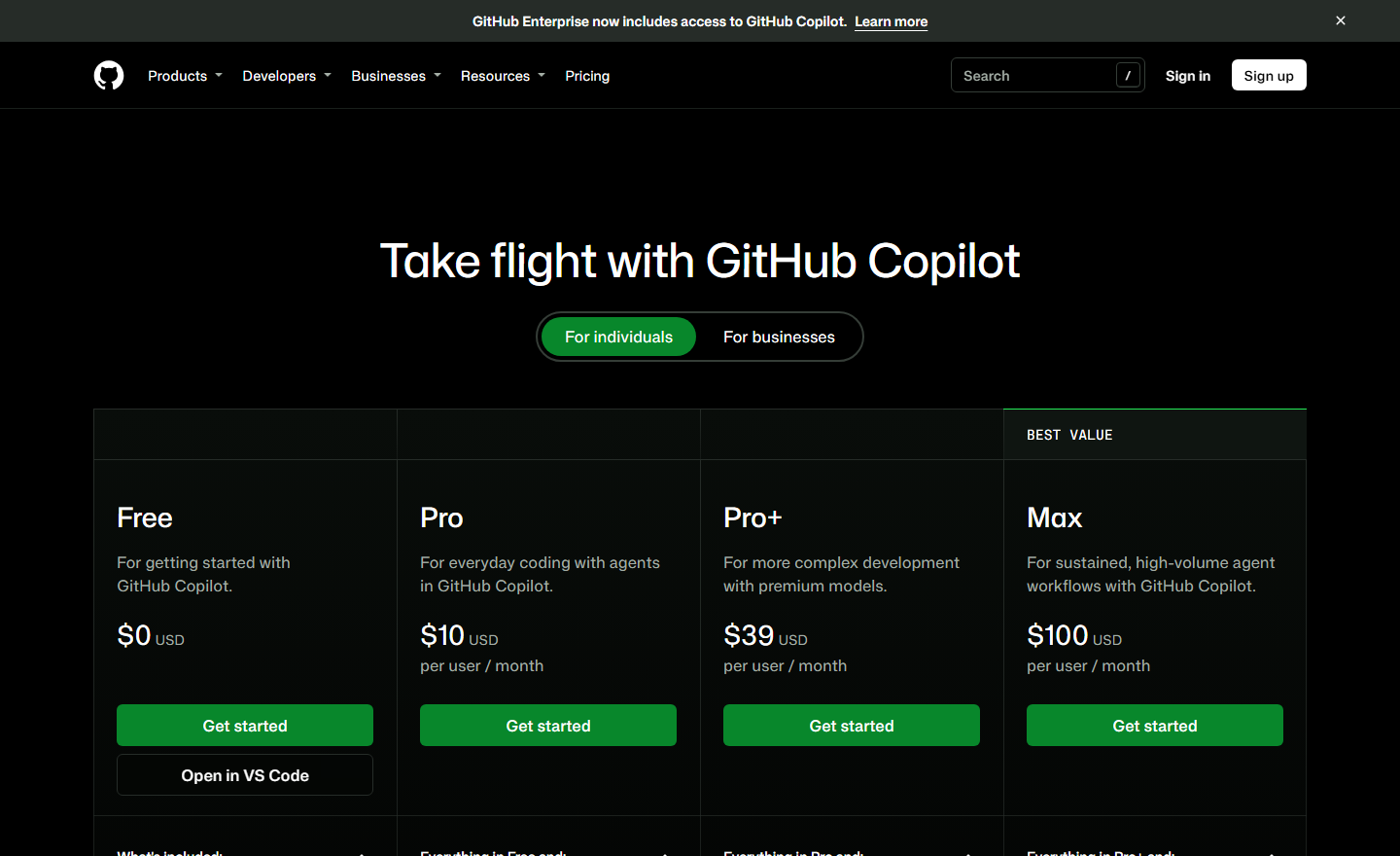
GitHub Copilot. The plans page lists Free, Pro at $10, Pro+ at $39 and Max at $100 per user per month. GitHub’s announcement says that from 1 June 2026 usage is metered in AI Credits, where one credit is worth one cent, and that code completions and next edit suggestions remain included in all plans without using credits. Pro includes $15 of monthly credits, Pro+ $70 and Max $200. For organisations, the same announcement lists Business at $19 per user per month with $19 of credits included, and Enterprise at $39 with $39 included, with promotional extra credits for existing customers through August 2026.
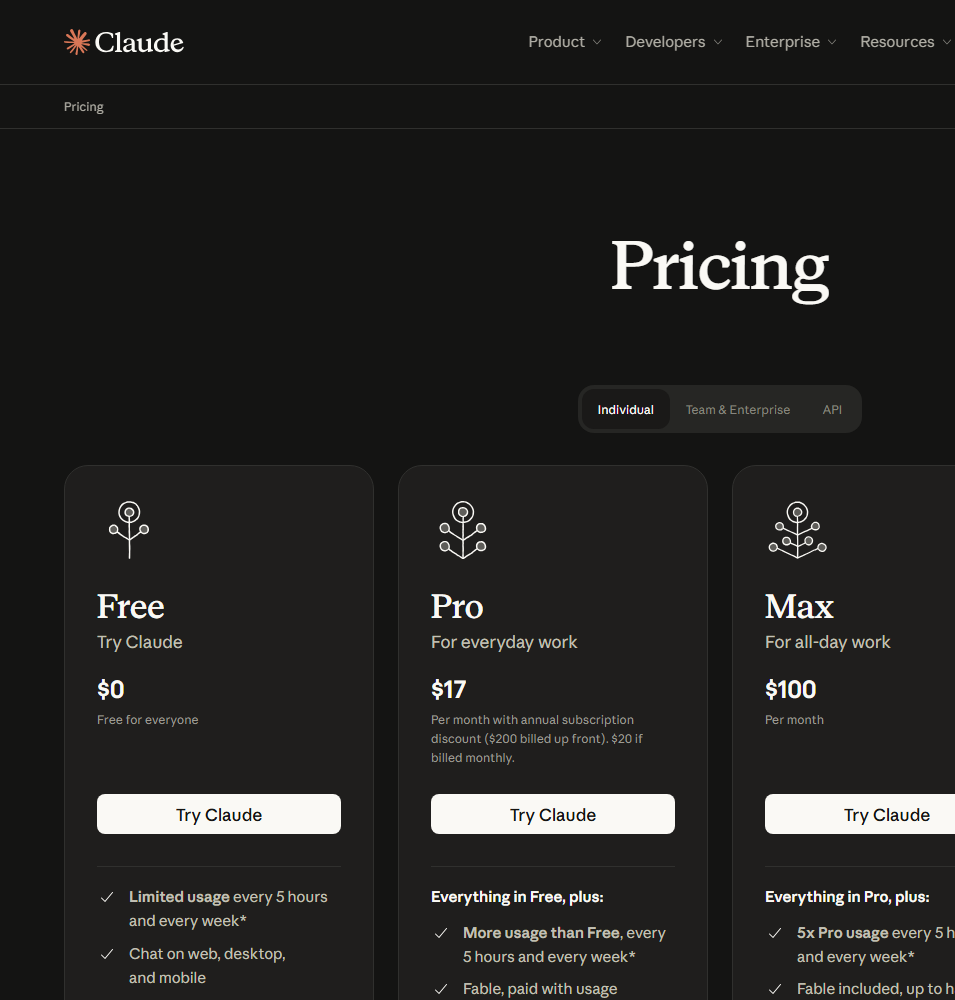
Claude Code. There is no separate Claude Code subscription. It comes with the Claude plans. Anthropic’s pricing page lists Pro at $17 a month billed annually, or $20 billed monthly, and Max at $100 a month. For teams, a Standard seat is $20 per month billed annually or $25 billed monthly, a Premium seat is $100 billed annually or $125 billed monthly with five times the usage of a Standard seat, and the minimum is two seats. Enterprise is $20 per seat plus usage at API rates, with a minimum of 20 seats. Subscription limits work as a 5-hour limit and a weekly limit, and depend on the model, the length of the chat and the size of the files.
What this means for a team of five. A managed plan lands somewhere between about $95 and $150 a month per tool on seat prices alone, before any extra usage. The seat price is not the number to watch. Watch the usage: credits that run out, a weekly limit that stops a heavy user on Thursday, or a pooled allowance that one person drains. Ask each vendor how overage is handled, and set a spending cap before you roll anything out. Our article on what an AI workflow costs to run explains why usage-based pricing needs a budget owner.
How does each Tool fit into daily work?
The three tools suggest three different habits, and this matters more than a feature list.
Cursor in daily use
Cursor puts the agent in the main window. You describe a task, the agent reads files, drafts a plan, edits code and shows the changes for you to accept. The home page screenshot above shows the layout: a list of tasks marked “ready for review” on the left, the agent chat in the middle and the plan document on the right. Cloud agents let a task run away from your own machine, and Code Review looks at pull requests on GitHub.
This suits a developer who wants to stay in one window and steer the agent as it goes. The risk is the usual one with fast tools: it is easy to accept large diffs you have not read.
GitHub Copilot in daily use
Copilot’s strength is placement. Because it sits inside GitHub, work can start from an issue, be picked up by a coding agent, come back as a pull request and go through the review process your team already has. GitHub’s documentation groups its abilities into four kinds: assistive, such as suggestions while you type; agentic, where it plans, edits files and prepares work for review; customisations, such as instructions, reusable prompts and custom agents; and external agents, models and tools, including MCP servers from other providers.
This suits a team that already runs its planning, review and releases on GitHub and wants the assistant to follow the same process. It is the most conservative choice and probably the easiest to explain to a manager or a client.
Claude Code in daily use
Claude Code behaves like a command-line tool as well as an assistant. Its documentation shows it piping logs in, running in continuous integration, opening pull requests and reviewing changed files. A file called CLAUDE.md in the project root sets coding standards, architecture decisions and review checklists, and Claude Code reads it at the start of every session. If a repository already has an AGENTS.md for other coding tools, Claude Code can read that instead. Skills package repeatable jobs such as a pull request review, hooks run commands before or after actions, and subagents work on different parts of a task at the same time.
This suits a team that wants an agent it can script and schedule, for example a nightly dependency check, or an automatic first review on every pull request. It asks more of the team: the power comes from setting up instructions and automation, not from opening the app. If you are weighing the non-developer side of the same product, we cover that in Claude Cowork or Claude Code for non-developers.
What do they have in Common?
It helps to separate the shared ground from the real differences.
- Agent modes. All three can plan a multi-step change and carry it out across several files. In plain terms, this is agentic AI, and our explainer on what an AI agent is covers the idea for non-specialists.
- Instructions files. Each lets you write project rules that the tool reads before it works. Writing those rules well is the single biggest lever on quality, and it is the same discipline as writing a good brief, which we cover in how to brief an AI tool like a new hire.
- Connections to other tools. All three support the Model Context Protocol, or MCP, which lets an AI tool read from and act in other software. If MCP is new to you, see our explanation of MCP against a plain API.
- A review step. Each one prepares changes for a person to approve. That step is the safety net, and removing it is the most common way these tools go wrong.
Which AI Models can each one use?
This is where the tools differ most. Cursor says it lets you “use the best model for every task”, and its home page lists models from several providers, including Grok 4.7, GPT-5.6 Sol, Fable 5.2 Max, Opus 5.5, Gemini 3.1 Pro and its own Composer 2.5, plus an Auto option that picks for you. The pricing page adds that third-party models on the Premium plan are charged at API list price, and that the Plus plan offers only Grok models.
GitHub Copilot’s plans page says the model list is the same on every plan and that plans differ in how much usage they include. Its Pro+ and Max plans list access to third-party coding agents, including Claude and Codex, although the Pro plan’s wording on this is inconsistent on the page, so check before relying on it.
Claude Code uses Claude models. Anthropic’s Max plan mentions its top Fable model being included up to half the weekly limit, and its Pro and Team plans have their own limits. For the terminal, VS Code and JetBrains versions, the documentation says third-party providers are also supported.
Two practical points follow. First, a team that wants to switch between providers fits Cursor or Copilot more naturally than Claude Code. Second, the best model for a task changes every few months, so avoid building a process that depends on one name. If you want to understand why model size and context window matter for large codebases, our article on what a context window is covers it.
What do they say about Security and Data Privacy?
Source code is often confidential and sometimes belongs to a client. Before you paste it into any tool, read what the vendor says about training, retention and control. We only report what the pages said.
Cursor. The pricing page says that users or team administrators can switch on Privacy Mode, and that when it is on, code data is not used for training by Cursor or its model providers. Teams adds team-wide privacy settings, custom chat data retention and SAML and OIDC single sign-on. Enterprise adds SCIM, audit logs and repository, model and MCP access controls. The home page lists SOC 2, ISO 27001, ISO 42001 and AIUC-1 certifications in its footer.
GitHub Copilot. On the individual plans, the plans page says a public code filter applies and that individual data may be used for model training unless you opt out. The individual plans do not list organisation controls such as user management, usage metrics or single sign-on. GitHub’s documentation says administrators on the organisation plans can decide who has access and which features are available, exclude files that Copilot should not see, and review usage data and audit logs. Seats are assigned by an administrator.
Claude Code. The pages we read describe plans and limits but do not set out a data-use position for Claude Code in the same way. That does not mean there is no policy, only that a buyer should read Anthropic’s commercial terms and privacy information for the plan in question, and ask about retention. Team and Enterprise plans are the managed route, and the Enterprise plan adds admin-set spend limits.
Where the data is stored. None of the pages we read gave a clear answer on data location. If you are in the EU, ask each vendor directly, and read our glossary entries on data protection and GDPR. Developer tools also fall under the EU AI Act in some uses, and our guide to what the EU AI Act requires of a small business is a good place to start.
The practical rules are simple. Use a managed team plan, not personal accounts. Turn on the strictest privacy setting. Keep secrets, keys and customer data out of prompts and out of the repository, as set out in what is safe to paste into AI tools. And decide who may connect the tool to other systems, because a coding agent that can read a web page can also be steered by it, which is the problem described in what prompt injection is.
Which one fits a team of two to ten developers?
Match the tool to your habits, not to a leaderboard.
Choose GitHub Copilot Business if your code, issues and reviews are already on GitHub, you want the lowest and most predictable entry cost, and you need administrator controls and audit logs without a long evaluation. It is the choice that needs the least explaining to a client.
Choose Cursor Teams if your developers want the agent as the centre of their day, you are happy for the editor to be a new tool, and you want to pick between models from different providers. Check the plan details and the model list on the day you sign, because third-party price guides show the plans changing during 2026.
Choose Claude Team if you want an agent that also runs in the terminal and in automated pipelines, you are willing to invest in instructions files, skills and hooks, and you want the same engine in the terminal, the editor, the desktop app and the browser. Premium seats are worth testing for the one or two people who will use it all day.
Choose two on purpose if your team has two kinds of work. A common pattern is an editor-based tool for everyday typing and Claude Code for larger or repeatable tasks, since Claude Code installs into VS Code and Cursor. Just make sure that you are not paying twice for the same thing.
For a team of one or two, the free tiers and the entry plans are enough for an honest trial. The price of a wrong choice is low, and the time to change tools is measured in days.
Where do they fall short?
They write confident mistakes. Every one of these tools can produce plausible code that is wrong, insecure or quietly unnecessary. This is the same family of error as a hallucination in a chat tool, and it is why a person must read the diff. Our guide on checking AI output before it goes to a customer applies to code as well.
Usage costs are hard to predict. Credits, pooled usage and weekly limits are all ways of saying that a heavy week costs more than a light one. Teams that skip the budget step tend to find out from the invoice.
Pricing pages move. GitHub changed how Copilot usage is billed on 1 June 2026, and third-party guides report plan changes at Cursor and Anthropic too. A comparison like this one is a snapshot, and you should check the live page.
Prototype code is not production code. Speed makes it tempting to ship what the tool wrote on a Friday afternoon. The risks of leaning on this are covered in our piece on vibe coding for business.
Shadow use is the real data risk. If the company does not pick a tool, developers will pick one themselves on a personal account, and the code will leave the building anyway. We explain why bans fail in why banning AI tools at work does not work, and an AI use policy is the practical fix.
How do you test them on your own Code?
A two-week trial gives you more than any comparison, including this one.
- Pick three real tasks from your backlog: a small bug fix, a medium feature that touches several files, and a chore such as writing tests or updating a dependency.
- Run each task on each tool with the same written instructions. Use a copy of the repository without secrets in it.
- Score the result on whether it worked, how much the reviewer had to change, how long the whole task took and how much usage it consumed.
- Ask the developers which one they would reach for first on a Monday. Preference counts, because a tool nobody opens saves nothing.
- Check the invoice or the usage screen at the end, and multiply by team size.
For the structure of a trial, see our guide to running a 30-day AI pilot, and for the buying questions that sit around it, how to choose an AI vendor. To measure the result honestly, use the questions in is your AI tool actually saving time.
Verdict
There is no single winner, and anyone who names one without seeing your codebase is guessing. What we can say from the vendors’ own pages is this.
GitHub Copilot is the safest default for a small team that already works on GitHub. It has the lowest managed-plan entry price on the pages we read, the clearest administrator controls and the shortest path from an issue to a reviewed pull request. Cursor is the one to trial if your developers want the agent in the middle of the editor and want a choice of models. Claude Code is the one to trial if you want to script and schedule an agent, and the team will invest in instructions and automation.
For most teams of two to ten, the sensible move is to trial two of the three for two weeks on the same real tasks, set a usage cap, pick one managed plan and write down the rules for what code and data may go into it. If you would like a second pair of eyes on the choice, the questions in an AI audit are built for exactly this kind of decision, and our AI training courses cover how to brief and check these tools.
Further reading
- Claude Cowork or Claude Code for non-developers: the same Anthropic tool from the point of view of someone who does not write code.
- Claude Sonnet 5.5 vs Opus 5.5: Which fits your Business?: how the models behind Claude Code compare.
- ChatGPT vs Copilot: Which fits your Business?: the chat-tool side of the Copilot name.
- AI Agents vs Prompting for Business: when an agent is worth the extra setup.
Sources
- Cursor pricing: individual plans, Teams and Enterprise features, Privacy Mode and single sign-on, read on 13 November 2026.
- Cursor home page: the product description, Agent, Cloud Agents and Code Review, the list of models and the security certifications in the footer.
- GitHub Copilot plans: Free, Pro, Pro+ and Max prices, included credits, feature table and the data-training note for individual plans.
- About GitHub Copilot (GitHub Docs): what Copilot does, where it runs and the administrator controls for organisations.
- GitHub Copilot is moving to usage-based billing (GitHub Blog): Business and Enterprise prices, included credits and the 1 June 2026 change.
- Claude pricing (Anthropic): Pro, Max, Team and Enterprise prices, seat minimums, Claude Code inclusion and the usage limits.
- Claude Code overview (Claude Code Docs): where Claude Code runs, instructions files, skills, hooks, subagents and automation.
FAQ
Questions we get asked
What is the difference between Cursor, GitHub Copilot and Claude Code?
Cursor is an AI coding editor with its own agent, cloud agents and code review. GitHub Copilot is an assistant built into GitHub and your IDE, so it works on your issues and pull requests. Claude Code is an agentic coding tool from Anthropic that runs in a terminal, an IDE, a desktop app and the browser. All three can now plan, edit files and prepare changes for review, so the real difference is where they live and how you pay for them.
Which is cheapest for a Small team of five developers?
On the prices we read on 13 November 2026, GitHub Copilot Business at $19 per user per month is the lowest entry price for a managed team plan, against Cursor Teams from $30 per user and Claude Team Standard seats at $20 per user billed annually or $25 billed monthly. Price per seat is only part of it, because usage is metered or capped differently on each one. Run a two-week trial and look at what your team actually used.
Is Claude Code included in a Claude Team plan?
Yes. Anthropic's pricing page lists Claude Code as included on Pro, Max, Team and Enterprise plans. Team has Standard and Premium seats, with a minimum of two seats, and a Premium seat gives five times the usage of a Standard seat. Usage limits depend on the model, the length of the conversation and the size of the files involved.
Can I use Claude Code inside Cursor or VS Code?
Yes. The Claude Code documentation offers an extension for VS Code and a one-click install for Cursor, as well as a JetBrains plugin and a terminal version. This means a team does not have to pick only one tool, and some teams use an editor for everyday typing and Claude Code for bigger tasks.
Does GitHub Copilot train on my Code?
It depends on the plan. GitHub's plans page says that on the individual plans, Free, Pro, Pro+ and Max, individual data may be used for model training unless you opt out. Organisation controls, audit logs and the Business and Enterprise plans are the route for a company, so a team handling client code should use a managed plan and have an administrator check the settings.
Is Cursor Safe to use with client Code?
Cursor says that when Privacy Mode is switched on, code data is not used for training by Cursor or its model providers, and team administrators can enforce privacy settings across the team. The Teams plan lists SAML and OIDC single sign-on, and Enterprise adds audit logs and repository, model and MCP access controls. As with any tool, check your client contract first and test on a non-sensitive repository.
Do I need a developer to use these Tools?
Yes, in practice. All three tools write and change real code in real repositories, and someone has to review that code, run the tests and decide what to merge. A non-developer can use them for prototypes, but a prototype is not something to put in front of customers without a person who can read the code.
Which one should a team of two start with?
Start with whichever tool fits the way you already work. If your team lives on GitHub and wants the lowest cost, trial GitHub Copilot Business. If you want an editor built around an agent, trial Cursor. If you want a tool that can run from the terminal and in automated pipelines, trial Claude Code. Use the same three real tasks on each and compare the results.
Can AI coding Tools replace a developer on a Small team?
No. They speed up a developer by writing first drafts, tests and routine changes, but they make confident mistakes, and the person accepting the change is still responsible for it. Treat them as a fast junior colleague whose work always needs reading.
Ready to Put This to Work?
Tell us where your team is with AI and we will tell you honestly what would make the biggest difference.