Gemini 4 Neon Review
Gemini 4 Neon reached paying users on 18 November 2026. What it does, what it costs, what independent tests show and whether a small business needs it over Carbon or Hydrogen.
Google’s new mid-tier AI model, Gemini 4 Neon, reached paying users on 18 November 2026. It is the fourth Gemini 4 model in about seven weeks, and it lands one day after OpenAI’s GPT-6.2 launch and nine days after Anthropic’s Claude Fable 5.2. Unlike Google’s Carbon launch, there is already independent testing to read, and it tells a more careful story than the headlines do. This review covers what Neon is, what it costs, what the tests show and whether a small business should use it.
The short version: Neon gives you close to Carbon’s results at a lower price per token, but it is slower and wordier than Google’s marketing suggests. For most businesses, the question is Neon or Hydrogen, not Neon or Carbon.
Key takeaways
- Gemini 4 Neon is Google’s mid-tier model, between Hydrogen (fast, everyday) and Carbon (the hardest tasks). Google released it on 18 November 2026.
- The API price is $3 per million input tokens and $15 per million output tokens. It is not on the Free tier and has no launch discount.
- In the Gemini app it is included in Google AI Pro at €21.99 a month. Carbon still needs Google AI Ultra, from €99.99.
- Artificial Analysis, an independent testing group, scored Neon one point ahead of Carbon, at a lower cost and time per task.
- It is not the speed champion. Google’s own table calls its speed “moderate”, and Artificial Analysis found it slow and very wordy at the highest thinking setting.
- Neon has replaced Argon in the Gemini app. Carbon is cheaper per token until 30 November 2026, then dearer.
What is Gemini 4 Neon?
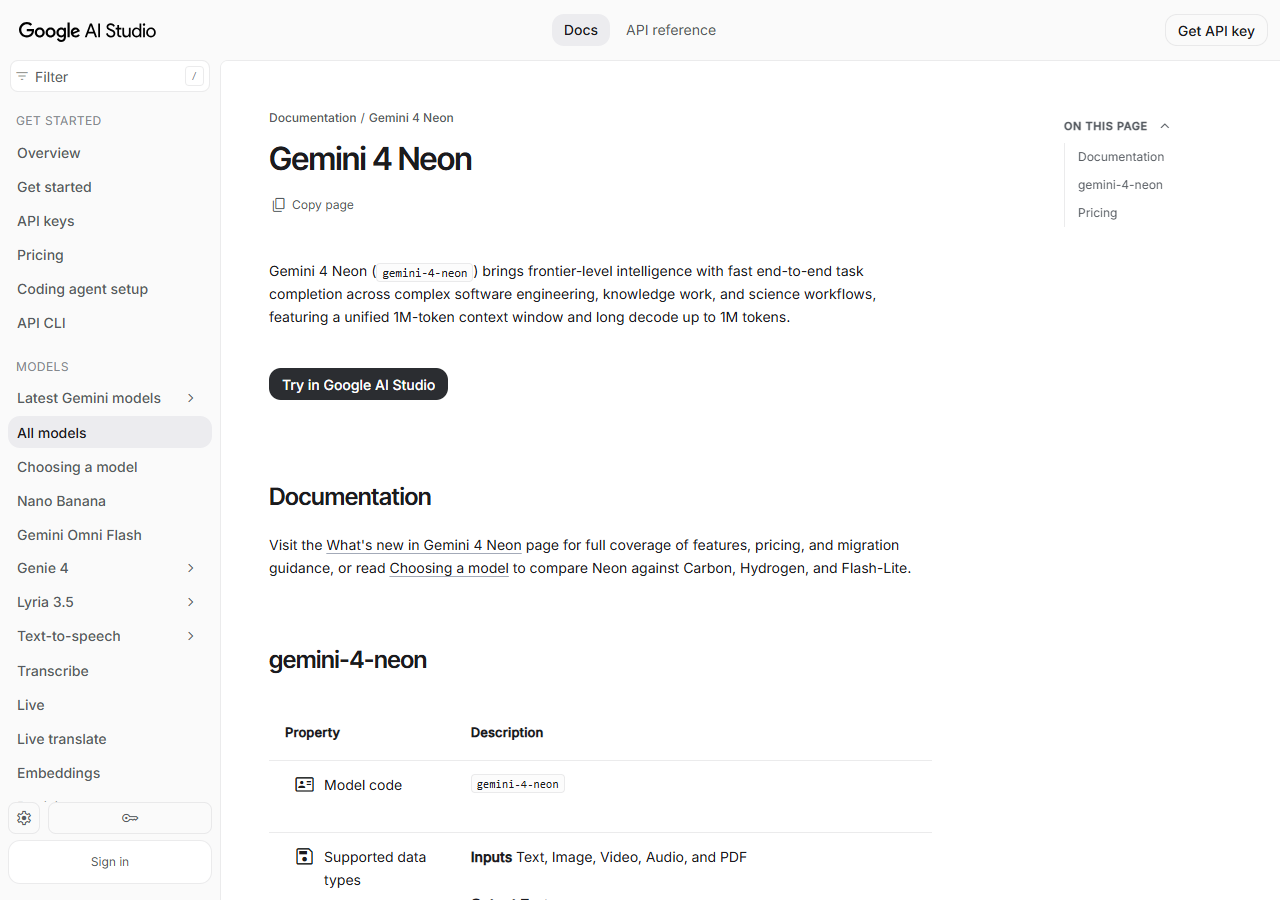
Neon is a large language model in Google’s Gemini range, and a reasoning model: it thinks through a problem before it answers. Google’s developer documentation says it “brings frontier-level intelligence with fast end-to-end task completion across complex software engineering, knowledge work, and science workflows”. In plain terms, it is meant to be the model you pick when a task is too hard for the cheap, fast model but does not need the most expensive one.
The Gemini 4 family now has four tiers, which is easier to follow in a list:
- Gemini 4 Hydrogen: everyday help and fast, cheap agent work.
- Gemini 4 Neon: deeper analysis, complex coding and knowledge work.
- Gemini 4 Carbon: the hardest, longest-running projects.
- Gemini 3.5 Flash-Lite: the fastest and cheapest, for high-volume jobs.
Argon, the model Google called the ideal choice for most work when it launched on 13 October, has been replaced by Neon in the Gemini app. Our Gemini 4 Carbon review covers the top of the range and how Argon fit in.
Neon is also built for the way people now use AI at work: handing it a job and leaving it to run. If the word “agent” is new, our entry on agentic AI explains it, and so does the article on what an AI agent is. In Google’s Antigravity coding platform, an Orchestrator mode pairs Neon’s planning with Hydrogen’s fast execution, a pattern worth knowing about because it uses the cheaper model for the bulk of the work.
How is Gemini 4 Neon Different from Gemini 4 Carbon and Hydrogen?
Google’s own comparison table shows the shape of the range.
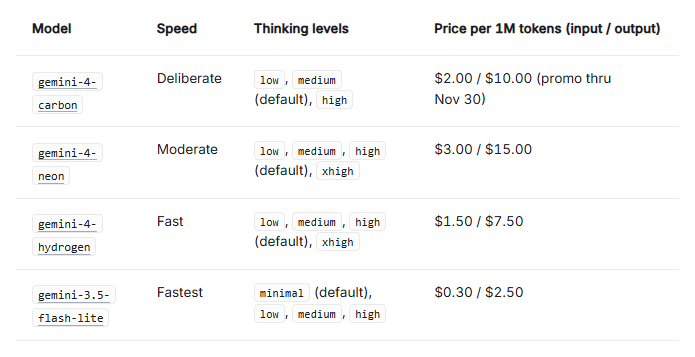
| Gemini 4 Hydrogen | Gemini 4 Neon | Gemini 4 Carbon | |
|---|---|---|---|
| Google’s speed rating | Fast | Moderate | Deliberate |
| Thinking levels | Low, medium, high, xhigh | Low, medium, high, xhigh | Low, medium, high |
| Default thinking level | High | High | Medium |
| API price per million tokens | $1.50 in, $7.50 out | $3 in, $15 out | $2 in, $10 out until 30 November, then $4 and $20 |
| Gemini app plan | Google AI Plus and above | Google AI Pro and above | Google AI Ultra |
| Free API tier | Yes | No | No |
Three details are worth reading twice. First, Neon costs twice as much as Hydrogen per token. Second, the price gap to Carbon is temporary: Carbon is cheaper until 30 November, and from 1 December Neon is 25% cheaper than Carbon. Third, Neon has a top thinking setting, “xhigh”, that Carbon lacks. Google’s documentation says to start with “high” and keep “xhigh” for hard, multi-step problems, because it uses the most tokens and takes longest.
What do the Gemini 4 Neon benchmarks show?
There are two sets of numbers, and they should be read separately. Google published its own table, and Artificial Analysis, an independent group that runs standard tests on every major model, published its results the same day.
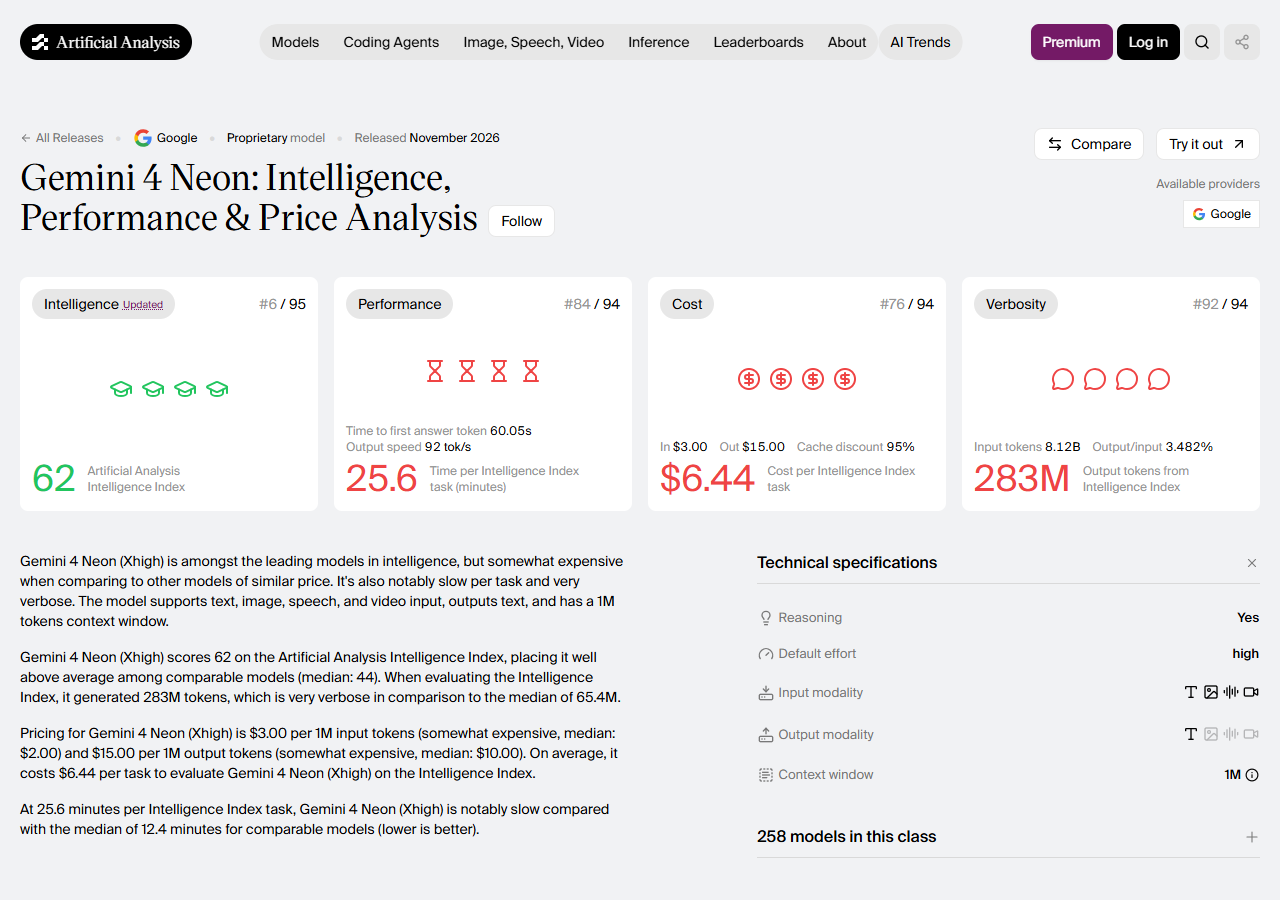
What the independent testers found. Artificial Analysis scored Neon at 61 on its Intelligence Index at launch, one point ahead of Carbon at its high setting and third overall, behind GPT-6.2 Astra and Claude Fable 5.2. Its model page now shows 62. Beyond the headline, its article makes four points:
- Cost per task is lower. Neon costs $6.44 per task on its tests, about 17% less than Carbon at Carbon’s standard price. The saving comes entirely from Neon’s lower token price, because Neon uses about 15% more output tokens.
- At the same effort it is much cheaper. Artificial Analysis says Neon at its high setting matches Carbon at its high setting for less than half the cost per task, using Carbon’s standard, non-discounted price.
- It is strong at coding agents. Using Google’s Antigravity tool, Neon scored 59 on the Coding Agent Index, against 55 for Carbon and 58 for both Claude Opus 5.5 and Claude Fable 5.2 used through Claude Code. Its average cost per task was $6.86, against $12.61 for Opus 5.5 and $15.47 for Fable 5.2.
- It writes well-presented work. On a test of slide and document quality, Neon led the table, 45 points ahead of the previous leader.
What Google’s own table adds. Google’s comparison, as reported by Digital Trends and 9to5Google, puts Neon ahead of Claude Opus 5.5 and GPT-6.2 Sol on the Artificial Analysis index (61, against 59 and 57). Google also reports first place on Zapier’s AutomationBench (56.3%), the Vals Index (70.9%) and Vending-Bench 2, a simulation of running a business, with a final balance of $16,843. It also reports first place on two legal and tax tests, which matter if your work involves either. Google concedes that Neon is behind Opus 5.5 on Terminal-Bench 4.1 and FrontierCode 2.0, and behind GPT-6.2 Sol on Chartography, a test of reading charts. Google’s claim that Neon costs 32% less per task than Carbon is higher than Artificial Analysis’s 17%, though the two are measured at different settings, so lean on the independent figure.
One caution applies to both sets of numbers. The headline scores come from the xhigh setting, which is not the default and which you will pay for in tokens and waiting time.
Is Gemini 4 Neon as Fast as Google says?
Not quite. 9to5Google’s headline called Neon “Carbon quality at Flash speeds”. Google’s own documentation rates Neon’s speed as “moderate”, one step below Hydrogen’s “fast”. The independent numbers sit in between.
At launch, Artificial Analysis measured about 110 output tokens a second for Neon against about 57 for Carbon, and about 21 minutes per task against about 36. That is a real improvement on Carbon. Its page now shows 92 tokens a second and 25.6 minutes per task, which it calls “notably slow” next to a median of 12.4 minutes for comparable models, and it describes Neon as “very verbose”, with 283 million output tokens across its tests against a median of 65 million.
The practical reading: Neon at its high or medium setting is a sensible choice for tasks that matter, but it is not a model for instant replies. If you need fast answers to simple questions, Hydrogen is the better fit, and our context window guide explains why long inputs slow any model down.
How much does Gemini 4 Neon cost?
There are two answers, because Google sells Neon in two ways.
Through the API, per token. Google’s pricing page lists these rates for paying users:
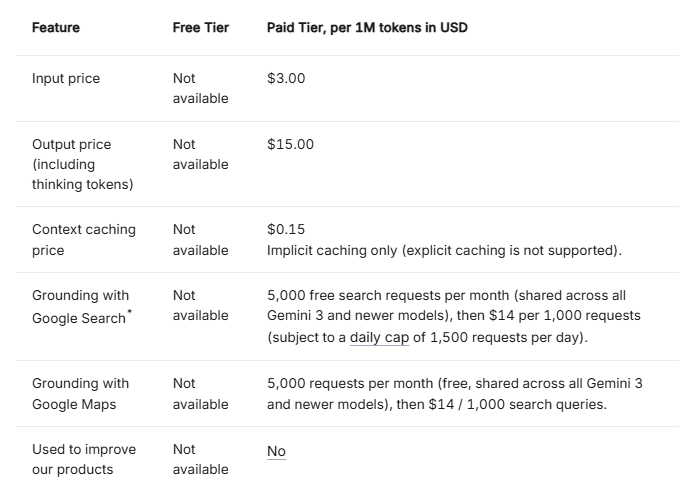
| Route | Input per million tokens | Output per million tokens |
|---|---|---|
| Standard | $3.00 | $15.00 |
| Batch and Flex | $1.50 | $7.50 |
| Priority | $5.40 | $27.00 |
Cached input costs $0.15 per million tokens, which is 95% off. Output prices include thinking tokens, so a model that thinks for a long time bills for that thinking. Grounding with Google Search gives 5,000 free requests a month, shared across Google’s newer models, then $14 per thousand.
To make that concrete, a 20,000-word report is roughly 27,000 tokens. Reading it costs about 8 cents on Neon, against about 4 cents on Hydrogen and about 11 cents on Carbon at its December price. A 2,000-word summary written back is roughly 2,700 tokens, which costs about 4 cents on Neon, plus whatever the model spent thinking. Single tasks are cheap. The cost builds up when a workflow runs hundreds of times, which is why our guide to what an AI workflow actually costs to run tells you to measure the cost per run, not the price per token.
Through the Gemini app, per month. The price is a plan, not a token count.
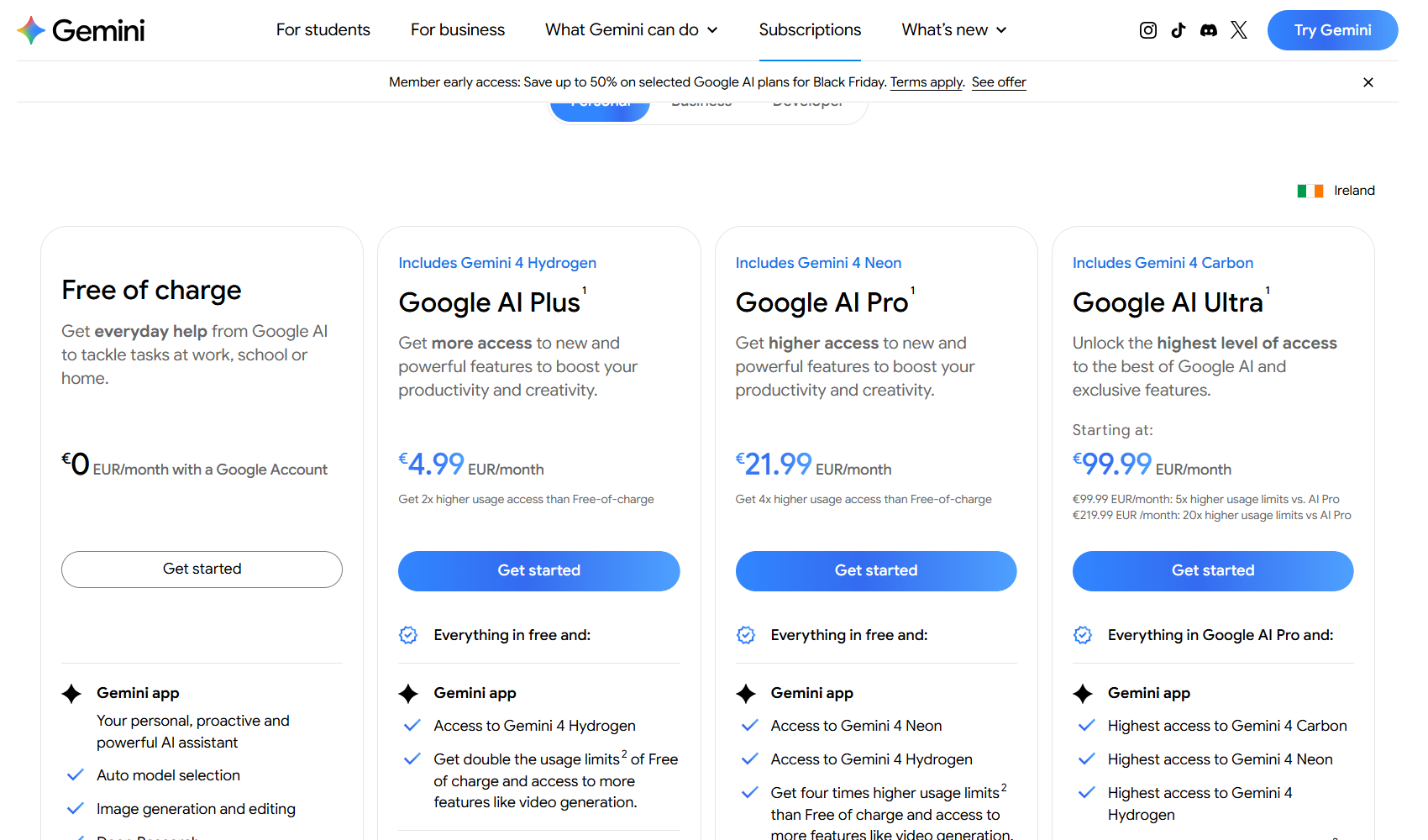
On Google’s Irish page, Neon is part of Google AI Pro at €21.99 a month. Google AI Ultra starts at €99.99 and adds Carbon. Google AI Plus, at €4.99, stops at Hydrogen. That makes Pro the first plan where a small business can use Neon without paying per token.
Who can use Gemini 4 Neon, and on which plan?
Neon is wider than Carbon, because it does not need the top plan.
- Google AI Pro and Ultra subscribers get Neon in the Gemini app, where it sits under “Deeper analysis” in the model picker. They also get it in Google AI Studio and in Antigravity.
- Paying developers and businesses get it through the Gemini API, Gemini for business and Google’s enterprise platform. It is listed for verified customers in the global, US and EU regions.
- Free users and Google AI Plus users do not get Neon. Plus includes Hydrogen.
If you run Gemini inside Google Workspace, check what your tier includes before you assume Neon is part of it. Our comparison of Gemini against ChatGPT for business explains why Gemini’s cost often sits inside a Workspace subscription, and the review of Microsoft Copilot against Google Workspace AI covers the same question from the other side.
What are the specifications of Gemini 4 Neon?
For readers who build with it, Google’s documentation sets out the details.
- Model code:
gemini-4-neon. - Inputs and outputs: it accepts text, images, video, audio and PDF files and replies in text. It is multimodal on the way in only. It cannot generate images or audio, and it does not support the Live API for real-time voice.
- Context window: 1,048,576 tokens, shared between input, thinking and output. Our entry on tokens explains the unit.
- Output limit: 65,536 tokens by default, and up to the whole window with Google’s long decode setting.
- Thinking: four levels, low, medium, high (the default) and xhigh.
- Tools: function calling, code execution, structured outputs, computer use, file search, URL context, and grounding with Google Search and Google Maps. A tool retrieval feature is in preview. Our entry on grounding explains how a model checks itself against the web.
- Caching: implicit only. Explicit caching is not supported.
- Moving from another Gemini 4 model: Google says no request changes are needed except the model name, though Neon’s default thinking level is high where Carbon’s is medium, so the same request can use more tokens.
What can Gemini 4 Neon actually do for a Business?
Google lists three areas, and all three matter to a small business.
Knowledge work. Google says Neon reads spreadsheets, PDFs and photos more precisely, turns dense material into reports and summaries, and pulls in details from Gmail and Docs. Google also reports first place on several finance, accounting and spreadsheet-modelling tests. If your main job for AI is working through documents, our review of NotebookLM for business documents shows a Google tool built for that purpose.
Research and tasks. Neon draws on the web to keep answers current, for jobs like comparing prices across suppliers. Tasks in Gemini, which hand off multi-step jobs such as checking a utility bill or cross-checking receipts, now run on Neon. Google says that stretches usage limits further than a larger model would.
Agentic coding. Google says Neon handles repository-level debugging and multi-file edits in fewer steps, and cuts repeated file reads over long sessions. For a business without developers, the useful reading is that tools built on Neon should get better at vibe coding, where you describe an app and let the model build it.
How does Gemini 4 Neon compare with Claude and GPT-6.2?
On Google’s table, Neon is ahead of Claude Opus 5.5 and GPT-6.2 Sol on the main index. On Artificial Analysis’s own ranking, it sits third overall at launch, behind the newest and most expensive models from OpenAI and Anthropic. Beyond the table, three differences matter more to a business.
- Cost per task. For coding agents, Artificial Analysis found Neon level with Claude’s best at roughly half the cost per task or less. If you run long, repeated jobs, that is the strongest argument for it.
- Ecosystem. Neon is strongest if your work already runs on Google Workspace, Search and Antigravity. Our reviews of GPT-6 Astra, Claude Fable 5.2 and Mistral Large 4 cover the others, and Claude against ChatGPT for business explains how the assistants differ on data and admin.
- Evidence. Our GPT-6 Astra review covers the earlier release, not the GPT-6.2 models Google compares against, and independent scores for the newest models are still settling. A fair test on your own work is the only comparison that counts. Our Claude Sonnet 5.5 against Opus 5.5 review makes the same point about a different family.
Is Gemini 4 Neon Safe to use with company Data?
There are two separate questions here: is the model hard to attack, and is your data handled properly.
On the first, Google’s documentation says Neon writes code with fewer security flaws and reduces “agentic overreach”, which means an agent doing more than it was asked. We found no published figures for Neon’s resistance to prompt injection, where a hidden instruction in a document tries to hijack the model, so treat the claim as unproven. No model is immune, so be careful when an AI agent reads untrusted emails or web pages.
On the second, Google’s pricing page says that on the paid API tier your data is not used to improve Google’s products. That is useful, but it is not a data protection review. Before you send personal data to any new model, find out where it is processed, how long it is kept and what your contract says. Our guide to what is safe to paste into AI tools sets out a simple rule for the data you should keep out, and the entries on data residency and GDPR explain the terms.
What are the downsides of Gemini 4 Neon?
None of these are reasons to avoid it. They are reasons to test before you commit.
- The best scores are at the most expensive setting. The headline numbers come from xhigh, which uses the most tokens and takes longest. At the default high setting the scores are lower.
- It is wordy. Artificial Analysis found it very verbose, and thinking tokens are billed as output.
- It is not the fastest. Google rates it “moderate”, and the independent speed figures fell between the launch article and today’s page.
- The price is changing around it. Carbon is cheaper until 30 November, so a comparison made now is not the comparison you will pay for in December.
- It can still be wrong. Google says Neon reduces made-up claims but gives no rate. Our guide to reducing AI hallucinations and the entry on hallucination explain what to do about it.
- It is text out only. It cannot make images or voice replies.
- Google’s names are hard to follow. Hydrogen, Neon, Carbon and Argon do not say which is the strongest, so keep the table above to hand.
Should a Small Business use Gemini 4 Neon?
For many small businesses, Neon is the sensible step up from Hydrogen, and the first Gemini 4 model that makes sense on the €21.99 Pro plan. Three questions settle it.
- Does Hydrogen already do the job? If it handles your drafting, summaries and spreadsheets well, Neon costs twice as much per token for little visible gain. Our article on how to choose an AI vendor helps if you are still comparing providers at all.
- Is the task complex, but not the hardest you have? Neon’s edge shows on multi-file, multi-source work: a long contract review, a supplier price comparison, a spreadsheet model. For the very hardest, longest jobs, Google still points to Carbon.
- Can your data rules allow it? Check the terms for your plan and your region before sending anything sensitive. Our entry on shadow AI explains the risk when staff try new tools on their own.
If you answer yes to the first two and can pass the third, test Neon on one real task. If Hydrogen already works, you can wait.
How to test Gemini 4 Neon on your own work
A fair test costs an afternoon, and it is worth more than any benchmark.
- Pick one task you actually do, such as summarising a long customer contract or turning a messy spreadsheet into a report.
- Run it on the model you use now, then on Neon, with the same instructions and the same files.
- Score both against a short list of what a good answer contains.
- Try Hydrogen too, since it is cheaper and Google’s own default for everyday work.
- Try Neon at the high and medium settings, not only xhigh, and compare the time taken and the cost of each run, not only the quality.
- Have a person check the answer, as our guide to checking AI output before it goes to a customer describes.
For a structured way to run this, our 30-day AI pilot guide sets out the steps. If you want a second pair of eyes on which model suits which job, an AI audit looks at your actual tasks and tools.
Verdict
Gemini 4 Neon is a strong mid-tier model. Independent testing puts it level with Carbon and close to the best from OpenAI and Anthropic, at a lower price per token than Carbon will charge from December, and the coding-agent cost figures are the most impressive part. It is also slower and wordier than the launch headlines claim, and the best scores come from a setting most people will not use.
The sensible move is to keep Hydrogen for everyday tasks, test Neon on the two or three jobs that genuinely need more thinking, and judge it on your own results and your own bill. Treat the benchmarks as a hint, plan your budget on the December prices, and keep Carbon in mind only for the hardest work.
Further reading
- Gemini 4 Carbon Review: the top of the Gemini 4 range and how Argon fit in.
- Claude Fable 5.2 Review: the Anthropic model Neon is scored against.
- Gemini vs ChatGPT: Which fits your business?: how Gemini sits inside Google Workspace and what it costs there.
- What is an AI agent?: the idea behind long-running agent work.
Sources
- Google launches Gemini 4 Neon (9to5Google): the 18 November launch, the model picker, Google’s benchmark claims and the price.
- Google says Gemini 4 Neon can hang with Claude Opus 5.5 and GPT-6.2 Sol (Digital Trends): Google’s comparison table, the Argon replacement and Antigravity Orchestrator mode.
- Gemini 4 Neon intelligence gain (Artificial Analysis): independent launch-day scores, cost per task, speed and coding agent results.
- Gemini 4 Neon model page (Artificial Analysis): the current index score, speed, cost and verbosity figures.
- Gemini 4 Neon model page (Google AI Studio docs): model code, context window, output limits and supported features.
- What’s new in Gemini 4 Neon (Google AI Studio docs): thinking levels, positioning against Carbon and Hydrogen, and migration notes.
- Choosing a model (Google AI Studio docs): the speed ratings, thinking levels and prices for each Gemini 4 model.
- Pricing (Google AI Studio docs): per-token rates by route, thinking-token billing, the Free tier and data use on the paid tier.
- Google AI plans, Ireland (Gemini): the plans, euro prices and which plan includes Hydrogen, Neon and Carbon.
FAQ
Questions we get asked
What is Gemini 4 Neon?
Gemini 4 Neon is Google's mid-tier model in the Gemini 4 family. It sits between Gemini 4 Hydrogen, the fast everyday model, and Gemini 4 Carbon, the model for the hardest tasks. Google released it on 18 November 2026 and describes it as frontier-level reasoning for complex, high-frequency work. It reads text, images, video, audio and PDFs, replies in text, and has a context window of about one million tokens.
How much does Gemini 4 Neon cost?
Through the API, Google lists $3 per million input tokens and $15 per million output tokens, with thinking tokens billed as output. Cached input costs $0.15 per million tokens. Batch and Flex requests cost half as much. In the Gemini app, Neon is included in Google AI Pro, which costs €21.99 a month on Google's Irish page.
Is Gemini 4 Neon better than Gemini 4 Carbon?
On independent tests it is about level. Artificial Analysis scored Neon one point ahead of Carbon and found it cheaper and faster per task, but Google still recommends Carbon for the hardest architecture, science and security problems. Carbon is cheaper per token until 30 November 2026, so the cost picture changes on 1 December.
Does Gemini 4 Neon replace Gemini 4 Argon?
In the Gemini app, yes. Neon has taken Argon's place in the model picker under the heading Deeper analysis. Google's API pricing page still lists Argon, so developers can keep using it for now. Google's own documentation points people moving between Gemini 4 models to Neon.
Can I use Gemini 4 Neon for Free?
No. Google states that Neon is not available on the Free tier of the Gemini API. In the Gemini app it needs Google AI Pro or Google AI Ultra. Google AI Plus, at €4.99 a month, includes Hydrogen but not Neon.
Is Gemini 4 Neon better than ChatGPT or Claude?
Google's own table puts Neon ahead of Claude Opus 5.5 and GPT-6.2 Sol on the Artificial Analysis Intelligence Index, but behind both on a few tests. Independent scoring puts it third overall at launch, behind GPT-6.2 Astra and Claude Fable 5.2. For coding agents, Artificial Analysis found it level with Claude's best at a lower cost per task. Test it on your own work before you switch.
Is Gemini 4 Neon really faster than Carbon?
Yes, but not as fast as the headlines suggest. Artificial Analysis measured Neon at about 21 minutes per task against about 36 for Carbon at launch. Google's own documentation rates Neon as moderate in speed and Hydrogen as fast. On the thinking setting Artificial Analysis tests, Neon also writes a great deal of text, which slows it down.
Can Gemini 4 Neon make mistakes?
Yes. Google says Neon reduces made-up claims and shortcuts in long tasks, but gives no figure and does not say it never invents things. Every language model can give a confident wrong answer. Keep a person in the loop for anything that reaches a customer, a contract or a financial decision, and check figures against the source.
Is Gemini 4 Neon Safe to use with customer Data?
Google's pricing page says that on the paid API tier your data is not used to improve Google's products. That is a helpful statement, but it is not a full data protection review. Check where the data is processed, how long it is kept and what your contract says before you put personal data into any new model.
Ready to Put This to Work?
Tell us where your team is with AI and we will tell you honestly what would make the biggest difference.